
How to make a single root CLAUDE.md load across your whole organization
Drop a CLAUDE.md at the root of a SharePoint site and nothing propagates. Each Claude product reads CLAUDE.md a different way. Four parallel loaders, all pulling from one canonical file, are what makes a single source of truth actually land in every session across Claude Code, Desktop, web, and Cowork.
Other pieces in the enterprise Claude series:
- SharePoint and OneDrive setup for Claude - getting Claude to find your documents
- SharePoint vs OneDrive permission exposure - what AI can see in each
- Claude Chat vs Cowork vs Code - which surface for which job
- Claude Desktop fleet management - Intune and MDM patterns
- Running Claude in compliance-heavy environments - SOC 2 and HIPAA scopes
- Claude Projects for team collaboration - project-level context for shared work
This piece tackles the instruction-propagation problem above. The companion posts cover the file-findability and surface-choice problems alongside it.
Key takeaways
- SharePoint inherits permissions, not files - dropping one CLAUDE.md at the site root does not propagate it into subfolders, and no Claude product walks SharePoint hierarchy at session start.
- Four Claude surfaces, four different loaders - Claude Code parent-walks the filesystem, Claude Desktop CLI shares that path, Claude on the web reads Organization Instructions, Cowork reads Global Instructions.
- One canonical file, four parallel loaders - SharePoint root stays the source of truth; OneDrive sync, an MDM-pushed CLAUDE.md, claude.ai/admin Organization Instructions, and a five-line Cowork paste cover the gap.
- Three of the four are invisible to users - only Cowork onboarding requires anyone to know the source file exists. Everything else loads silently.
The mental model goes like this. Drop one CLAUDE.md at the root of your company SharePoint site. Sync the site to OneDrive. Every Claude session at the company picks the file up from there. Done. One source of truth for AI policy, firm context, and shared skills, propagating itself everywhere by virtue of the folder layout.
The mental model is rubbish, and the gap matters more than people realize.
Microsoft SharePoint inherits permissions, retention policies, and sensitivity labels from parent folders into child folders. It does not inherit files. A CLAUDE.md placed at the site root does not appear inside subfolders by virtue of the layout, and no Claude product walks SharePoint hierarchy looking for special files at session start. The Microsoft Learn permissions inheritance reference spells this out plainly. What passes from parent to child is the permission setting, not the content of the parent.
So the layout-first instinct produces a CLAUDE.md that loads precisely nowhere. Which is the opposite of what you wanted.
So how do you actually make one root file land on every Claude session in the firm, given that none of the surfaces will pick it up by walking SharePoint hierarchy?
This post walks through what does work. One canonical root file, four parallel loaders pulling from it, reaching every Claude surface in the firm. Each loader is small. Skipping any one of them leaves a surface that does not see the source of truth.
Why one CLAUDE.md does not propagate
The reason every Claude session at a company benefits from one source of truth is mundane. Without it, every user re-explains Fortune Five Hundred plumbing to Claude in every session. AI policy fragments across teams, with one finance analyst getting a different idea of “approved tools” from a sales rep two doors down. Use cases stay siloed in personal folders because nobody knows what the canonical pattern is. The first time you watch three different Claude sessions at the same firm interpret the same acronym three different ways, the gap is obvious.
The goal is one root file every Claude product picks up, without each user having to think about it. Easy to say. The wrinkle is that “every Claude product” is at least five surfaces, and they all read CLAUDE.md a different way.
Here is the per-surface table for what actually loads, today, on each surface.
| Claude surface | How it picks up CLAUDE.md today |
|---|---|
| Claude Code (CLI) | Walks parent directories from the working directory. Loads every CLAUDE.md it finds, root-most first. (source) |
| Claude Desktop, CLI-invoked | Same as Claude Code. Shares the same memory path. |
| Claude Desktop, open chat | Does not load any CLAUDE.md. |
| Claude Desktop, Project | Loads project-specific instructions. Manual setup per project. |
| Claude.ai web | Reads Organization Instructions if set in claude.ai/admin (Team or Enterprise plan), plus per-project instructions and per-user Custom Instructions. |
| Cowork | Reads user-level Global Instructions. Inherits Organization Instructions where set. |
Six entries on the right side. One source of truth needed on the left. They do not match up, and there is no single Claude knob that joins them.
Even the Claude Code parent walk has a quieter trap. Subdirectory CLAUDE.md files inside the same synced repo only load when Claude actually touches files in that directory during the session. Thomas Landgraf, in a working post on Claude Code’s memory model, puts it cleanly: “Subdirectory memory files are only loaded when Claude actually accesses files in those directories.” So even within the parent-walk model, the loading order depends on which files the session interacts with, not on filesystem structure alone.
The conclusion is that any “single source of truth” plan based on putting the file in the right folder and hoping is going to leak. The folder is fine as the canonical location. It just is not the loader.
The 4-track architecture
The fix is small. Or really, four small fixes, each handling one of the loaders. One canonical CLAUDE.md in SharePoint, plus four parallel pulls from it that reach the four surfaces.

The SharePoint root stays as the editorial source. Each track is a different way of getting the same content into a place where one specific Claude surface will read it. Tracks two through four are derived from track one’s file. Edit the SharePoint copy, regenerate downstream.
Track 1: SharePoint root + OneDrive sync (Claude Code, parent-walk)
Users sync the relevant SharePoint document library via the OneDrive client on their laptop. From any subfolder under that synced root, Claude Code walks the directory tree on session start and loads every CLAUDE.md it finds, with the root-most file injected first.
Anthropic documents this directly. When Claude Code starts in a subdirectory of an OneDrive-synced repo, it will pick up Departments/CLAUDE.md automatically if the user is operating from Departments/Finance/ or any depth below that. The user does not type a path, does not choose a file, does not even know it happened.
You can prove this on any machine. Drop into a subfolder, list a few parents, see what is sitting there.
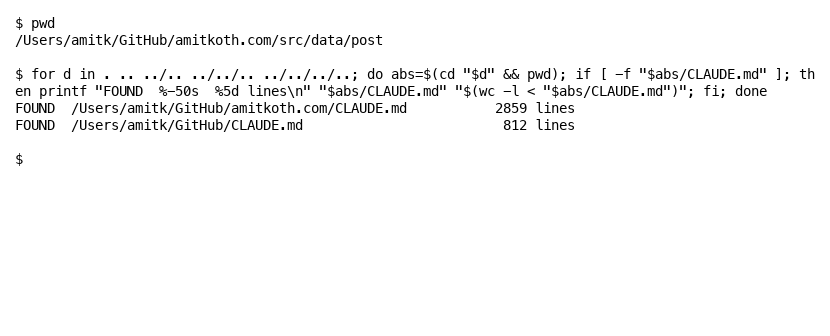
That output is from this site’s own checkout. Two CLAUDE.md files at two parent levels, both real, both loaded automatically when Claude Code starts in the post directory. The deeper one (2,859 lines, project root) gives the project-specific rules. The shallower one (812 lines, GitHub root) covers all the repos under it. Both inject into context on every session in this directory tree.
Track one is free if your team already syncs SharePoint to OneDrive. The cost is one file at the right place in the tree.
Track 2: Managed CLAUDE.md at the system policy path (Claude Code, every machine)
Track one covers anyone who runs Claude Code from inside a synced subfolder. It does not cover the developer running Claude Code from /tmp or from a private repo outside OneDrive. For those sessions, you need a copy of the root CLAUDE.md that loads no matter where the user starts.
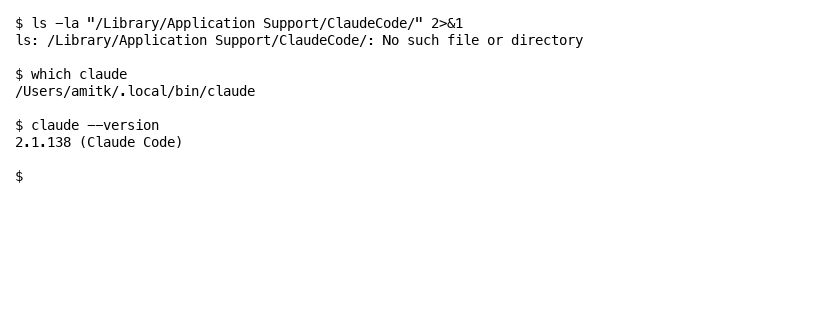
Anthropic supports this with a managed CLAUDE.md at a system policy path. Verbatim from the Memory documentation: “This file cannot be excluded by individual settings.” The paths:
- macOS:
/Library/Application Support/ClaudeCode/CLAUDE.md - Windows:
C:\Program Files\ClaudeCode\CLAUDE.md - Linux and WSL:
/etc/claude-code/CLAUDE.md
On most Macs the directory does not exist by default. IT creates it and drops the file in via Jamf, Kandji, Intune for Mac, or Ansible. Once present, every Claude Code session on the machine loads it, and no user setting can opt out.
Anthropic ships example MDM payloads on GitHub covering Jamf and Kandji on macOS and Intune and Group Policy on Windows. The repo’s templates are scoped to managed-settings.json, not CLAUDE.md, but the deployment plumbing is identical. A small Win32 app or signed .pkg that copies one file is enough. Detection rule: file exists at the target path with a hash matching. Refresh: re-push when the SharePoint root changes.
Track two is the only true guaranteed loader for Claude Code and CLI-invoked Claude Desktop. Track one and track two together are belt-and-suspenders. If OneDrive sync flakes for one user, the system policy file still loads.
Track 3: Organization Instructions (Claude on the web, Cowork inheritance)
Claude on the web does not parent-walk anything. It reads Organization Instructions set by an Owner in claude.ai/admin. The Anthropic Organization Instructions documentation is short. Maximum three thousand characters. Team and Enterprise plans only. “Up to an hour to take effect across Claude products.” For Owners with admin access, this is a no-brainer.
The job is to condense the SharePoint root CLAUDE.md to about five hundred words covering firm overview, AI policy summary, where to find more, and voice. Paste into the field. Save. Within an hour, every conversation across the org gets it injected silently. No user can disable it.
Cowork inherits Organization Instructions where set. So track three covers Claude on the web AND most of Cowork in one move.
The catch is that this is text, not a file the user can inspect. Owners see it in admin. Users see only the effect. Refresh on a quarterly cadence as the SharePoint root changes, or whenever firm facts shift materially.
Track 4: Cowork user onboarding (the residual gap)
Cowork has its own per-user Global Instructions panel. Track three reaches Cowork via Org-level inheritance, but for full coverage, ask each user to paste a five-line summary into Cowork’s own settings. One-time, takes about five minutes per user, and gives Cowork a tighter grip on firm context for the agent’s local actions.
This is the only track that requires a user to do something. The five lines fit on a one-page user onboarding sheet that drops into a wiki or the User Guide tab of a planning doc.
Three of the four are invisible to users
Look at where the visible work happens. Track one: zero user action, parent-walk is silent. Track two: zero user action, IT pushes the file system-wide. Track three: zero user action, the Owner sets it in admin and it propagates. Track four: one paste, once, when a user first opens Cowork.
After tracks one through three are deployed, end users do not need to know the SharePoint root exists. Engineers run Claude Code from anywhere and pick up the file via parent-walk or the system policy path. Knowledge workers open Claude on the web and get firm context injected silently. Only Cowork asks them to act, once.
That is the user-experience win. Single source of truth, four invisible loaders, one short user onboarding step.
Where the content lives and how to lift it there
If you have not yet sorted out where files live for AI at all, the SharePoint and OneDrive choices upstream of this, do that first. The CLAUDE.md layer assumes the file layout is settled.
The folder pattern is small. One CLAUDE.md at the document library root. A REFERENCE/ directory beside it for shared skills, glossaries, and reusable assets. Per-team subfolders, each with their own narrower CLAUDE.md that pulls in root content via @-import.
SharePoint document library
└── Departments/
    ├── CLAUDE.md                  ← the canonical root file
    ├── REFERENCE/
    │   ├── glossary.md
    │   ├── products.md
    │   ├── plants.md
    │   ├── erps.md
    │   └── skills/
    │       ├── voice-profile.md
    │       └── meeting-prep.md
    ├── Finance/
    │   └── CLAUDE.md              ← team overlay only
    ├── Sales/
    │   └── CLAUDE.md
    ├── Operations/
    │   └── CLAUDE.md
    └── IT/
        └── CLAUDE.md
Each team’s overlay file starts with @-imports back to the root and the relevant REFERENCE files, then adds team-specific content underneath. Worked example for a Finance subfolder:
@../CLAUDE.md
@../REFERENCE/glossary.md

## Finance team context

[Finance-only content here, deduplicated from root]
Anthropic’s docs note the recursion limit is five hops, and the first time a session resolves a new @-imported file, the user sees an approval dialog. The 200-line size guidance per CLAUDE.md, repeated across the docs, is real. A 1,500-line root file hurts adherence even if it loads correctly. Better to keep the root tight and push deep content into REFERENCE files that subfolder CLAUDE.md files import on demand.
There are four content categories worth thinking about separately when you sit down to do this work the first time.
Firm-wide content lifted into the root. If a finance subfolder already has a CLAUDE.md, half of it is probably firm-wide. Products, plants, ERPs, glossary, hierarchy, AI policy, communication norms. None of that is finance-specific. Lift it up to root. Leave the finance-only content (close cycle, FP&A tools, finance vendors) in the team file. Use @-import to stitch them. Run this exercise once per team subfolder that already has a CLAUDE.md, and after a couple of teams the root file converges.
Organization Instructions text. Take the root file. Cut to about five hundred words. Drop the deep technical detail and the per-team pointers. Keep firm overview, AI policy summary, where-to-find-more, voice. Paste into claude.ai/admin. The condensed version is what reaches Claude on the web and Cowork via track three. It does not have to match the root word for word. It has to match the root in spirit.
MDM payload for the system policy path. This is just the root file, byte-for-byte, dropped at the system policy path on every machine via Intune or Jamf or Group Policy. No transformation. The Intune package is a tiny installer that copies one file. Detection rule: hash match. When the root changes materially, re-push. Monthly cadence works for most firms.
Cowork onboarding paste. Five lines, summarising the firm, the default tool (Claude only), the default connectors, and the escalation path for sensitive data. The user pastes it into Cowork’s Global Instructions. Document the five lines in your wiki. New hires hit the same paste during onboarding.
Need help getting this right across four loaders the first time? Blue Sheen takes on this kind of architecture work.
Caveats, gotchas, and the contrarian view
A few things will bite if you do not look for them.
OneDrive Files-on-Demand. OneDrive’s default mode marks files online-only, which means they sit on disk as zero-byte placeholders until first access. If your CLAUDE.md is a placeholder, Claude Code reads the placeholder stub, not the real file. The fix is to mark the Departments folder “Always keep on this device” for all Claude Code users, or to push that setting via Intune. Microsoft’s Files-on-Demand reference is the source for the per-folder behaviour. This is also why track two matters even if track one is healthy. The system policy path does not depend on OneDrive sync at all.
Sync conflict renames. If two users edit the SharePoint root file at roughly the same time, OneDrive will rename one copy CLAUDE-Amit.md and leave the other as the canonical. Once a CLAUDE-Amit.md exists in the synced library, every Claude Code session that walks past it will load it too, and the conflict copy becomes part of context. That is a kludge waiting to happen. The real fix is to make the SharePoint root file read-only at permission level. Designate one owner who edits it and one process that propagates downstream. Editorial conflict turns into a permission denial, which is the right error to get.
Block-level HTML comments are stripped from CLAUDE.md. Block comments like <!-- maintainer note: refresh quarterly --> are removed before context injection. Useful for maintainer notes that should not burn context tokens, and worth knowing if you wonder why your “TODO refresh by Q3” line is not influencing the model’s behaviour. The model never sees it. Inline notes that you want the model to read have to be plain prose.
Track one + track two is not optional. A common rollout pattern is to deploy only one of these. Why does the one-track rollout always backfire? Because each surface has its own loader, and skipping any one of them leaves the gap visible. Track one alone fails for any user not running Claude Code from a synced subfolder (someone working in ~/code/quick-script/, for example). Track two alone fails to give per-team subfolder overlays. Together they cover the messy middle, and the cost of running both is one extra Intune package nobody notices.
CLAUDE.md is context, not enforced configuration. This is the one most people miss. The Anthropic docs say it directly: instructions in CLAUDE.md arrive in the model’s context as a user message, not as a system prompt or a hard-coded rule. The model reads them. The model does not have to obey them. So what do you do for things that must run, like a pre-commit check or a banned-tool list? Use hooks or permissions.deny in the managed settings file. For rules that live outside Claude, build out a custom MCP server. CLAUDE.md is for guidance and context, not for hard enforcement.
Same logic applies to the size guidance. A 1,500-line CLAUDE.md is not “more rules” for the model. It is a longer block of context that is harder for the model to attend to. Trim aggressively. Keep the root file focused on facts about the firm and high-level policy. Push specifics into REFERENCE files that get imported on demand, or into hooks if they really must run.
Subdirectory loading is on-demand. Per the Landgraf quote earlier, subdirectory CLAUDE.md files only load when the session touches files in that subdirectory. This is fine for most projects but worth noting if you have a deeply nested team structure. A finance analyst running Claude Code from Departments/Finance/Q3-Close/ will get the root file, plus the Finance overlay, plus the Q3-Close overlay if there is one. Move into a different subfolder mid-session and the relevant CLAUDE.md will load when the session next touches a file there. This is a feature, not a bug, but it is also why size discipline at every level matters.
In building Tallyfy, the version of this problem that bit hardest was not loading. It was drift. The root file was right when we wrote it. Six months later half of it was stale. The fix is fairly small. Schedule a quarterly review on the calendar, refresh the root, regenerate tracks two and three, and move on.
Where firm context is the kind of thing a compliance audit will care about, drift is itself a finding. The audit trail is the file’s git history if you keep the canonical in a repo, or SharePoint’s version history if you keep it in the document library. Either is fine. Pick one and stick with it.
What this looks like once it works
What does this actually look like once it is running? The whole architecture comes down to a small picture. SharePoint root as the canonical file. Four parallel loaders pulling from it. Three of the four invisible to users. One five-minute paste to round it out.
For engineers, Claude Code starts and the firm context is just there. Same on Claude Desktop when invoked from a project directory. For knowledge workers using Claude on the web, every conversation arrives with org context already injected, no thinking required. For Cowork users, one onboarding step gives the agent the same shape of context it needs to actually do the thing you asked for. Across all four surfaces, the conversations no longer start with “let me explain what we do”. They start with the work.
None of this is a Claude product limitation. Each surface picks up instructions in the way it was designed to. The architecture is small. The plumbing is small. What matters is actually deploying all four tracks. Skipping any one of them leaves a surface that does not see the source of truth, and once that gap exists, drift is inevitable.
The cleanup is also small once the architecture is in place. Quarterly refresh of the root file. Re-push tracks two and three. Update the onboarding doc when firm facts change. That is the running cost. Smaller than most firms expect, and the reduction in repeat context-setting per session usually pays it back inside a quarter.
If your firm is rolling out Claude or another AI platform across multiple teams and you want one source of truth to actually land in every session, this is the kind of architecture work Blue Sheen does. The plumbing is small. Getting it right the first time saves the rebuild.
Amit Kothari is a managing partner at Blue Sheen, and writes at amitkoth.com about AI in operations and the work of getting it into real organizations.
About the Author
Amit Kothari is an experienced consultant, advisor, coach, and educator specializing in AI and operations for executives and their companies. With 25+ years of experience and as the founder of Tallyfy (raised $3.6m), he helps mid-size companies identify, plan, and implement practical AI solutions that actually work. Originally British and now based in St. Louis, MO, Amit combines deep technical expertise with real-world business understanding. Read Amit's full bio →
Disclaimer: The content in this article represents personal opinions based on extensive research and practical experience. While every effort has been made to ensure accuracy through data analysis and source verification, this should not be considered professional advice. Always consult with qualified professionals for decisions specific to your situation.