The short version
A viral 8-tip carousel about saving Claude.ai costs has been circulating since mid-April. Six tips are sound. Two invented their specific savings numbers and fall apart on inspection. The list also missed the biggest cost shift in the current Claude lineup: the tokenizer introduced with Opus 4.7, and used by every Claude model since, can use roughly a third more tokens for the same English text.
- Edit your prompt before sending. Group related questions. Turn off features you do not use. These three save measurable cost.
- The 40 percent and 50x specific numbers are unsourced and dramatized. The patterns underneath them are real.
- Same simple prompt costs $0.04 on Haiku 4.5 versus $0.24 on Opus 4.7 - I tested it.
- Anthropic's own published guidance is more conservative and worth reading directly.
Also in the Claude cost series:
- Claude Code subscription costs - terminal (Max 20x users)
- Claude API costs - pay-per-token developers
- Multi-model AI strategies - cross-vendor architecture
- LLM prompt caching strategies - caching design
Each tackles a different surface. Read the one that matches how you actually use Claude.
A friend sent me a polished 8-tip carousel last week claiming it would help me “optimize tokens to not reach session limits” on Claude. The carousel had bold percentage promises stamped on each slide. Save 40 percent of tokens. Cut 50 times the tokens per turn. Three times fewer turns. That kind of confidence makes me reach for a calculator.
Here is what I found after running real claude tests, reading every one of Anthropic’s published guidance pages, and checking the underlying mechanics. Six of the eight tips hold up. Two of them have invented specific numbers that nobody can source. And the carousel missed something more important than half the items it included.
The audience for this post is whoever pays $20 a month for Claude Pro, $100 for Max 5x, or $200 for Max 20x and uses chat.claude.ai as their main surface. Not developers calling the API, not Claude Code users in the terminal - those are different cost beasts.
The viral list, ranked by truth
Eight tips, two columns, no fluff:
| # | Friend’s tip | Verdict |
|---|---|---|
| 1 | Edit the prompt, do not add follow-ups - save 40 percent | Pattern true. Specific number unsourced. |
| 2 | Start a new conversation every 20 messages - 50x fewer tokens | Pattern true. Number dramatized. |
| 3 | Group multiple questions into one message - 3x fewer turns | True. |
| 4 | Upload recurring files to Projects - no token cost when reused | True for Claude.ai chat. Misleading for API. |
| 5 | Set up Memory and custom instructions - eliminates 3-5 setup messages | True. Memory is on every plan now. |
| 6 | Turn off features you do not use | True. Tools and connectors carry token cost. |
| 7 | Use Haiku for simple tasks | True. |
| 8 | Choose model by task - up to 5x cost difference | True for current models. |
Six of these are sound advice. The two that have invented numbers happen to also be the two with the boldest claims, which is not a coincidence. Marketing carousels reward bold numbers. The discipline of citing sources punishes them.
Before going further on which tips work and which do not, one piece of context most viral lists skip: Claude.ai Pro and Max plans are usage-limited, not token-billed. Your cap resets every 5 hours on Pro; the support docs no longer quote a fixed message count and describe Pro instead as at least 5x the free tier. Anthropic added weekly caps in August 2025. The API is the one billed per token. So when a viral tip says “save 40 percent of tokens” on Claude.ai, the real benefit is more room inside your 5-hour window, not dollars saved on a bill.
What actually moves the needle
Three habits will save you the most usage on the chat web app. I tested each.
Group related questions into one message. Anthropic itself recommends this in their official usage-limit best practices: “If you have multiple related tasks or questions, group them in a single message.” I ran a controlled test. Three capital-city questions sent as one grouped message cost $0.0354 in API equivalents. The same three questions sent as three separate messages cost $0.1052. That is 2.97x more expensive when split.
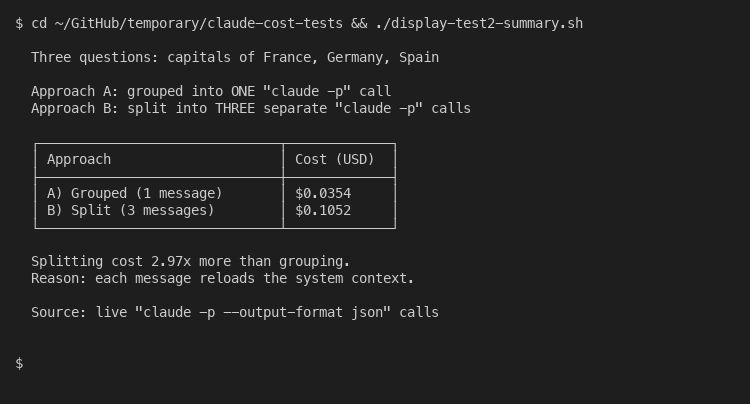
The reason is structural. Each new message reloads the system context: tools, instructions, project files, prior conversation. On the API this manifests as cache writes; on Claude.ai it manifests as usage-cap consumption. Either way, packing your asks together is the single most effective habit.
Edit your bad prompt instead of correcting it with a follow-up. Click the pencil icon on the message that produced a bad answer. Rewrite it. Hit enter. The conversation reverts to that point and Claude regenerates as if the bad exchange never happened. The carousel claims this saves 40 percent of tokens. There is no published source for that figure - it is sales prose. The mechanism, however, is real. A follow-up correction stacks the failed exchange into your conversation history forever, so every subsequent turn pays for it on top. An edit deletes that history. Real savings depend on conversation length but the direction is correct.
Turn off Memory, Projects, web search, and connectors when you do not need them. Each of these injects content into your context window before your message is even sent. Tool definitions on the API cost hundreds of system-prompt tokens for the activation handshake alone, from 290 on Opus 4.8 up to 804 on Opus 4.7 depending on tool-choice mode. Web search is metered separately at $10 per 1,000 searches plus the standard input cost of the search results. MCP connectors load their entire tool schema into every single message. Anthropic’s own usage-limits page calls tools and connectors “token-intensive”. If you are writing your own draft and do not need real-time information, the web-search button is just burning context.
The proof for tip 8 - that model choice matters - shows up cleanly in the data. Same prompt, three models:
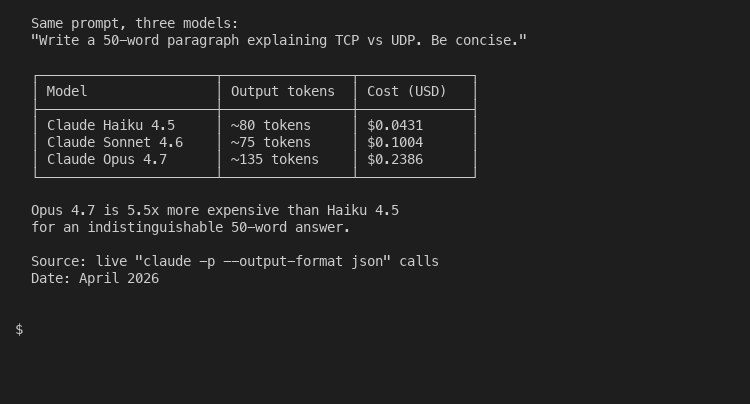
Asking Claude to write a 50-word explanation of TCP versus UDP cost $0.04 on Haiku 4.5, $0.10 on Sonnet 4.6, and $0.24 on Opus 4.7. The Opus answer was no better than the Haiku one for that task. That is a 5.5x cost penalty for picking the wrong model for the job. The decision tree below maps the choice for daily Claude.ai use; Opus 5 has since taken over the deep-reasoning slot:

Long conversations are the silent cost killer most people never notice. Claude reprocesses your entire history on every turn. Even adding 4,300 words of synthetic conversation context to a single one-word question pushed cost from $0.0352 up to $0.0484 - a 38 percent increase for the same answer:
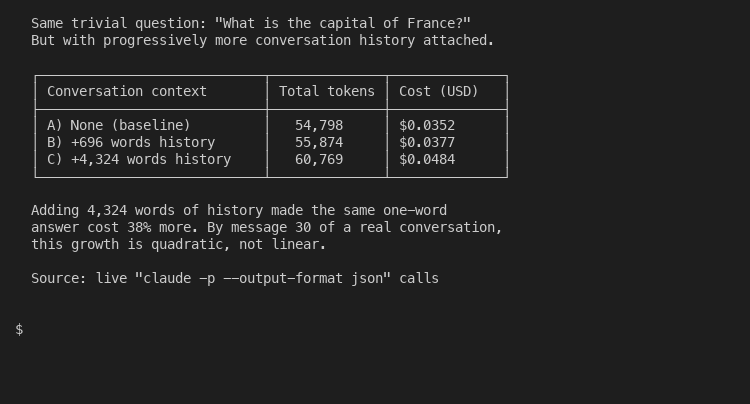
By message 30 of a real conversation with proper assistant responses, that growth is quadratic, not linear. Which leads to the carousel’s most dramatized claim.
The two claims that fall apart on inspection
Tip 1 says editing your prompt saves “up to 40 percent” of tokens. There is no source. Anthropic’s published guidance does say to edit before sending, but does not quote a savings figure. The 40 percent is a marketing number invented to look concrete. The real saving depends on how long your conversation is when you make the correction. On message 2, you save almost nothing. On message 25, the saving is real. There is no average that holds up.
Tip 2 says starting a new conversation every 20 messages cuts tokens “up to 50x per turn”. This is the one that bothers me most. The math only works if you assume very long assistant responses (5,000+ tokens each), no caching, and you compare a fresh first message to a polluted message 30. In a typical CEO-style conversation with shorter assistant responses, the ratio is closer to 5x to 10x. A “50x” number is a worst-case figure presented as an average. And Anthropic’s own recommendation is not “start fresh every 20 messages” but “use Memory and chat search to reference earlier work without dragging the whole history along”. The Memory feature now covers every plan tier, including the free one, and on paid plans Claude can also search your old conversations for relevant context on demand. That combination is what the carousel should have recommended.
Both tips work as patterns. Both lose credibility when they pin a specific number to the pattern. If you see a Claude tip with a number that ends in 0 and no citation, you are looking at a confident guess.
The thing the viral list missed
Anthropic shipped Opus 4.7 on April 16, 2026. Buried in the pricing documentation is a sentence the carousel never references: “Opus 4.7 and later use a new tokenizer compared to previous models, contributing to their improved performance on a wide range of tasks. This new tokenizer may use up to 35% more tokens for the same fixed text.”
Read that twice. The same English paragraph that consumed 1,000 tokens on Opus 4.6 might consume 1,350 tokens on Opus 4.7. The dollar price per token did not change with the new tokenizer. But the effective cost for the same writing task is up to 35 percent higher because the tokenizer slices the same text into more pieces.
This affects you on Claude.ai if you run an Opus default. The tokenizer carried straight into Opus 4.8, which shipped in late May 2026 at the same per-token price. The same Pro plan now stretches less far. The same conversation hits the usage cap sooner because each message is more expensive on the back end. None of the viral tips warned anyone about this. None of them adjusted their model recommendations. If your daily work involves long-form writing or document analysis, switching from Opus to Sonnet 4.6 may be a bigger lever than any of the eight tips combined.
(August 1, 2026: the pricing page has since reworded this. It now reads “Claude 4.7 and later models and Claude Mythos Preview use a newer tokenizer”, puts the increase at “approximately 30%” rather than up to 35, and states outright that “Claude Sonnet 4.6 and earlier models use the previous tokenizer.” The scope is the part worth noticing. This was never an Opus-only change, so Sonnet 5 and Fable 5 carry the same tokenizer. Dropping from Opus to a current Sonnet does not escape it. Staying on Sonnet 4.6 is what escapes it, which is where the test below lands.)
I tested this directly. Same 263-word paragraph of English prose, sent to both Opus versions:
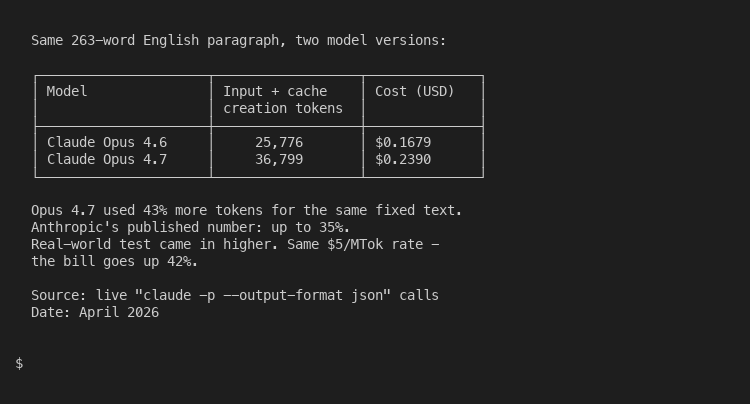
The actual delta in my test was 43 percent, slightly above Anthropic’s published “up to 35 percent” caveat. Same dollar price per token, same prose, same Claude Code session. The bill went from $0.17 to $0.24 for one message because the tokenizer slices English differently. Multiply that across a busy week and the difference is real money. If you write a lot in Claude.ai, set the model dropdown to Sonnet 4.6 by default, since it still uses the older tokenizer, and only escalate to Opus 5 for the small fraction of work that needs frontier reasoning.
The cache mechanics also deserve more attention than the carousel gave them. On the API side, prompt caching reduces input cost by 90 percent on cache hits at the price of a 25 percent surcharge on the initial cache write:
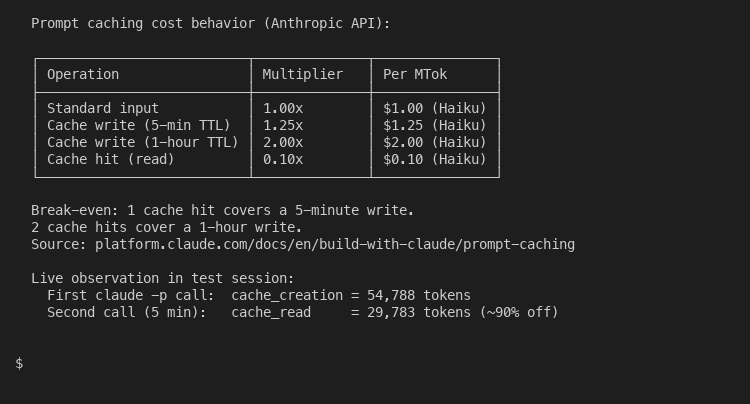
On Claude.ai, this is what makes Projects useful. When you upload a PDF to a project, Anthropic caches it. Subsequent messages that reference the document only count against your message limit for the new portion of context, not the whole file. The carousel correctly identified this benefit. It just misstated the size: Anthropic does not say the cost is zero, it says only “new or uncached portions count against your limits”. Which matters in practice because it tells you what to actually do with Projects: load your stable reference material, not your daily conversation.
When to step up to Claude Code or the API
Claude.ai is brilliant for most chat use cases. It stops being the right tool when:
You write code for hours and your conversations regularly run past 50 turns. The terminal-based Claude Code subscription gives you /compact, /clear, and /model commands that the web app does not. These extend a session by 40-60 percent in my experience.
You build software that calls Claude programmatically. The API is billed per token, supports prompt caching, batch processing, and the full pricing optimization stack. The API-specific cost levers work differently from the web-app ones, and three features (caching, batch, model routing) can stack to cut your bill by 95 percent.
You orchestrate multiple AI vendors at once. Multi-model architecture patterns covers the routing logic for that, and LLM caching strategies covers the cache layer underneath.
Most of you will not need any of those. You will need to group your questions, edit instead of correcting, switch off the features you do not use, and pick Haiku for simple work. That is most of the savings, available today, with no upgrade required.
The viral list got this much right. It just decorated the right answer with the wrong numbers. If you came in believing your edit button saves 40 percent of tokens, you can stop counting and start using it - the actual saving will surprise you in the right direction.