
How to actually reduce your Claude costs on a subscription plan
Claude subscription plans hide real cost levers behind context management, model switching, and session hygiene. After months on the Max 20x tier, these specific techniques measurably extend what you get from every session - with terminal proof.
If you remember nothing else:
- Every message you send includes your entire conversation history - by message 30, you are burning 31x more tokens than message 1
- Three slash commands (/compact, /clear, /model) do more to extend your usage than any plan upgrade
- Your CLAUDE.md file costs tokens on every single turn - a bloated one wastes over 140,000 tokens per session
- Fast mode charges 6x standard rates against your extra usage budget, not your subscription - and switching it on mid-conversation is even worse
Subscription plans create a weird illusion. You pay a flat monthly fee, so it feels like usage is free. It isn’t. Claude subscriptions come with finite usage limits, and once you hit them, you are either rate-limited or paying overage charges. The question isn’t “how do I pay less per token” but “how do I get more done before the meter runs out.”
I’ve been on the Max 20x tier for months. Mostly Claude Code in the terminal, sometimes Desktop, occasionally the web app. And honestly, I still hit rate limits during heavy coding sessions. In building Tallyfy, I run Claude Code for hours at a stretch - refactoring modules, writing tests, debugging API endpoints - and watching the context bar creep toward 100% became a daily annoyance. That was painful enough to make me dig into what actually eats tokens and what you can do about it. Turns out, most of the waste is self-inflicted.
Your context window is bleeding tokens
Here is something that surprised me when I first looked into it. Claude doesn’t just process your latest message. It reprocesses your entire conversation history on every single turn. Message 1 sends maybe 500 tokens. Message 5 sends 2,500. By message 30, you are pushing 15,000 tokens per message, and the cumulative total hits 232,000. Anthropic’s own context window documentation confirms this - the entire conversation is resent as input with every turn. There’s no incremental processing.
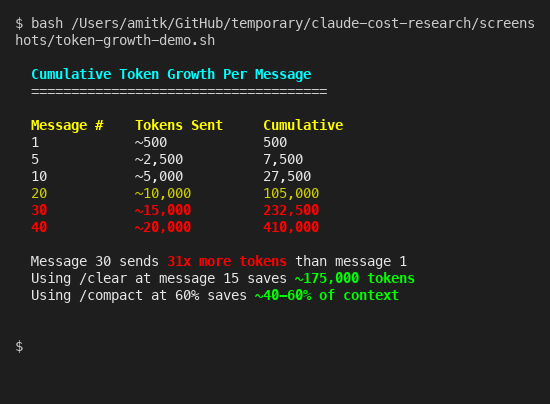
That 30th message costs 31x more than the first. Which is kind of nuts when you think about it.
The /context command in Claude Code shows you exactly where tokens go. System prompt, tool definitions, your CLAUDE.md files, conversation history - the breakdown is right there. Run it. The numbers are probably worse than you expect.
Speaking of CLAUDE.md - that file gets loaded on every turn. Every word in it is a token tax you pay 30, 40, 50 times per session. I measured the actual cost on my own setup:
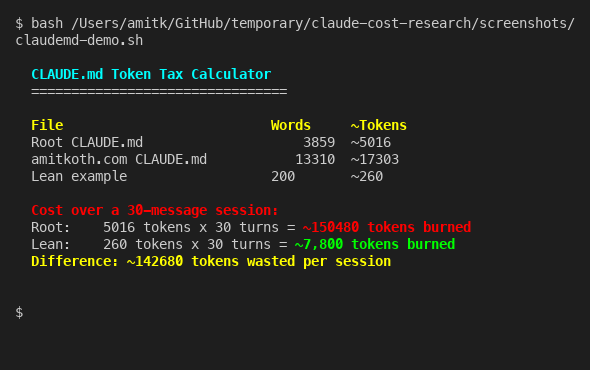
My root CLAUDE.md is about 3,900 words. Over a 30-message session, that’s roughly 150,000 tokens burned just loading project instructions. A lean 200-word CLAUDE.md does the same job for 7,800 tokens. The difference - 142,000 tokens per session - is basically free performance you are leaving on the table.
Keep your CLAUDE.md files under 2,000 tokens. Move anything situational into separate files that Claude can read on demand instead of loading every turn. The official best practices recommend exactly this. When consulting with companies about their Claude Code setups, the bloated CLAUDE.md is the single most common waste I see - people dump their entire coding standards document in there when a 10-line summary pointing to the actual files would do the same job for 95% fewer tokens.
Three commands that changed everything
These are built into Claude Code and they work on every subscription tier. No API key needed, no configuration files - just type them.
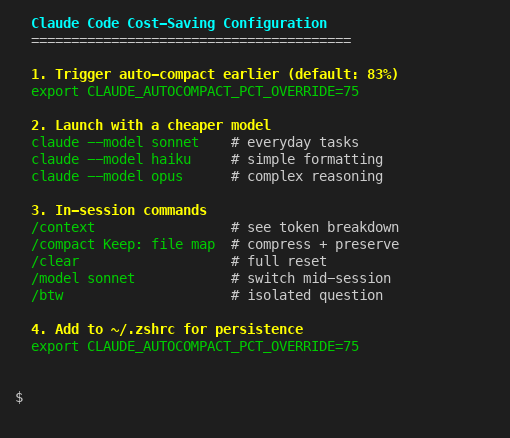
/compact [instructions] compresses your conversation history into a condensed summary, then continues from that smaller context. The key insight from the cost management docs: trigger it proactively at around 60% context usage, not reactively when you get the warning. You can also tell it what to preserve. /compact Keep: current file map, the decision to use PostgreSQL over Redis keeps your critical decisions alive while dumping the verbose back-and-forth. Without custom instructions, compaction tends to drop architectural decisions you made earlier in the session - and then Claude suggests the exact approach you already rejected. Annoying.
/clear is the nuclear option. It wipes everything and starts fresh. Use it between unrelated tasks. If you just finished debugging an API endpoint and now want to write tests for a completely different module, /clear is the right call. Starting fresh from zero costs a fraction of dragging 20 messages of irrelevant context into your next task. Think of sessions like git commits - focused and bounded. I reckon most people treat Claude Code like one long conversation when they should be treating it like a series of short, disposable ones.
/model sonnet switches to a cheaper model mid-session. This one is sort of brilliant for everyday work. Use Opus for architecture decisions and complex multi-file refactors. Switch to Sonnet for straightforward edits, writing tests, or explaining code. Drop to Haiku for simple formatting or renaming tasks. The model configuration docs cover the full list. You can also launch Claude Code with a specific model from the start: claude --model sonnet.

What the official docs barely mention
There are several lesser-known features that compound the savings. These are the ones I had to dig through GitHub issues and environment variable docs to find.
CLAUDE_AUTOCOMPACT_PCT_OVERRIDE=75 is an environment variable that triggers auto-compaction earlier. The default threshold is roughly 83% of your context window. Setting it to 75 means compaction kicks in at around 150,000 tokens instead of 166,000, which preserves more working memory for complex multi-file operations. Add it to your ~/.zshrc and forget about it.
The /btw command creates an isolated branch to ask quick questions without polluting your main conversation thread. Mind you, this isn’t just cosmetic. It reuses your parent conversation’s prompt cache, so the overhead is minimal. Community testing suggests it can cut token consumption by up to 50% in sessions where you frequently need to ask mid-task questions.
Preprocessing hooks in your settings.json can filter data before Claude ever sees it. If you are running tests and only care about failures, a PreToolUse hook can grep for FAIL in a 10,000-line test output before Claude reads the entire thing. That is the difference between Claude processing 10,000 tokens of test output versus 200 tokens of just the failures. The cost management guide covers this pattern.
Subagent delegation is probably the most underused cost lever. When Claude Code spawns a subagent to explore your codebase, all those file reads and search results stay in the subagent’s context window - a separate 200,000-token budget that doesn’t touch your main conversation. Your main conversation only sees the summary. For large codebases like Tallyfy’s Laravel monolith, this keeps your primary context clean while the subagent handles the exploratory work in its own isolated sandbox. I wouldn’t attempt a large refactor without delegating the research phase to subagents first.
Stop fast mode from draining your budget
This one properly bit me. Fast mode in Claude Code gives you roughly 6x faster output from Opus. Sounds brilliant. The catch, buried in the fast mode documentation: it charges 6x standard Opus token rates. And those charges go against your extra usage budget, not your subscription allocation.
It gets worse. If you switch to fast mode mid-conversation, Claude charges the full uncached input token price for your entire context at the new rate. So enabling fast mode on message 20 of a deep session means you are paying the 6x premium on everything that came before, not just what comes after.
The practical rule: only use fast mode for short, focused tasks. Start a fresh session, enable fast mode, do the quick job, exit. Never toggle it on during a long session. That said, for a quick 3-message task where speed matters, fast mode is genuinely useful. Just be deliberate about when you reach for it.
The /fast toggle in Claude Code makes it easy to flip on and off. The messy part is remembering that the cost implications are asymmetric - turning it on mid-session costs way more than starting with it on, because the entire existing context gets repriced. If you are going to use fast mode, decide before you start the session, not halfway through.
Which plan tier actually makes sense
Before upgrading your plan, apply everything above first. I’d guess most people can stretch their current tier by 40-60% with just the commands and settings covered here. No point paying for a bigger bucket if yours has holes in it. That is probably the most important takeaway from this entire post.
The jump from Pro to Max 5x is 5x the price for 5x the limits. Linear. No volume discount. Same for Max 5x to Max 20x - 4x the price for 4x more. Annual billing saves you roughly 17% across all tiers, which is the single easiest cost reduction available. If you are paying monthly and you have been on Claude for more than two months, switch to annual. That is it. Done.
For teams, the pooled usage model is a genuine advantage. Anthropic allocates usage at the organization level, not per seat. Your light users effectively subsidize your heavy users. If 5 out of 30 people are power users and the rest barely touch it, pooled allocation absorbs those spikes without triggering per-user overage. The billing mechanics are trickier than most people realize - worth understanding before choosing a tier.
One common misconception about Enterprise plans: unused seats don’t give extra tokens to other users. Enterprise seats are organizational access licenses, not token pools. Buying 50 seats when only 30 people use Claude doesn’t give those 30 people more headroom. I’ve seen this assumption trip up more than one procurement team. They think unused licenses mean surplus capacity. They don’t.
Everything in this post applies to Claude Desktop too, by the way. Desktop uses the same subscription allocation. The Projects feature in Desktop works like CLAUDE.md for Code - it keeps context focused and lean. If you are choosing between Code, Desktop, and the web app, the cost dynamics are identical across all three.
University partnerships are worth mentioning. Anthropic offers free Pro-level access through 2027 to students at partner institutions including Northeastern University, London School of Economics, Columbia University, Syracuse University, University of Pittsburgh, and Champlain College. The list keeps growing. If you have a .edu email from a partner school, you might not need to pay at all. Amazon Prime Student also includes a 30-day Claude Pro trial, and GitHub’s Student Developer Pack includes Claude Pro access.
One last thing that’s easy to miss: be specific in your prompts. “Fix the bug” forces Claude to explore your entire codebase looking for context. “Fix the null reference error in loadUserMetrics in dashboard/analytics.js” tells Claude exactly where to go. Specific prompts waste fewer tokens on exploration and get better results. It’s the simplest habit change and it costs nothing.
If you use the Claude API directly for development, the cost reduction techniques are completely different and even more powerful - prompt caching alone can cut input costs by 90%.
About the Author
Amit Kothari is an experienced consultant, advisor, coach, and educator specializing in AI and operations for executives and their companies. With 25+ years of experience and as the founder of Tallyfy (raised $3.6m), he helps mid-size companies identify, plan, and implement practical AI solutions that actually work. Originally British and now based in St. Louis, MO, Amit combines deep technical expertise with real-world business understanding.
Disclaimer: The content in this article represents personal opinions based on extensive research and practical experience. While every effort has been made to ensure accuracy through data analysis and source verification, this should not be considered professional advice. Always consult with qualified professionals for decisions specific to your situation.