
I spent a Saturday building a Stop hook for Claude Code that was supposed to verify plan completion. The hook ran. It returned its decision. Claude ignored it and stopped anyway.
Three hours of debugging later, I discovered the problem. Exit code 1 means “error, log it and continue.” Exit code 2 means “block, actually prevent Claude from stopping.” I was using exit code 1. The hook was firing perfectly, producing the right output, and having zero effect.
That bit still annoys me when I think about it. Not the bug itself, but the way the system happily lets the wrong exit code waste your afternoon without so much as a warning. This is the kind of thing that isn’t obvious from the documentation. Hooks in Claude Code are powerful, but the gap between “it runs” and “it works” is full of sharp edges. Here is what I learned building a real one.
What are hooks?
If you have ever used git hooks, you already understand the concept. A pre-commit hook runs before every commit. A post-commit hook runs after. You can use them to lint code, run tests, block bad commits, or inject messages.
Claude Code hooks work the same way, but for AI sessions instead of git operations. They are automated actions triggered by specific events during your interaction with Claude.
Claude Code now defines around thirty event types, everything from PreCompact to SubagentStop, but six carry most of the practical weight:
- Stop fires when Claude finishes responding. This is the big one for enforcement. If your hook returns exit code 2, Claude can’t stop and must continue working. It is the one event with its own dedicated guide, which now also covers the AI-auditor pattern: a Stop hook can spawn a fresh
claude -psub-agent to audit the work against the actual files on disk, not just grep the response text. Worth knowing about for plan-mode sessions where a string match is too easy to game. The newer version of that auditor blocks on a confirmed miss rather than only reporting it, and since the sub-agent is low-context and sometimes wrong, the full-context parent gets to fix the finding or rebut it as a false positive. - PreToolUse fires before each tool call (Read, Edit, Bash, etc.). You can block dangerous operations here.
- PostToolUse fires after each tool call succeeds (failed calls get their own PostToolUseFailure event). You can inject additional context.
- UserPromptSubmit fires when you press Enter on a message. You can add reminders or validate input.
- SessionStart fires when a new Claude Code session begins.
- Notification fires when Claude sends a notification.
Stepping back a moment before I keep listing events. Each hook receives context as JSON via stdin. The fields include session_id, transcript_path (pointing to this session’s specific transcript file), last_assistant_message (Claude’s response text, supplied to Stop hooks), permission_mode, and cwd. This context is what makes hooks session-aware and safe for concurrent use.
The return format depends on the hook type:
// Stop hooks: block, or omit "decision" to allow
{ "decision": "block", "reason": "why Claude must keep going" }

// PreToolUse hooks (DIFFERENT shape!)
{ "hookSpecificOutput": { "permissionDecision": "deny" } } // or "allow", "ask"
Fair enough if that looks confusing. It confused me too, and this drives me crazy about API design in young tooling: two adjacent concepts pick neighboring vocabulary that differs by one synonym. The valid output depends on the hook type. I initially used "allow" in a Stop hook because it seemed logical. Claude Code threw a JSON validation error. A Stop hook says "block" or stays silent to let Claude stop; a PreToolUse hook says "allow", "deny", or "ask", nested inside hookSpecificOutput. Different field name, different shape. Easy to mix up, painful to debug.
What are the hook types and when to use each?
Hooks come in five flavors these days: command, http, mcp_tool, prompt, and agent. The two ends of that spectrum, command and agent, teach you the most.
Command hooks run a shell command. They are fast (10-100ms), deterministic, and read session context from stdin. A bash script, a Python script, whatever you want. They can’t reason about code, but they can grep, parse JSON, check files, and return decisions instantly.
Agent hooks spawn a separate Claude instance. They are slow (2-30s), expensive (1000-10000+ tokens per invocation), and here is the kicker: they can’t see the conversation. The agent is a separate process with no knowledge of what you and Claude were discussing. It can read files and run commands, but it has zero conversation context. Anthropic labels agent hooks experimental and says to prefer command hooks for production.
Does that mean agent hooks are useless? No. They’re brilliant for complex reasoning tasks that don’t need speed. But for my plan enforcement hook, the choice was a no-brainer. After 10+ years in workflow automation, my reflex is to ask whether the heavy option is solving a real problem or just feels more thorough. I needed something that fires on every single turn (potentially dozens per session), needs to run in milliseconds, and checks whether specific text appears in Claude’s response. Command hook. An agent hook would have added 2-30 seconds of latency to every Claude response while consuming thousands of tokens for a check that takes grep 5ms.
This is where it gets tricky: the concurrent session problem.
My first approach was to find the most recently modified plan file in ~/.claude/plans/ to check if a plan was active. This works fine if you run one Claude Code session at a time. I regularly run 10-20 sessions simultaneously. Session A’s hook grabs Session B’s plan file. False positives, false negatives, complete chaos.
The trick was that hooks receive transcript_path, which points to this session’s specific transcript file. Each session gets a unique transcript at ~/.claude/projects/[encoded-path]/[uuid].jsonl. Grepping this session’s transcript for plan file operations tells you whether this specific session used a plan. No cross-contamination. Session-safe.
This was discovered through research, not by hitting it in production. But it would have been a nasty intermittent failure, good at hiding until the worst possible moment. The kind that works 90% of the time and then ruins your afternoon when two sessions happen to overlap. If you want to dig into this for your company, my door is open.
Where hooks live and how they travel
Hooks are defined in settings.json under a hooks key. The two places you will actually use:
Global: ~/.claude/settings.json fires in every session on the machine.
Project: .claude/settings.json in a project directory fires only when Claude runs in that directory.
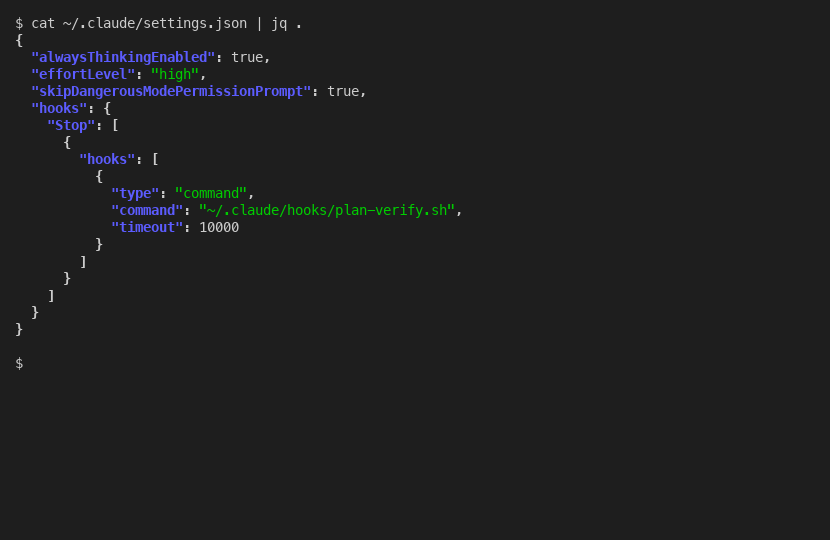
Both global and project hooks fire in parallel, not sequentially. This is important. Byte-identical handlers get deduplicated automatically, but anything short of that (a different script path, an extra argument) runs at both levels, and a blocking hook that runs twice blocks twice. Keep enforcement hooks at one level only. I use global for plan verification (it should apply everywhere) and reserve project-level for future project-specific hooks.
For portability, store hooks as external script files rather than inline bash in the JSON. Claude Code has a documented history of mangling shell commands that pipe into jq: an escaping bug (issue 1132, closed “not planned” so it won’t be fixed) corrupted jq pipe patterns, and an inline echo "$CONTEXT" | jq -r '.field' buried inside JSON config is exactly the construction that breaks silently, the sort of kludge you only discover after you’ve cobbled together something fancy and watched it produce nothing. An external script avoids the whole class and has the bonus of being testable, debuggable, and version-controllable independently.
The full settings.json for a global Stop hook is minimal:
{
  "hooks": {
    "Stop": [
      {
        "hooks": [
          {
            "type": "command",
            "command": "~/.claude/hooks/plan-verify.sh",
            "timeout": 10
          }
        ]
      }
    ]
  }
}
To move this to another machine, copy the settings.json and the script file. Done.
Real examples that actually help
Here is the plan verification hook I built, simplified to the essential pattern:
#!/bin/bash
set -euo pipefail

CONTEXT=$(cat)
LAST_MSG=$(echo "$CONTEXT" | jq -r '.last_assistant_message // empty') || LAST_MSG=""
TRANSCRIPT=$(echo "$CONTEXT" | jq -r '.transcript_path // empty') || TRANSCRIPT=""

# Check if this session wrote/edited a plan file
HAS_PLAN=0
if [ -n "$TRANSCRIPT" ] && [ -f "$TRANSCRIPT" ]; then
HAS_PLAN=$(grep '"file_path" *: *"[^"]*\.claude/plans/' "$TRANSCRIPT" \
 | grep -c '"Write"\|"Edit"') || HAS_PLAN=0
fi

# No plan? Allow (omitting "decision" lets Claude stop).
if [ "$HAS_PLAN" -eq 0 ]; then
exit 0
fi

# Plan exists but no completion check? Block.
if ! echo "$LAST_MSG" | grep -q 'Plan Completion Check'; then
echo '{"decision": "block", "reason": "Include Plan Completion Check."}'
exit 2
fi

exit 0
The critical exit code rules that will save you hours:
- Exit 0 = approved. Hook ran, everything is fine. Silent, no message to user.
- Exit 1 = error. Hook had a problem. Logged, but Claude continues anyway. This does NOT block.
- Exit 2 = block. Claude is physically prevented from stopping. Must address the issue first. One guard rail exists: after 8 consecutive blocks, Claude Code overrides the hook and ends the turn, so a condition that can never pass will not loop forever.
I said earlier that exit 1 means “error, log and continue.” That oversimplifies it. The accurate version is: exit 1 means the script crashed in Claude Code’s eyes, and Claude Code’s response to a crashed hook is to ignore everything the script said, including the carefully formatted JSON decision you printed to stdout. Most people building security hooks use exit 1 and wonder why Claude ignores their blocks. Exit 1 is non-blocking. Spot on if you want logging. Rubbish if you want enforcement.
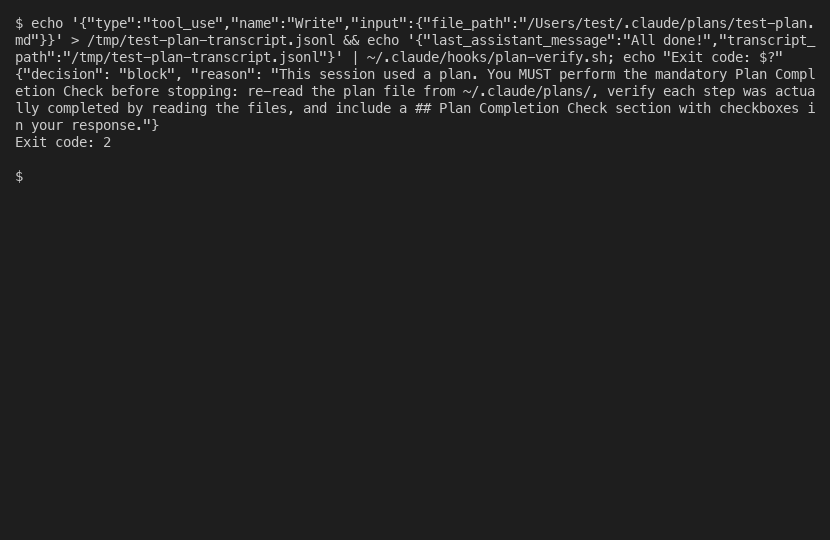
One more UX detail that is easy to miss: approved hooks are silent. No “Ran 1 stop hook” message, no notification, nothing. You can’t visually confirm a hook ran successfully. Only blocks produce visible output. This is by design (no clutter on every turn) but it means you need a test suite to verify your hooks work, not just manual observation.
What I built and every pitfall I hit
The plan verification hook went through 6 bug fixes before it was solid. After chewing over which to lead with, I’m putting them in the order they hit me, because the order tells its own story about how the assumptions broke down one at a time. Each one taught me something about how hooks actually work versus how I assumed they work.
Bug 1: Wrong enum value. Used "allow" in a Stop hook. Caused JSON validation error. A Stop hook blocks with "block" and allows by omitting the field; PreToolUse decisions ("allow"/"deny"/"ask") nest inside hookSpecificOutput. Different hook type, different shape.
Bug 2: False positive plan detection. Initially grepped for 'plans/' in the transcript. This matched permission-mode entries and text mentions, beyond actual plan file operations. Tightened to '"file_path".*\.claude/plans/' but that still had problems.
Bug 3: Circular trap. The hook blocks and tells Claude to “re-read the plan file.” Claude runs Read on the plan path. That puts a "file_path"...plans/ entry in the transcript. Next time Claude tries to stop, the grep matches that Read entry. Infinite loop. Fix: only match Write and Edit operations, not Read.
Bug 4: Content leakage across JSONL fields. Editing a documentation file that mentions .claude/plans/ in its content triggered the grep. Because JSONL puts an entire tool call on one line, .* in the grep pattern spans across JSON field boundaries. Fix: anchor with [^"]* to stay inside the file_path value string.
Bug 5: Hook blocks during planning. The hook fires on every turn, including during plan writing. Without a guard, it demands verification before execution even begins. Fix: check permission_mode in the context and skip enforcement when it is "plan".
Bug 6: Silent jq dependency. Without jq installed, both jq calls fail silently, both variables become empty, and the hook approves everything. Zero enforcement, zero error. Fix: explicit command -v jq check that blocks with install instructions.
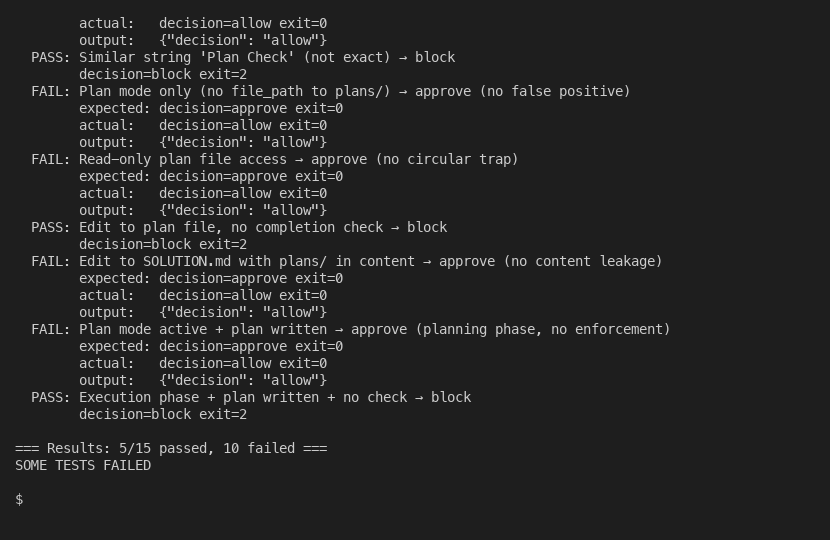
I built a 15-test regression suite that catches all of these. Every new change runs against all 15 scenarios.
The real limitations: hooks went through a stretch of not loading from settings at all (issue 11544, open for months before a fix landed in January 2026). False “hook error” labels appear in the transcript even when the hook works correctly (issue 34713). And the last_assistant_message field this whole approach depends on only arrived in version 2.1.47; on anything earlier, a hook has to parse the transcript file to read Claude’s response.
Is this stable enough to bet a workflow on? Not yet, if I’m being straight. Hooks are powerful. They are also janky in the way that any 1.0 feature is janky. Build your enforcement, write your tests, handle the edge cases, and accept that some things will break across versions. The alternative is no enforcement at all, which is worse.
For the complete story of how this fits into a three-layer plan enforcement system, see how to ensure Claude follows through on a plan.