Key takeaways
- A turn isn't a message - it is the entire cycle from user input through every tool call to Claude's final response
- Tokens accumulate across turns - long sessions hit context limits where earlier instructions get compressed and can fade
- Hooks fire at specific points in the turn lifecycle - before tools, after tools, and at the end when Claude finishes responding
- Plan mode is one planning turn plus execution turns - understanding this separation is what makes enforcement possible
If you have used Claude Code for more than a few sessions, you have probably noticed that some responses feel expensive and others feel cheap. One response reads three files and edits two. Another just answers a question. Both count as one turn, but they are not the same thing. Not even close.
The thing is, nobody really explains what a turn means in Claude Code. The official documentation talks about messages and tokens. Community discussions mention context windows. But the turn itself, the fundamental unit of interaction, sort of gets glossed over.
I spent a weekend building a plan enforcement system for Claude Code and learned more about turns than I expected to. Here is what I wish someone had explained to me earlier.
What a turn actually means

A turn is one complete cycle. You send a message. Claude reads it, thinks about it, and then does things. Maybe it reads a file. Maybe it edits three files and runs a test. Maybe it searches your codebase, reads what it finds, writes new code, and verifies the build passes. All of that, every single tool call, happens within one turn.
Then Claude responds with text. That is the end of the turn.
This matters because a turn isn’t the same as a prompt or a message. A message is what you type. A turn is the entire cascade of work that follows. In a complex coding session, a single turn might involve 15-20 tool calls: reading files, grepping for patterns, editing code, running tests. One turn. One response. Fifteen tool calls.
A session is a sequence of turns. Each session gets a unique session_id and its own transcript file stored in ~/.claude/projects/. That transcript records every tool call, every response, every state change. When you run /cost, you are seeing the accumulated token usage across all turns in that session.
Here is the lifecycle of a single turn:
- You type a message and press Enter (this is where
UserPromptSubmithooks fire) - Claude receives your message plus the full conversation context
- Claude thinks and decides what to do
- Claude calls tools. For each tool:
PreToolUsehook fires, the tool runs,PostToolUsehook fires - Steps 3-4 may repeat multiple times within the same turn
- Claude generates its final text response
- The
Stophook fires. The turn is over.
That seventh step is where it gets interesting.
Why turns matter more than you think
Here is a pattern I have seen repeatedly when advising companies on AI workflows. Teams build a system that works in short sessions. Then they try a complex task that runs for 40+ turns. And it breaks. Not crashes. The AI just quietly stops following instructions.
This happens because of context compression.
Claude Code has a finite context window. When your session approaches that limit, earlier messages get compressed. Not deleted. Summarized. The system condenses prior turns to make room for new ones.
Sounds fine in theory. In practice, it means your carefully written CLAUDE.md instructions, which Claude reads at the start of the session, gradually fade. By turn 30 or 40, Claude might not remember the specific rules you established. Running Tallyfy for over a decade taught me that written instructions are only as good as the system that enforces them. The same principle applies here.
Token usage accumulates across turns. Each turn’s tool calls, each file read, each edit, all count toward context consumption. A turn that reads 5 files consumes dramatically more context than one that answers a question from memory. Most developers don’t think about this until they hit the wall.
The practical implication is simple. Long sessions with many turns will eventually lose track of your rules. This isn’t a bug. It is how context windows work. And it is why hooks exist as a backup enforcement mechanism.
How hooks interact with turns
Hooks are automated actions that fire at specific moments in the turn lifecycle. Think of them like git hooks (pre-commit, post-commit) but for AI sessions. Each hook type corresponds to a different point in the turn:
During a turn:
PreToolUsefires before each tool call. If your hook returns a block decision, the tool call is prevented.PostToolUsefires after each tool call completes. You can inject additional context here.
At the end of a turn:
Stopfires when Claude finishes responding. This is the enforcement point. If your hook returns exit code 2, Claude is forced to continue and can’t stop.
Between turns:
UserPromptSubmitfires when you press Enter on a new message. You can inject reminders or validate input here.
Before any turns:
SessionStartfires when a new session begins. Useful for setting up context.
The Stop hook is the one that matters most for quality enforcement. It fires at the end of every turn. Every single one. You can’t skip it. You can’t bypass it. Even --dangerously-skip-permissions doesn’t skip hooks (that flag only skips permission prompts).
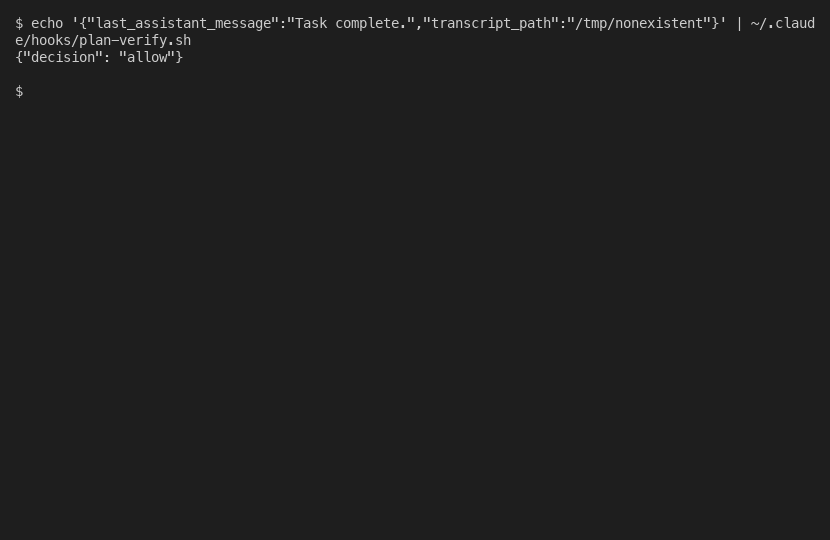
When a Stop hook approves, it is silent. No message, no notification. You would never know it ran. Only when a hook blocks does it become visible, with a “Ran 1 stop hook” message that forces Claude to address the issue.
Practical tips for working with turns
After building and testing the enforcement system, a few patterns became clear.
Batch your requests. Each turn costs context. If you need Claude to read 5 files, ask for all 5 in one message. Claude will use parallel tool calls within a single turn instead of spreading them across five turns. Fewer turns means less context consumed.
Use plan mode for complex work. Plan mode creates a clean separation: one turn for planning (where Claude explores, reads files, asks questions) and then separate turns for execution. This isn’t just an organizational tool. It creates a boundary where enforcement hooks can distinguish between “Claude is writing a plan” and “Claude is executing a plan.” I wrote about this distinction in detail in my post about plan enforcement.
Watch for context compression. If you notice Claude starting to miss instructions that it followed perfectly in earlier turns, you are hitting compression. The /cost command shows token consumption. When you are above 80% of context, consider starting a fresh session. Mind you, your CLAUDE.md gets reloaded in the new session, so you get a clean start on instructions.
Parallel tool calls save turns. Claude can run multiple independent tool calls within a single turn. Reading three unrelated files happens in parallel, not sequentially. This is a turn efficiency gain that most people miss.
The nightmare scenario is a 50-turn session where Claude was following a 12-step plan, hit context compression around turn 35, and silently stopped verifying steps 8 through 12. No error. No warning. It just declared “done” based on its memory of what it did, not verification of what actually happened. That is broken, and it is exactly why I built the hook system.
What I built to make turns work harder
The Stop hook fires at the end of every turn. So I built a bash script that checks two things when it fires:
- Did this session write or edit a plan file? (Checks the session-specific transcript)
- If yes, does Claude’s response include a “Plan Completion Check” section?
If a plan was used but the check is missing, the hook returns exit code 2. Claude is blocked from stopping and must produce the verification.
The interesting technical challenge was the concurrent session problem. I initially tried finding the most recently modified plan file in ~/.claude/plans/. That would work fine with one session. But I regularly run 10-20 Claude Code sessions simultaneously. Session A’s hook would grab Session B’s plan file. Total chaos.
The solution came from discovering that Stop hooks receive a transcript_path field pointing to this session’s specific transcript file. Each session has its own transcript at a unique path. Grepping that transcript for plan file operations tells you whether this specific session used a plan, with zero cross-contamination.
Turns out, understanding the turn lifecycle is what made the whole system possible. The hook fires at the end of every turn (the right moment), checks session-specific data (the right scope), and blocks with exit code 2 (the right enforcement). Miss any of those pieces and it falls apart.
For the full technical details on hooks, read what hooks are and how to use them. For the complete plan enforcement story with all 6 bugs I found and fixed, read how to ensure Claude follows through on a plan.