Key takeaways
- Overlays sit on top, they do not fix the code - a widget cannot change a colour that is hardcoded wrong or a button a keyboard cannot reach.
- The FTC agrees - it fined accessiBe a million dollars in 2025 for claiming its AI made any website compliant.
- A vendor badge is not a defence - hundreds of businesses running overlays got sued for inaccessibility anyway.
- Real AI auditing runs the other way - it finds the exact broken line so a person can repair it.
An accessibility overlay is one line of JavaScript that promises to make your website compliant while you do nothing. It does not work. It cannot work, and a wall covered in plaster patches is the right picture for why.
The widget loads on top of your site and tries to rewrite it on the fly. The real problems, a colour nobody can read, a button a keyboard cannot reach, a form field with no label, live in the code underneath. Painting over them from the outside leaves them exactly where they were, just harder to see.
The overlay promise
The pitch is hard to resist if you are busy and a little scared. Drop in a script, get a small accessibility icon in the corner, and a dashboard tells you that you are now ADA compliant. No developer time. No audit. Done by Friday.
I get the appeal. Accessibility law is frightening if you do not know it, and a one-click fix sounds like exactly what a small team needs. That is the whole sales model, fear plus a shortcut. The problem is that the shortcut goes nowhere, and the people it is meant to help were the first to say so.
What actually happened
The FTC fined accessiBe a million dollars in early 2025. The reason, in the agency’s own words, was deceptive claims that its AI product could make any website compliant. It could not.
The lawsuits tell the same story from the other side. Plenty of businesses that installed an overlay got sued for inaccessibility regardless, because a vendor’s compliance badge carries no weight in court. One class action laid the core problem out in plain numbers: even the best automated software detects only about 30 percent of accessibility issues, and the other 70 percent needs a person. An overlay does not employ that person. It hopes you will not notice they are missing.
One small dermatology practice bought a widget subscription, got served with a complaint anyway, and ended up paying a lawyer plus a separate firm to remediate the site by hand. That manual work is the exact thing the widget had been sold to replace.
Blind users worked this out long before the regulators did. Hundreds of them, alongside developers and advocates, signed an open letter asking companies to stop using these tools, because the overlays often fight with the screen readers they claim to support.
It is worse than doing nothing, in a specific way. An overlay injects its own ARIA and reorders how the page gets read, so a blind person who already has a screen reader set up the way they like gets a second, clumsier layer arguing with the first. Many of them now know the widget on sight and switch it off on contact. You end up paying a subscription to degrade the experience for the exact people it was sold to serve.
Related reading
How I ran a real accessibility audit is the full process behind this post. What a VPAT really costs covers the report you produce at the end of it.
Why a widget cannot fix this
Look at one real example from my own product. This is a create-template form in dark mode. The Cancel button is fine. The primary button beside it, the one that actually does the thing, is dark text on a dark background.
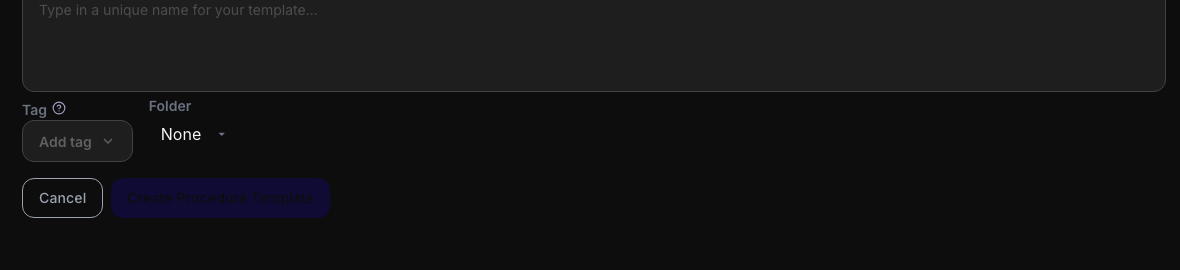
The primary action on the right is there. You just cannot read it. Measured contrast 1.13 to one, where the floor for normal text is 4.5.
I measured that button at 1.13 to one. An overlay cannot repair it, because the colour is written straight into a stylesheet rule that hardcodes a near-black value where a design token should be. A script that loads after the page has rendered has no idea that rule is wrong, and no safe way to override it without knocking three other things out of place.
Keyboard problems are worse for an overlay. On the same product the audit found a calendar, a kanban board, and a file uploader that all opened with a mouse and were dead to the Tab key. An overlay cannot wire up keyboard support that a custom widget never had. That behaviour lives in the component, not in a layer you can spray on afterwards. The problem is structural, so the repair has to be structural too.
What fixing the source looks like
This is where real AI testing earns its place, and it is the mirror image of an overlay. Instead of hiding a problem from the outside, an agent reads the live page, finds the exact element and the rule behind it, and writes up what is wrong and where. A person then changes that line.
On that one form the agent did not report “low contrast somewhere on this screen”. It named the button, gave the measured ratio, pointed at the stylesheet line, and said which design token should have been used instead. That is a bug report a developer acts on in two minutes. The colour swap is one line. The button becomes readable for everyone, in the code, for good.
And it stays fixed. A code change ships once, gets reviewed, and is done. An overlay re-runs on every page load and can break again the next time the site changes, a standing tax that never moves you any closer to being accessible for real.
The difference is direction. An overlay works from the outside in and changes nothing real underneath. An audit works from the inside out and leaves the code better than it found it. One sells you a feeling of safety. The other does the unglamorous work that actually produces it.
How to tell snake oil from the real thing
If a vendor is selling you accessibility, three questions sort the real from the rubbish.
Does it change your code, or sit on top of it? Anything that installs as a single script and promises compliance is painting over the wall. Real repairs land in your repository, as commits you can read.
Does it run an actual screen reader? Whether a blind person can operate your product is the entire question, and you cannot know the answer without listening to one read it out. A tool that never drives VoiceOver or NVDA is guessing on your behalf.
Does it show you the problems element by element, or just a score? A number with nothing behind it is marketing. A list of named issues with their locations is an audit you can act on.
I wrote up the full process in how I ran a real accessibility audit, the one that caught that unreadable button to begin with. The short version is that the work is real, a machine can do a lot of it now, and none of it looks anything like a widget glowing in the corner of your screen.