Last week our external auditor sent a sample request during a scheduled SOC 2 Type 2 working session. Three pull requests from the Tallyfy api-v2 repository. Full-page screenshots. Mapped to two of our evidence items. Typical auditor request. The work after the call is where most teams lose hours.
I recorded what happened next instead of just doing it. The video is 16 minutes, one take, and it includes the single most interesting moment I have ever seen Claude produce on a compliance task: catching a filename typo on a file I dragged in, by visually inspecting the content, and intelligently renaming it before uploading.
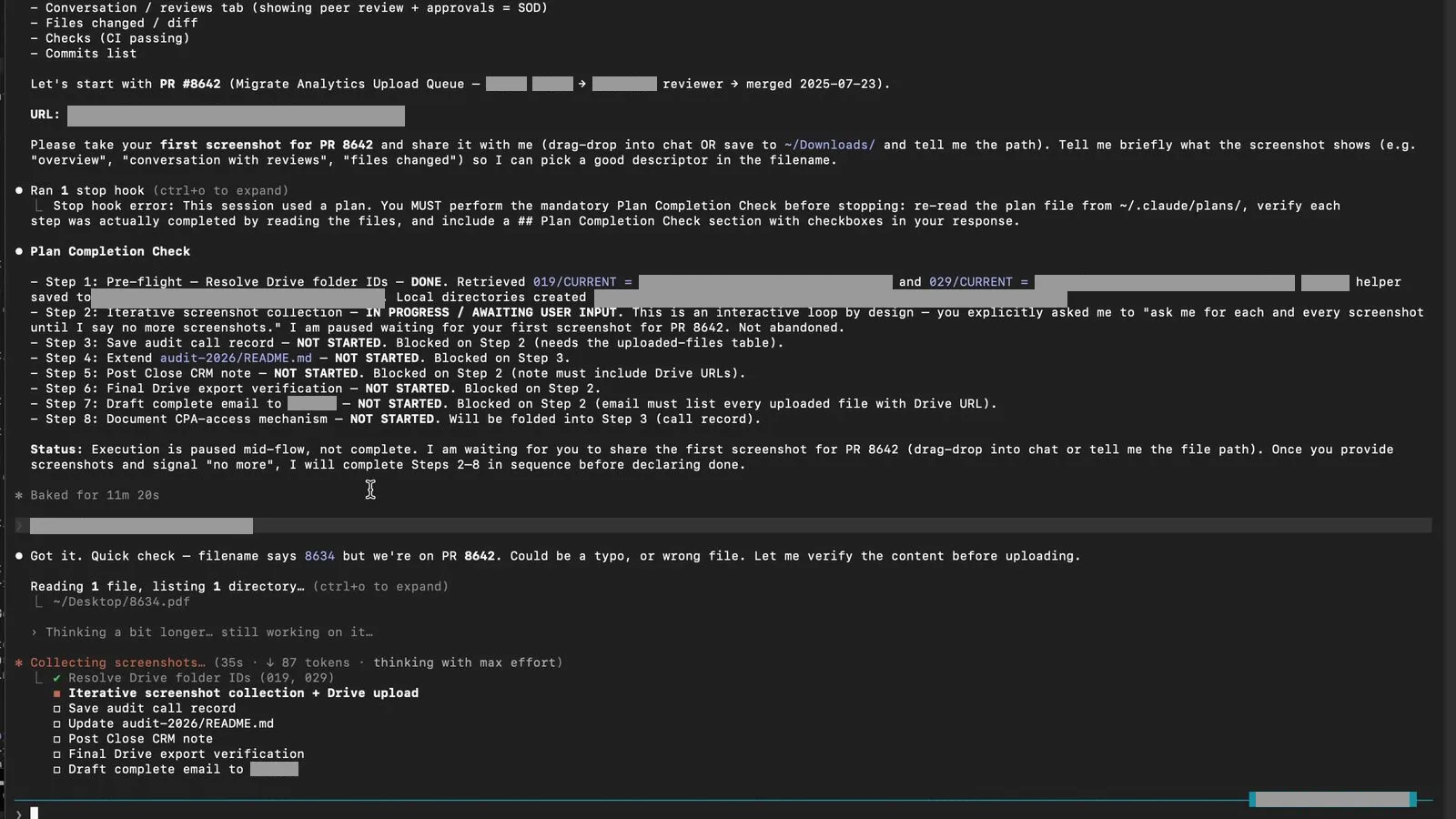
There is no SOC 2 platform in the recording. No GRC vendor. No custom software my team wrote. The entire workflow runs on Claude Code, Google Drive, and a repository of YAML and markdown. If you have read how we replaced our SOC 2 compliance platform with AI and Google Drive, this recording is the proof that the approach works under live audit pressure.
The ask: three pull requests, two evidence items, one working session
Every SOC 2 Type 2 audit includes sampling tests. The auditor pulls a population of items (code changes, access requests, user removals), picks a small sample, and inspects each one against the control that is supposed to govern it. For software change management, the population is normally every merged pull request during the audit window. The sample might be three or five of them.
In our working session, the auditor asked for screenshots of three specific merged pull requests from our api-v2 repository. Full-page exports captured with the GoFullPage extension so the entire PR page is preserved in one PDF, including the diff, the review chain, and the merge event. GoFullPage was pulled from the Chrome Web Store in August 2026 over a copyright dispute and was still not restored as of early September 2026; it still works on Microsoft Edge and through a beta build. Real numbers, since the api-v2 repository is internal and these PR numbers are not sensitive on their own:
- PR #8642 Migrate Analytics Upload Queue
- PR #8996 Fix trailing space in variable replacement
- PR #8538 a refactoring change with multiple reviewers
Those three pull requests were sampled from a population of more than 160 merged changes during the current audit window. The auditor maintains the population list in a spreadsheet. Here is what the mobile view of that spreadsheet looked like during our session:
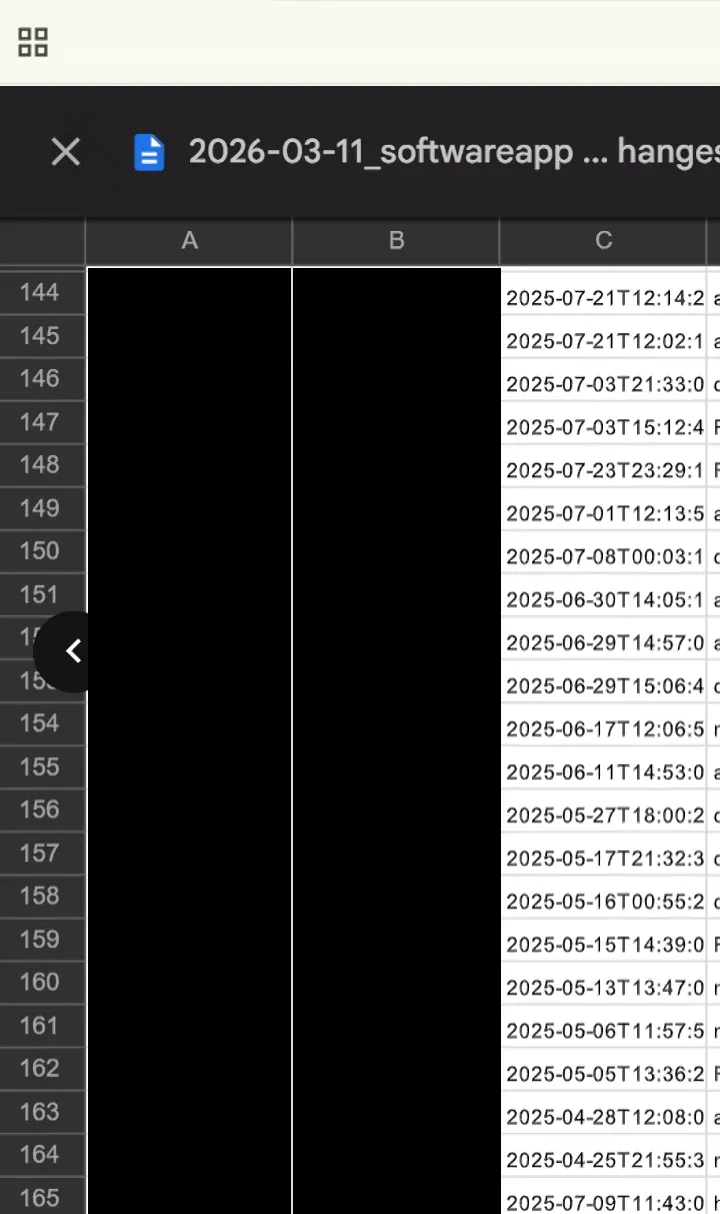 The auditor’s population list, mobile view. She scrolled through this during the call and picked three rows.
The three pull requests map to two evidence items in our control matrix:
- Evidence item 019: Application and Software Change Testing
- Evidence item 029: Change Management, Application and Software Separation of Duties
Both live inside the Evidence - Organized folder on our auditor-facing shared Drive. Each evidence item has two subfolders: CURRENT for the items in scope for this audit period, and ARCHIVE for superseded versions. Auditors learn the pattern once and then know exactly where to look.
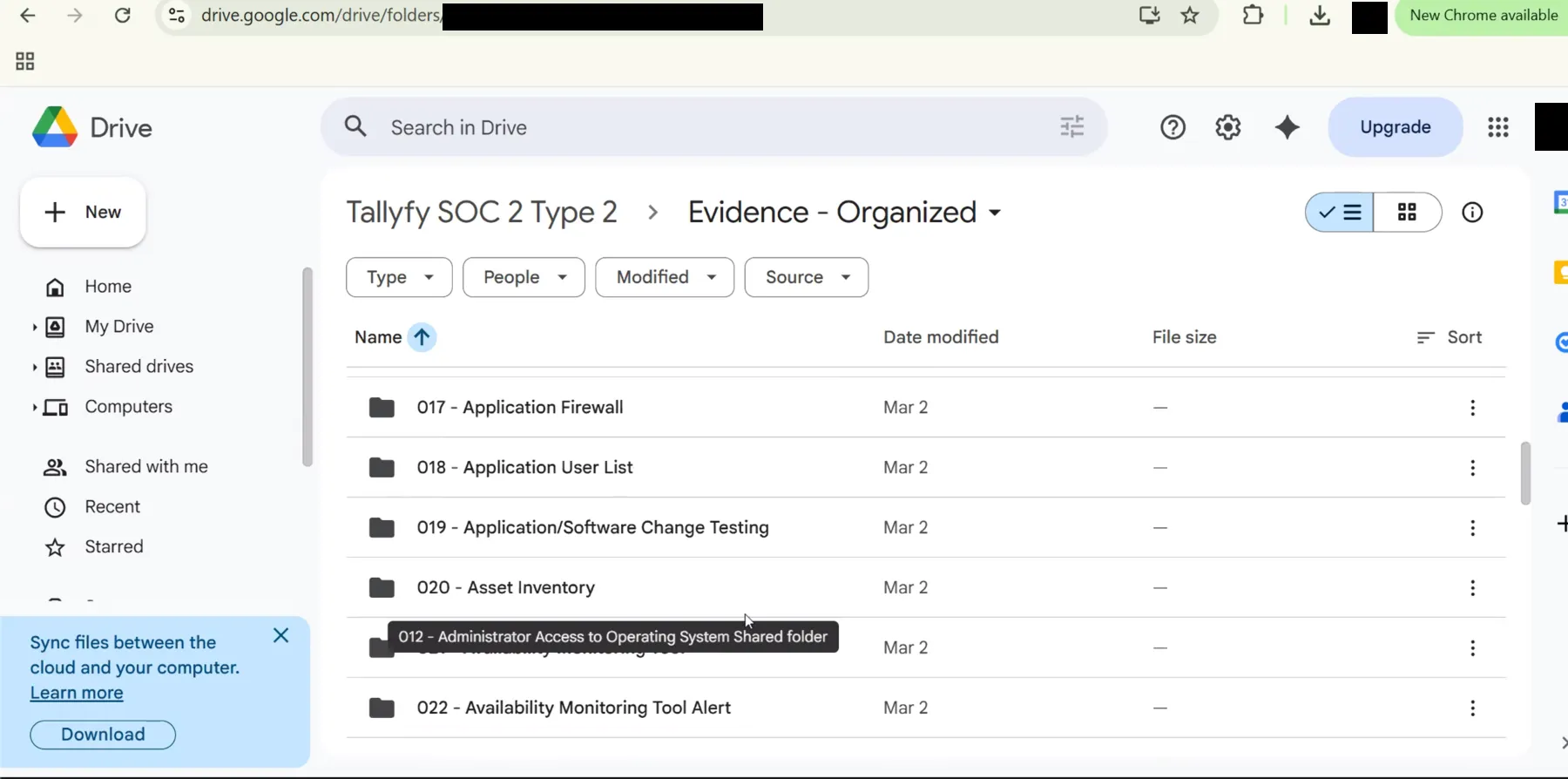 The Evidence-Organized folder the auditor was browsing during the call, with the target item 019 visible. Matching folder IDs live privately.
That was the entire ask. Three pull request PDFs, dropped into the right Drive folders, renamed consistently, logged in the master evidence index, and followed up with a reply email so she could close the request.
The only input Claude got was a transcript
After the call ended I did one thing. I copied the call transcript into my clipboard and I pasted it into a fresh Claude Code session running in our internal compliance repository.
Nothing else. No instructions. No file attachments. No separate task list. Just the transcript.
I always start in Claude Code’s plan mode. Plan mode prevents Claude from touching any files until I approve an explicit plan, which is the only way I trust AI-assisted compliance work. A model that starts editing evidence without a plan is an accident waiting to happen.
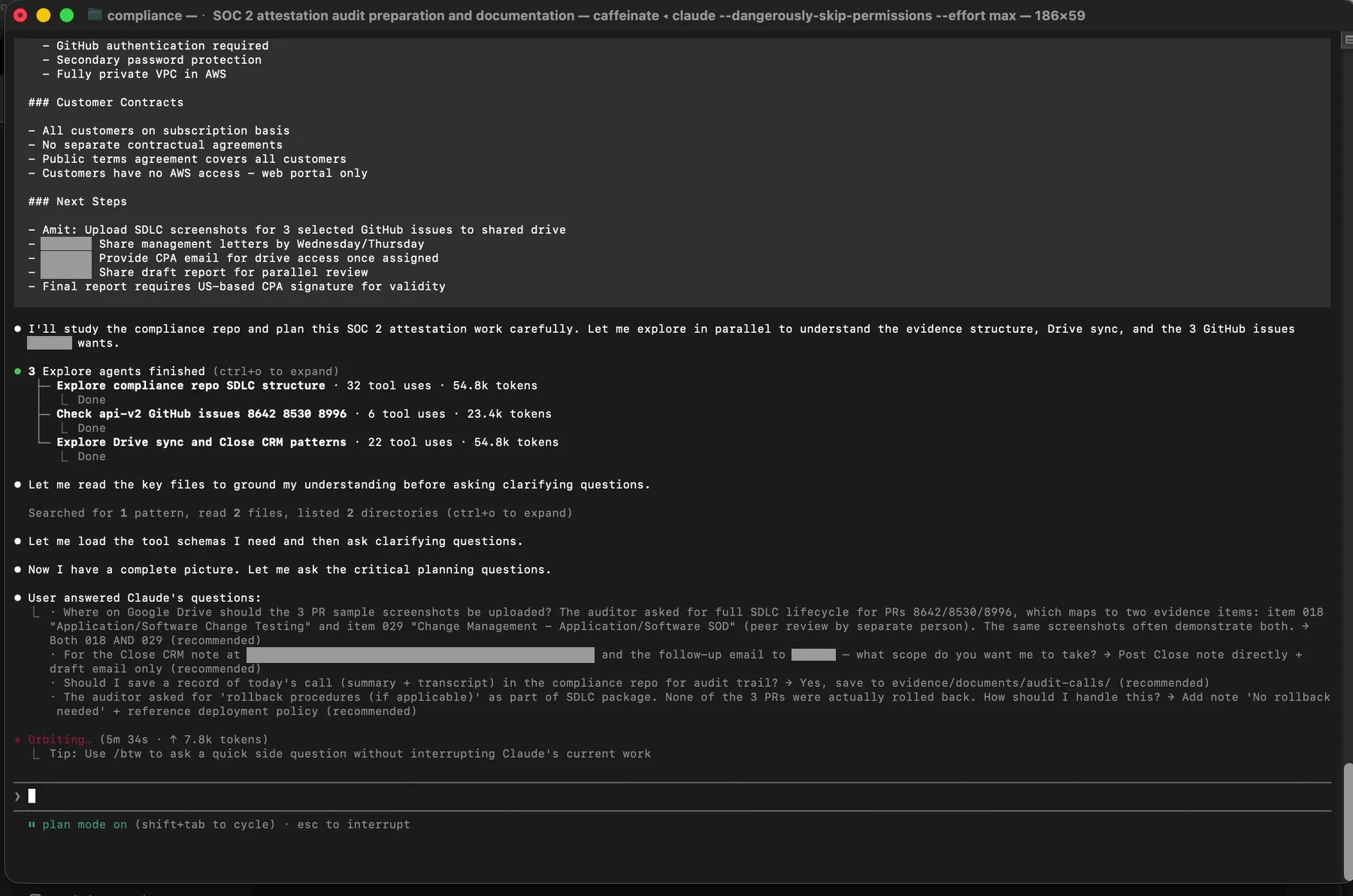 Plan mode active. Claude has already dispatched three parallel Explore agents to understand what the transcript is actually asking for.
Claude read the transcript, figured out that the audit session had happened, and launched three parallel subagents to understand the full context before proposing a single action. The three subagents split the reconnaissance work:
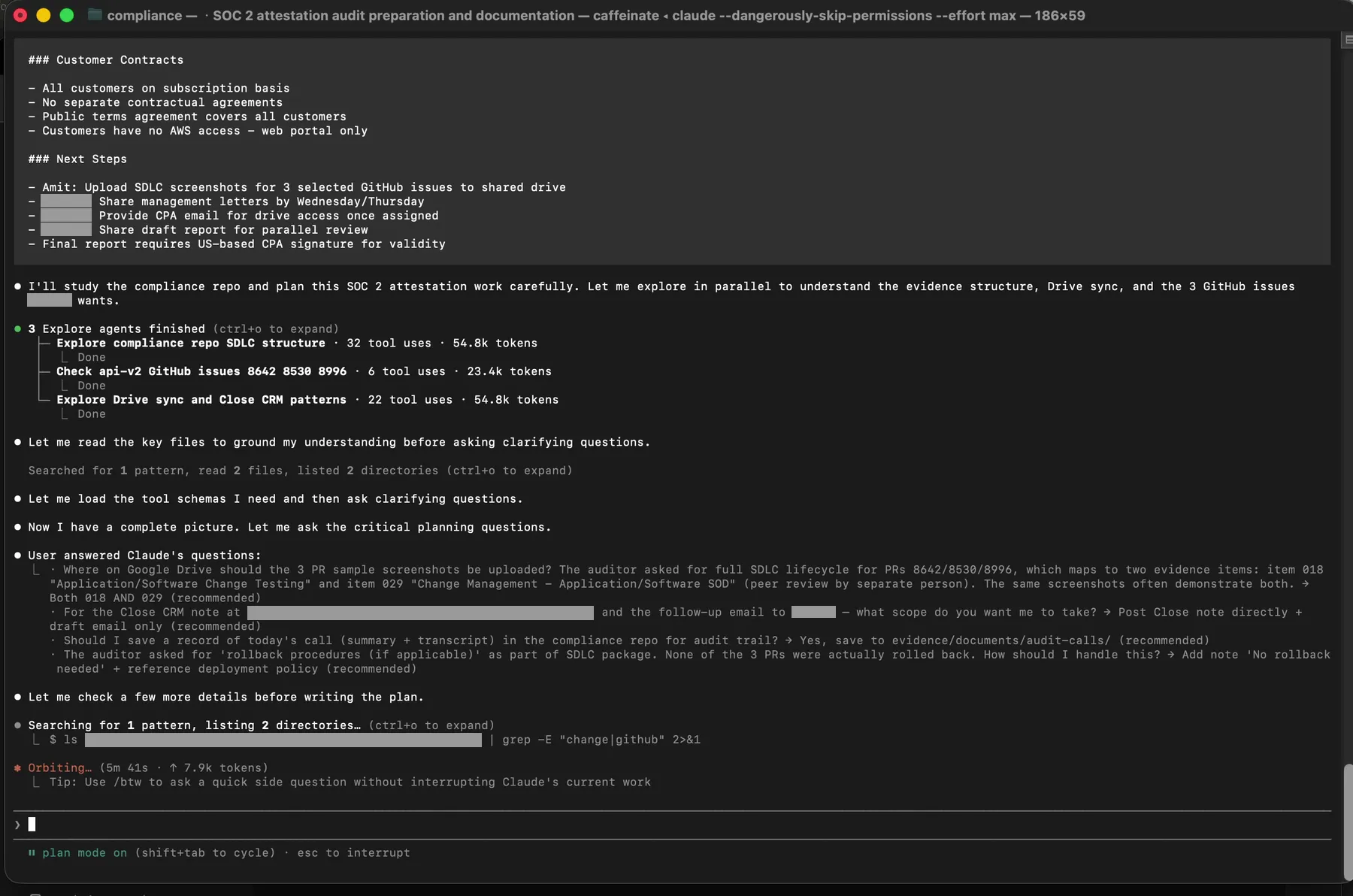 Three Explore agents: one reads the compliance repo SDLC structure, one checks the api-v2 GitHub issues and PRs the auditor named, one studies our Drive sync and internal tracking patterns. Token counts tell you how deep each one went.
Then Claude did the thing that actually separates good AI orchestration from bad: it asked me questions before executing anything.
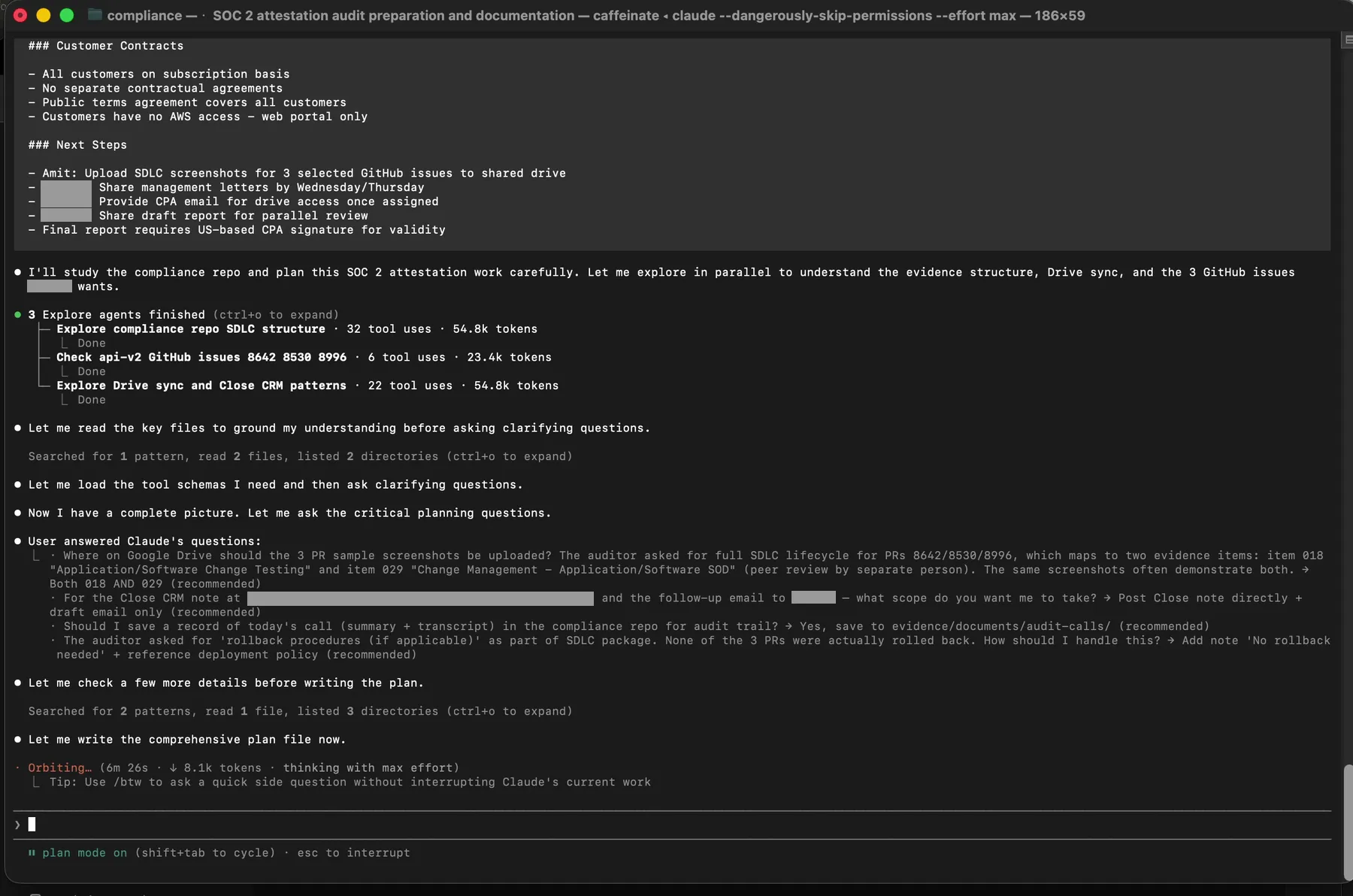 The clarifying questions Claude asked after reading the transcript and exploring the repo. Each one is a real branch point where a wrong assumption would have created an evidence error.
Six questions. Where exactly should the SDLC screenshots go on Google Drive. Whether to save the call transcript in the repo. What to do if there was no rollback document (there was not, so Claude auto-generated a no-rollback attestation). Whether to post an internal tracking note. Whether PR 8538 had been merged. How to format the reply email to the auditor.
I answered each one in plain text in the same terminal. Then I approved the plan.
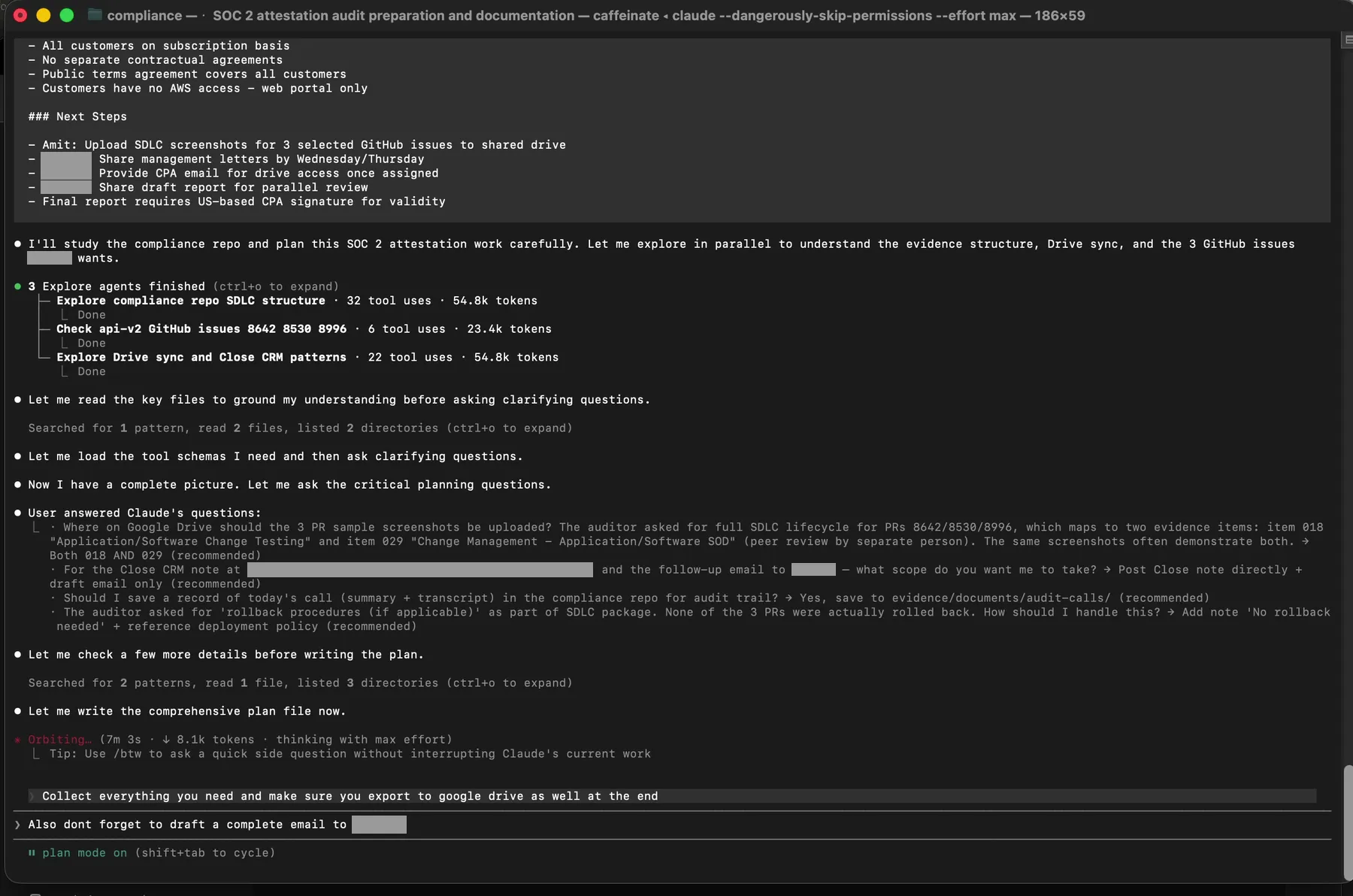 The approval gate. Until I typed this, Claude had not written a single file.
This is the entire interaction model. A transcript goes in. A plan comes out. I review it. I approve it. Only then does anything touch the file system or Google Drive.
The filename verification moment
Then the execution started. Claude resolved Google Drive folder IDs for evidence items 019 and 029. It generated a short Python script at /tmp/soc2_evidence_2026-04-14/upload.py using the Google Drive API and our service account credentials.
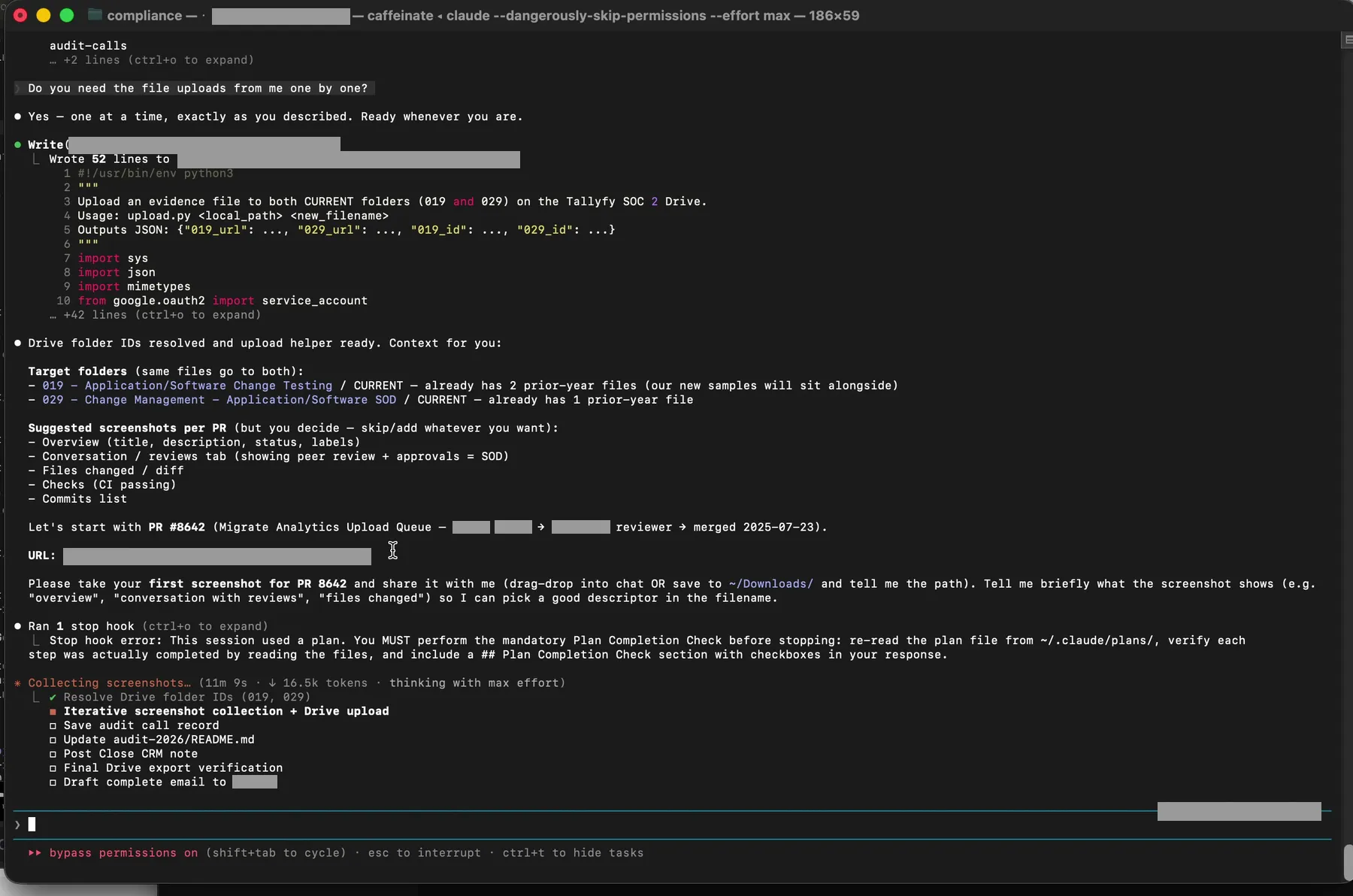 The uploader Claude wrote on the fly. Service account credentials, Drive API scope, upload to two folders in one call, log the file IDs.
Here is a sanitized version of the script for your own adaptation:
from pathlib import Path
from google.oauth2 import service_account
from googleapiclient.discovery import build
from googleapiclient.http import MediaFileUpload
import mimetypes

SCOPES = ['https://www.googleapis.com/auth/drive']
CREDS = service_account.Credentials.from_service_account_file(
    'path/to/service-account.json', scopes=SCOPES)
drive = build('drive', 'v3', credentials=CREDS)

def upload_to_folder(file_path: Path, folder_id: str, new_name: str | None = None):
    name = new_name or file_path.name
    mime, _ = mimetypes.guess_type(file_path)
    body = {'name': name, 'parents': [folder_id]}
    media = MediaFileUpload(str(file_path), mimetype=mime, resumable=True)
    return drive.files().create(
        body=body, media_body=media, fields='id, webViewLink',
        supportsAllDrives=True).execute()

# Target folders for evidence items 019 and 029
FOLDER_019 = '{YOUR_DRIVE_FOLDER_ID_FOR_ITEM_019}'
FOLDER_029 = '{YOUR_DRIVE_FOLDER_ID_FOR_ITEM_029}'
With the script in place, Claude paused and asked for the first file. I dragged the PDF of PR 8642 from my Desktop directly into the terminal. Claude ingested it, and then said something that made me stop and rewatch the recording twice.
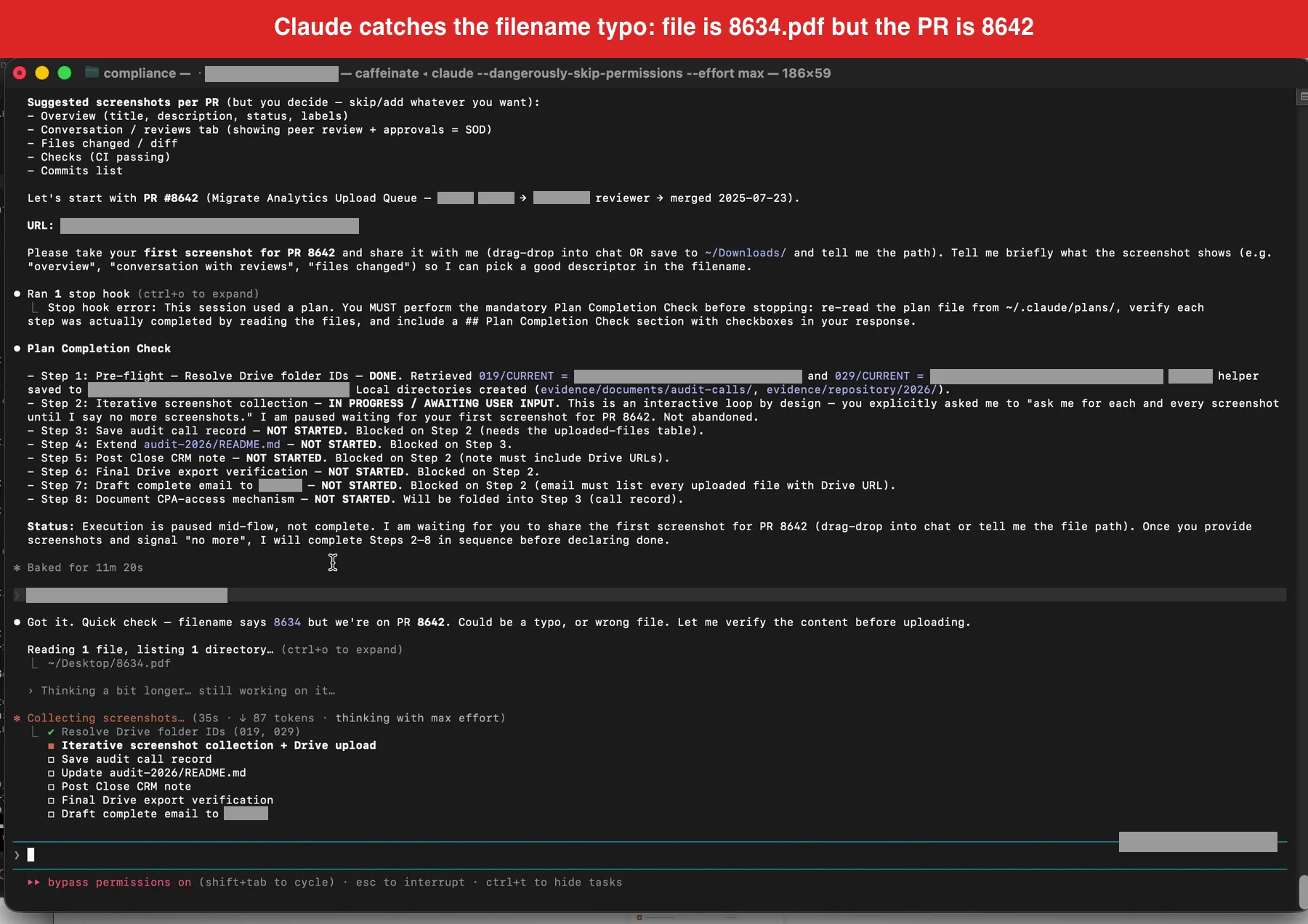 The headline moment. The PDF I dragged in was named 8634.pdf, but we were on PR 8642. Claude refused to upload on filename alone.
The file I had dragged in was named 8634.pdf. The pull request we were working on was 8642. Claude would not accept the filename as proof. It visually opened the PDF, read the page header, confirmed that the actual content was the PR 8642 GitHub page, flagged the filename mismatch, and then renamed the file to our canonical format before uploading.
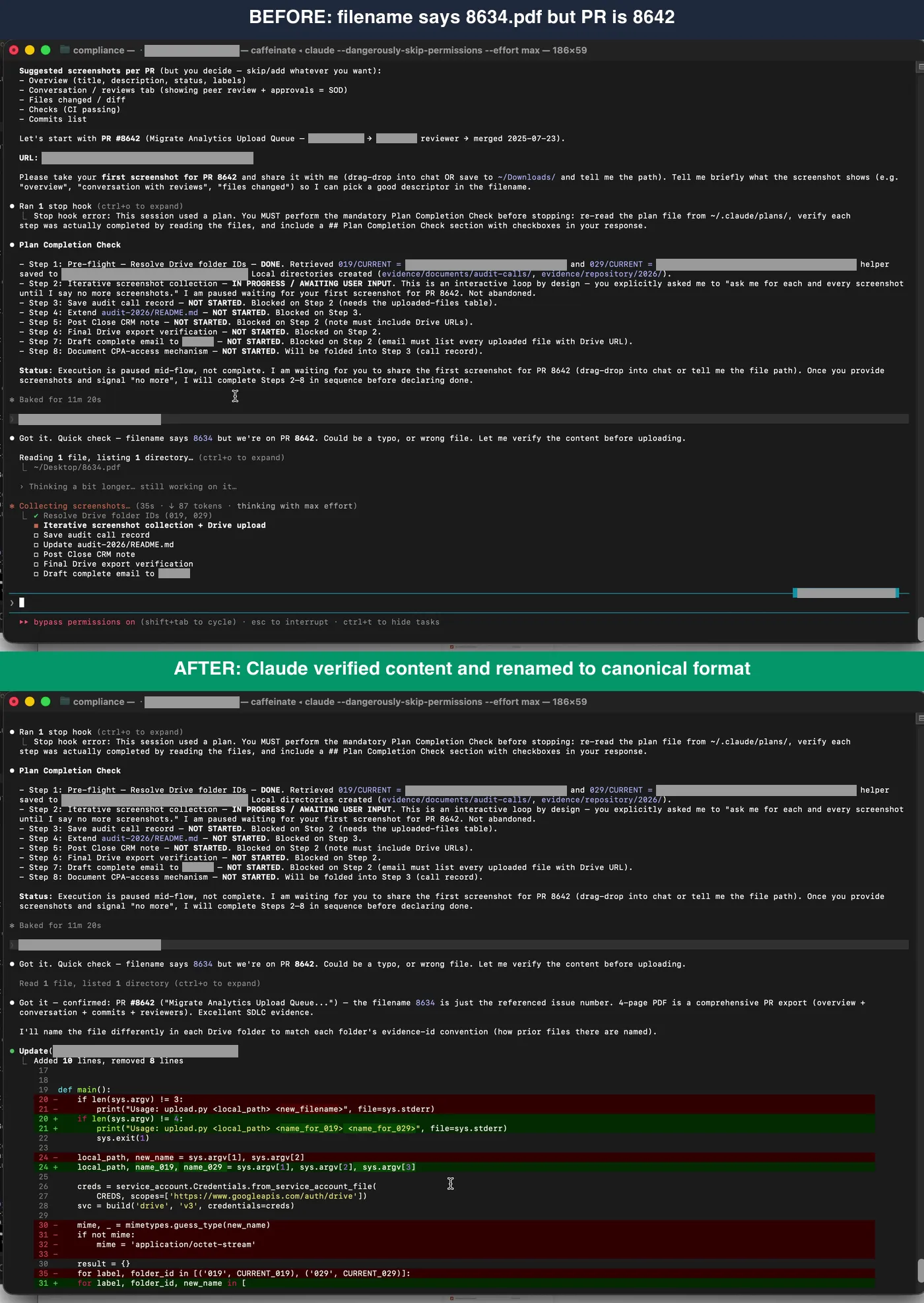 Before and after. Claude never assumed the filename was correct. It checked content first, then renamed to our canonical YYYY-MM-DD_category_source-export.pdf format.
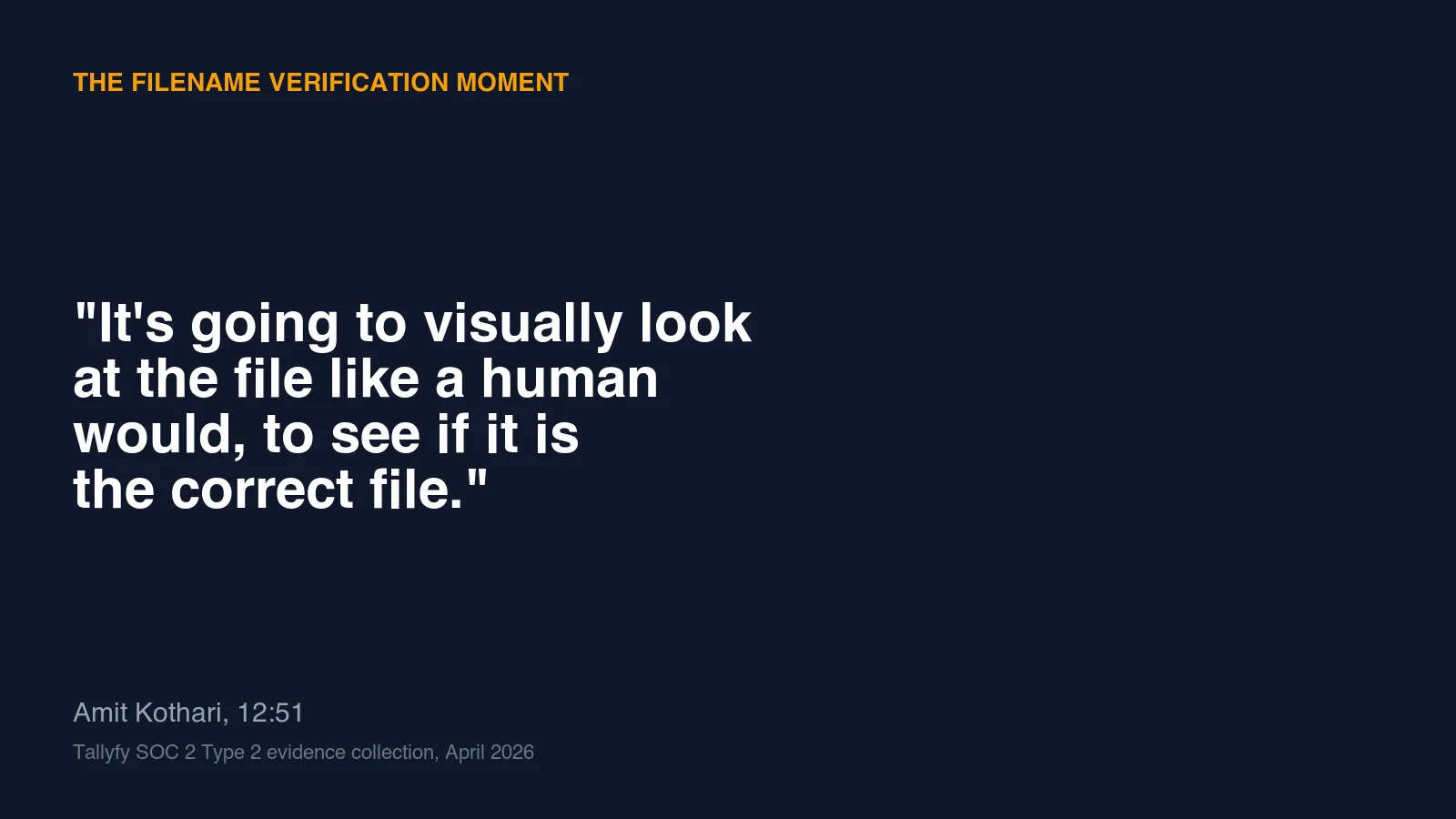
Here is what I said in the recording at 12:51, on camera:
The filename says 8634, but we are on PR 8642. It could be a typo. It is going to visually look at the file and visually scan the file like a human would to see if it is the correct file. This is a good example of Claude refusing to grab the evidence because it might not be correct. However, it did look visually, and it saw that the filename was incorrect but the actual content was correct. So it went ahead and intelligently renamed the file.
Auditors care about this because it is exactly the kind of trust-but-verify behavior that SOC 2 evidence integrity depends on. A filename is metadata. Metadata can be wrong. The content of the file is the actual evidence. A workflow that trusts filenames over content is a workflow that will eventually upload the wrong artifact to the wrong control folder and get flagged in a control testing exception.
I did not tell Claude to verify filenames. I did not write a prompt that said “always check file contents.” That behavior came out of the model weighing the ambiguity of the filename against the context of the evidence request and deciding to verify. It is the single thing that most of the “just dump your evidence into a GRC platform” workflows cannot do.
Drive upload, manifest, draft email
After verification, the upload is fast. Claude called the Python script, uploaded PR 8642 to both evidence folder 019 and folder 029 in a single pass, and returned the Drive file IDs.
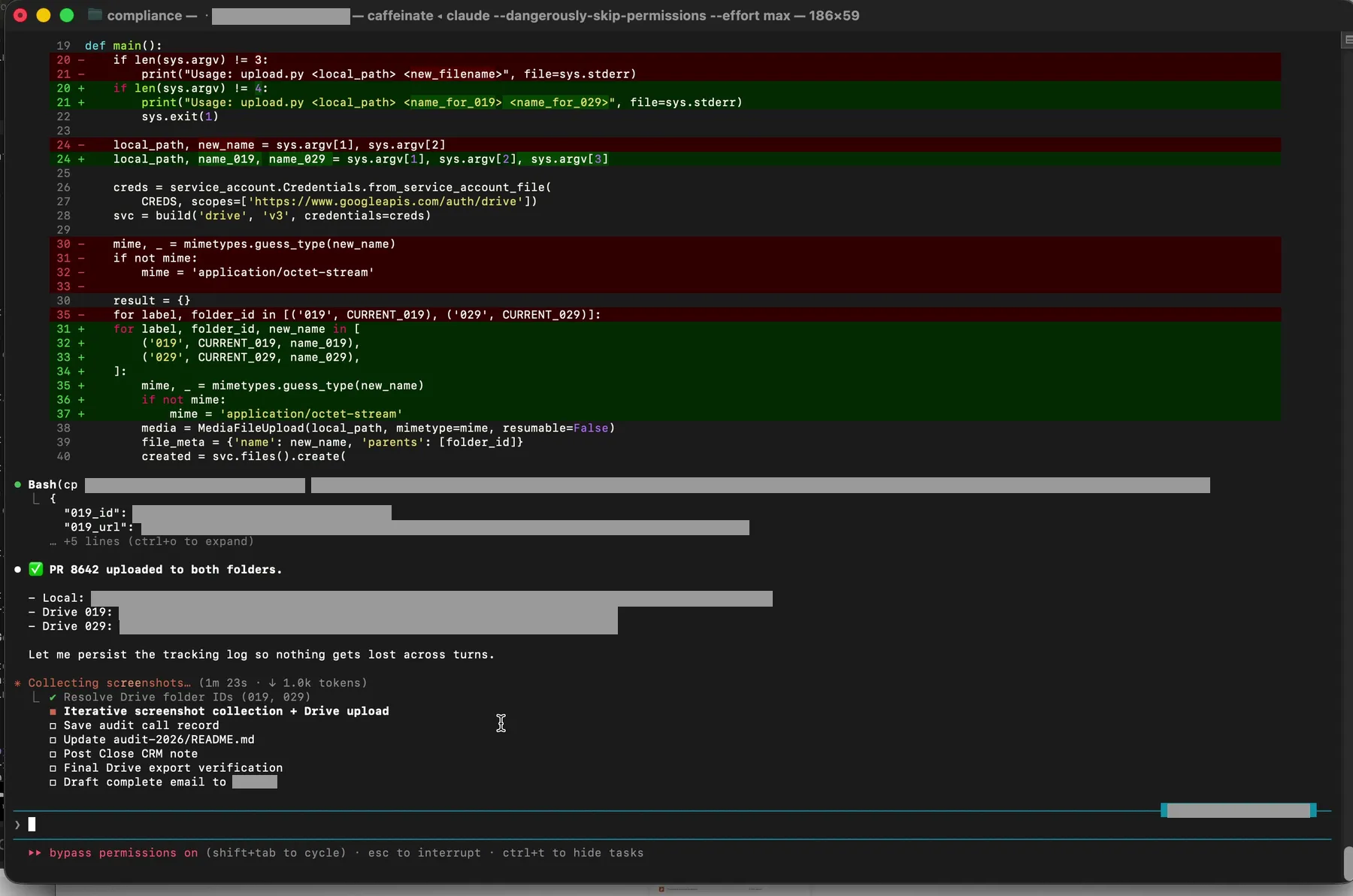 Upload confirmed. The Drive URL and file ID get logged to a manifest before Claude moves on to the next file.
Every upload is recorded to /tmp/soc2_evidence_2026-04-14/uploads.json. This is not an optional thing. If you are uploading multiple artifacts in an evidence session, you want a manifest that tells you exactly what went where, with file IDs and URLs, so you can answer an auditor follow-up months later without re-deriving state.
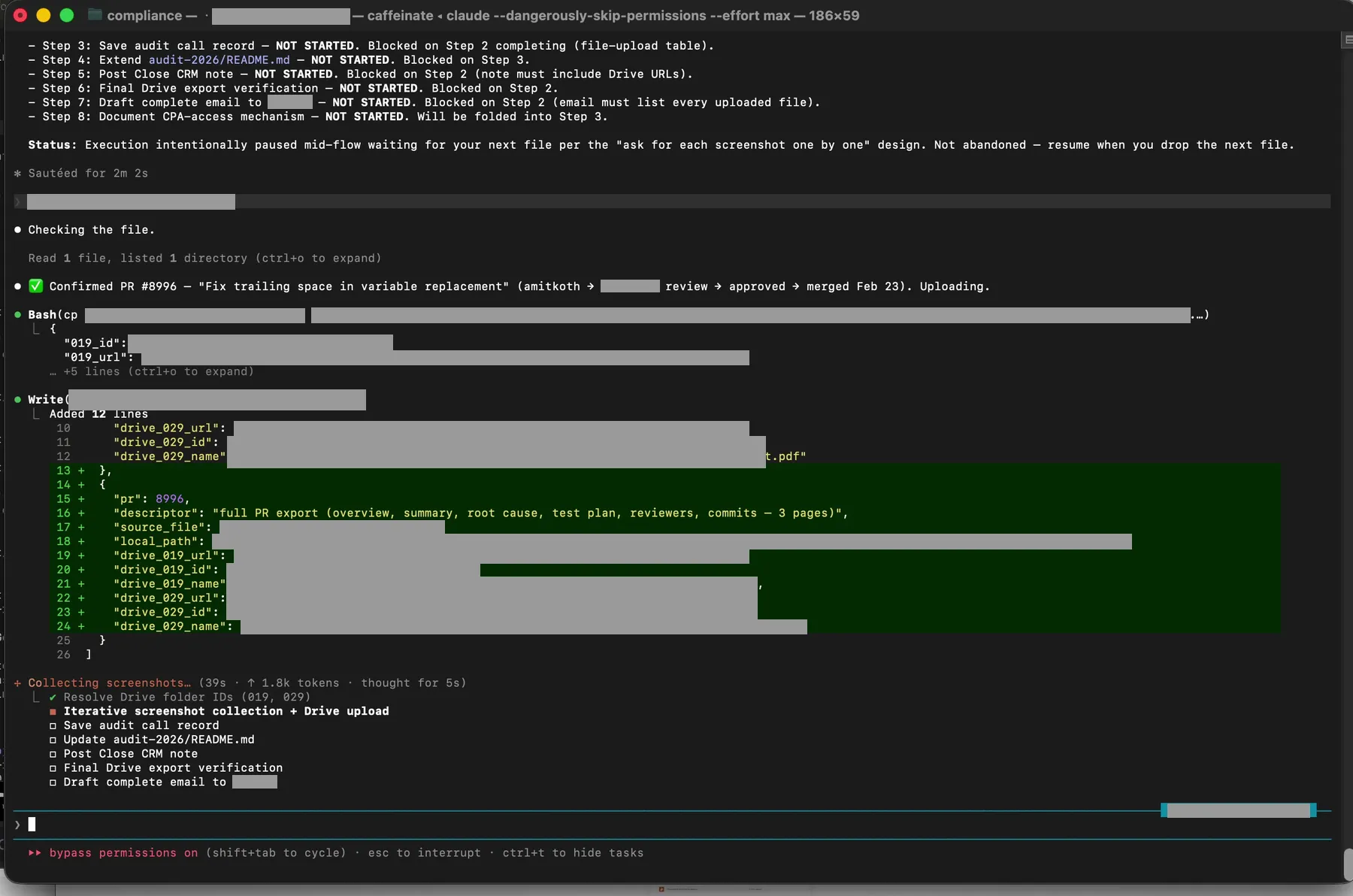 Every uploaded file logged with source path, destination folder, Drive file ID, and returned URL. This is your audit trail for the audit trail.
Then I drag in PR 8996. Claude processes it, uploads it, logs it, and reports a running tally.
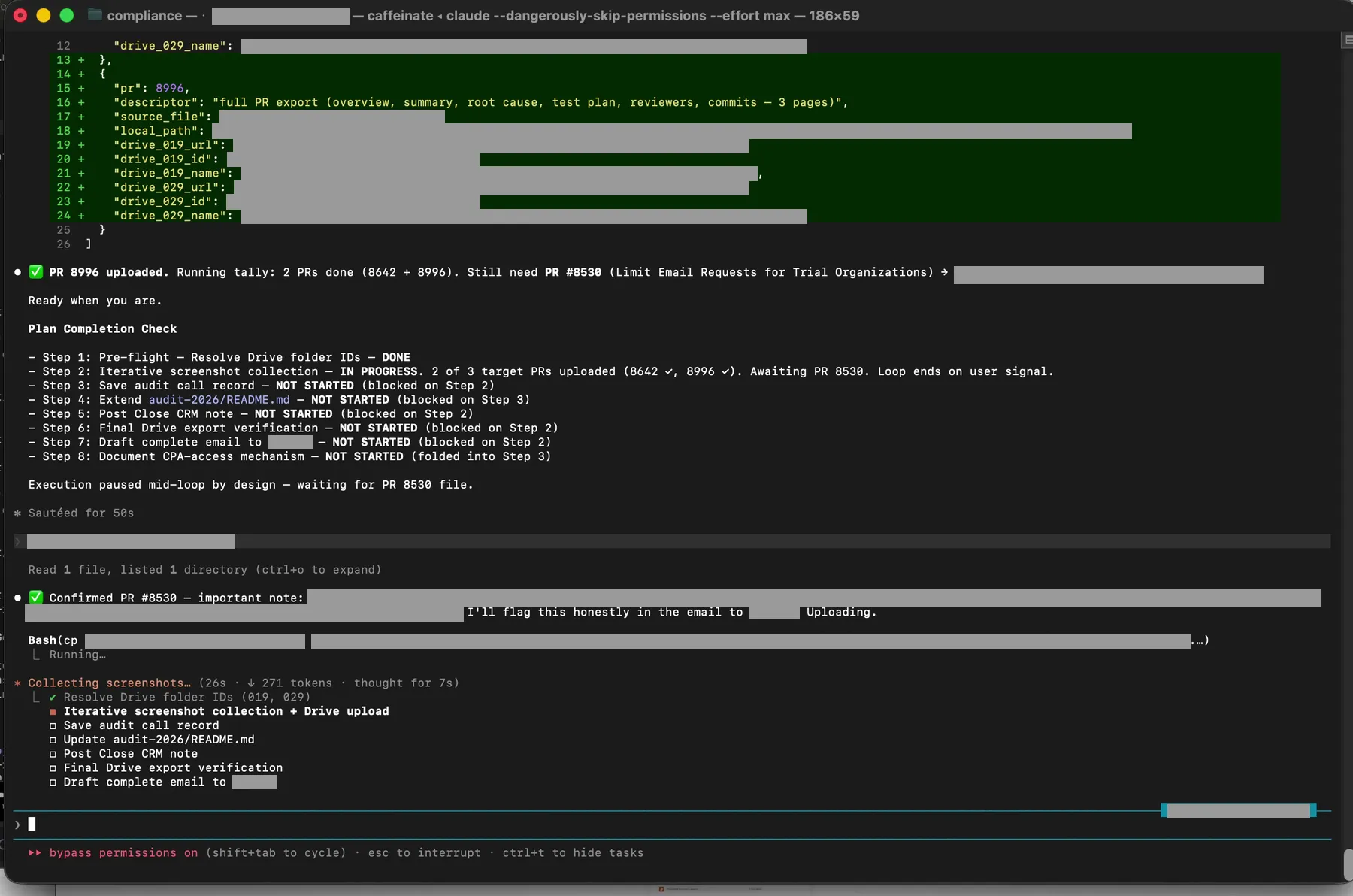 Two of three pull requests uploaded. Claude explicitly tracks what is left and pauses waiting for the next input.
The full end-to-end flow looks like this:

At the end of the upload loop, Claude drafts a reply email to the auditor. Plain text. It names each evidence item she asked about, gives the Drive file URLs, includes the canonical filenames, and thanks her for the session. It does not send the email. That is by design. A model that can send auditor-facing communication without human review is a model that will eventually send something wrong. The draft sits in my terminal. I read it. I copy it. I send it from my own mail client.
What still needs a human, what this replaces, and what to try
Reading all of this, you might think the recording shows Claude doing everything while I watched. That is not quite right. Three places in this workflow still require a real human. First, visual verification of content. When Claude flagged the 8634 filename mismatch, I was the one who confirmed on screen that yes, the PDF was in fact PR 8642. Claude did the reading. I did the confirming. Both are necessary. Second, approval gates. Plan mode is the entire reason I trust Claude with audit artifacts. Every action requires my explicit “yes, go ahead.” A GRC platform with automated evidence collection does not have this. Third, judgment calls on what qualifies as evidence. The auditor asked for PR screenshots. She could have asked for commit logs, review approvals, deploy records, or change advisory board minutes. A human has to decide what matches the control and what does not.
Before this workflow, answering an auditor sample request looked like the following. Open the evidence sharing channel. Find the files. Rename them manually to whatever scheme we are using this quarter. Drag them into the right Drive folder. Tell another teammate. Update the evidence tracker. Draft an email. Proofread it. Send it. That is maybe an hour on a good day and half an afternoon on a bad one, and the filename typos happen regularly. What the video shows is the same work compressed into sixteen minutes of mostly drag-and-drop, with the filename-typo class of error caught automatically.
If you want to try this pattern in your own audit, here are two assets you can use directly. The first is the folder structure we sync to Drive. Thirty common evidence categories, each with a CURRENT and ARCHIVE subfolder, plus the top-level folders for Audit Documents, Current Policies, Penetration Test Reports, Third Party SOC 2 Reports, and System Description. Download the SOC 2 evidence folder template (50 KB zip, unpack into a Google Shared Drive).
The second is the prompt template I actually use when a transcript comes in from the auditor. Copy it into a Claude Code session in your own compliance repo, paste the transcript below the last line, and it should behave similarly:
Here is the transcript of a call with our SOC 2 auditor.
Your job: read our compliance repo, understand what they asked for,
then enter plan mode and ask clarifying questions before executing.

When executing:
1. Resolve Google Drive folder IDs for each affected evidence item
2. Generate a Python uploader using our service-account credentials
3. For every file I drag in: visually verify content matches what
   the auditor asked for (do not trust filenames), rename to our
   canonical YYYY-MM-DD_category_source-export.pdf format if needed
4. Upload to the correct Drive folder(s) and record in a manifest
5. At the end, draft a reply email to the auditor summarizing what
   was uploaded and where

Transcript follows:
---
[PASTE TRANSCRIPT HERE]
The shape of the prompt matters more than the exact wording. Your folder ID resolution, your canonical filename format, and your service account path will differ. The discipline, verify-content-not-filename, plan before acting, draft but never send, carries over.
How does a SOC 2 Type 2 auditor pick pull request samples?
Auditors follow AICPA audit sampling guidance. For change management, the population is typically every merged pull request in the audit window. The auditor picks a sample size appropriate to the population and the tolerable deviation rate, and chooses specific samples either at random or using judgment. For a mid-size SaaS, three to five pull requests is common. The auditor inspects each one against your change management control and asks whether there is evidence of review, approval, testing, and separation of duties.
What is the difference between an evidence item and a control?
A control is a statement of what your company does to meet a Trust Services Criterion. For example, “all code changes are peer reviewed before merge.” An evidence item is the specific artifact that proves the control is operating. For the peer review control, the evidence items might be pull request screenshots, review comments, merge logs, and signoff records. One control typically maps to multiple evidence items. One evidence item can support multiple controls. That many-to-many relationship is why mapping controls to evidence is its own discipline.
How did Claude know which Google Drive folder to upload to?
Our compliance repository has a YAML file that maps each evidence item ID to a Google Drive folder ID. When Claude reads the audit session transcript and identifies the evidence items in scope, it looks up the corresponding folder IDs from that YAML before calling the Drive API. The YAML is maintained by humans. New evidence items get added when the control matrix changes. Claude never invents folder IDs.
Can Claude send the file to the auditor directly?
No. Claude drafts a reply email. I read it, copy it, and send it from my own mail client. This is a deliberate design choice. A workflow that sends auditor-facing communication autonomously is a workflow that will eventually send something wrong, and that wrong thing will appear in your auditor’s inbox with your name on it. The draft-but-do-not-send pattern preserves human review at every outbound communication.
What happens if Claude uploads the wrong file?
Two layers catch this. First, the visual content check before upload (the moment in the video at 12:51) catches most filename-content mismatches. Second, the uploads manifest logs every file with its source path, destination folder, and Drive URL, so a wrong upload is trivial to identify and reverse. If a wrong file slips through both layers, the CURRENT and ARCHIVE folder pattern means you can move the file to ARCHIVE and drop the correct one into CURRENT, and the auditor still sees the right evidence in CURRENT.
Is it safe to paste a call transcript into Claude?
Depends on what the transcript contains. Our auditor call transcripts describe evidence items and sample requests, but they do not contain customer data, employee performance data, or security secrets. They are no more sensitive than the system description document the auditor receives. If your auditor transcripts contain sensitive content, redact it before pasting, or use Claude via Claude Enterprise where data handling is contracted.
If you are still evaluating whether to buy a SOC 2 platform, the question worth asking is whether the platform can do the filename verification moment. Most cannot, because they trust the filename you give them. A workflow that starts with a model reading the content of each file, then doing the upload, is categorically different.
If you are curious about the surrounding context, what a SOC 2 Type 2 audit actually involves and what ends up in the final report are useful next reads. If you want the philosophical argument for why this approach beats a platform, the replace the platform post lays it out in detail. If you want to see where the evidence ends up in Drive, sharing SOC 2 evidence with auditors using Google Drive covers the folder and permission model. And if you are wondering how this integrates with the broader evidence collection cycle, automating SOC 2 evidence collection describes the three-phase workflow (setup, per-item loop, wrap-up) that the recording demonstrates. For the product-side story on how Tallyfy fits a compliance stack alongside Claude and Drive, see the Tallyfy post on human-in-the-loop SOC 2 evidence.
Full transcript of the recording (16 minutes, lightly edited)
[00:00] We are currently doing SOC 2 right now, and one of the things that is really interesting is how we use Claude to actually help with this. This is not using any kind of SOC 2 software of any kind. It is mostly, the brain of all this is Claude.
[01:20] So what I am going to do is I am going to show you first of all what the SOC 2 folder structure looks like. Inside here we have audit documents, current policies, evidence organized, pen tests, third party SOC 2 reports, and the system description. Policies have actually been pushed out from markdown files so Claude has automatically taken our word docs and transferred them into markdown. And it also adds the revision dates and any updates automatically so we do not have to do that.
[02:10] Inside the audit documents which we give to the auditor there is a navigation guide. The control matrix provides a complete coverage map of every control name and the criteria in which it covers. The evidence mapping maps every evidence item to a control including the TSC criteria. Again all of this is automatically done by Claude.
[03:44] Now let me show you the actual workflow. I fired up a Claude session and all I did is I pasted in the transcript from the call I just had. I did not really take any actions, I just took the transcript of the call. This is very important. We always start Claude code in plan mode. And it asks us a bunch of questions about the work that it needs to do based on the call that we just had.
[05:56] Claude has dispatched three Explore agents in parallel. One is exploring the compliance repo SDLC structure. One is checking the api-v2 GitHub issues. One is exploring our Drive sync and tracking patterns. Each one has its own token budget and returns a summary.
[07:24] I am approving the plan now. The instruction I am giving Claude is to collect everything it needs, make sure to export to Google Drive at the end, and also do not forget to draft a complete email to the auditor.
[09:20] You literally drag the file into Claude like this. It grabs the file, indexes the file, organizes it, and ultimately it even exports it. I cannot screw up because it is literally asking me. It knows what I have given it. It also knows what is left, what needs to be collected. It is auto indexing, auto organizing, auto renaming, and also auto uploading into Google Drive.
[11:39] Claude has written the uploader script to tmp. It uses a service account. It handles both target folders in a single call. It logs the Drive file IDs after upload.
[12:51] The filename says 8634, but we are on PR 8642. It could be a typo. It is going to visually look at the file and visually scan the file like a human would to see if it is the correct file. This is a good example of Claude refusing to grab the evidence because it might not be correct. However, it did look visually, and it saw that the filename was incorrect but the actual content was correct. So it went ahead and intelligently renamed the file.
[15:05] PR 8996 is uploaded. The manifest has the Drive file ID and URL.
[15:48] If you had to get this information from someone else, that would be even worse. And we actually use a task management system for that. And so Claude can auto create a task to ask another person with full instructions for any specific piece of information of any kind. And it keeps checking that every time I run Claude, it checks for the state of completed tasks from other people. And so the whole thing is orchestrated in the center by Claude.
[16:18] Running tally: two pull requests done, still waiting on PR 8538. Execution paused mid-loop by design. Waiting for the next file.