
Mapping SOC 2 controls to evidence without losing your mind
SOC 2 controls do not map one-to-one with evidence items under the AICPA framework. A single control might need three pieces of evidence, and one evidence item might satisfy four controls. Managing these many-to-many relationships in spreadsheets is how compliance programs break down.
The short version
SOC 2 controls don't map one-to-one with evidence items. A single control might need three pieces of evidence, and a single evidence item might satisfy four controls. Managing these many-to-many relationships in spreadsheets is how compliance programs break down.
- 67 controls map to 123 evidence items through 151 documented relationships
- YAML-based mapping files make the relationships machine-readable and auditable
- The three-way chain runs: Trust Service Criteria to Controls to Evidence
67 controls. 123 evidence items. 151 mappings. That is the reality of a SOC 2 program, and most companies manage it in a spreadsheet that nobody trusts.
The problem isn’t the number of controls. Most compliance teams can list their controls without much trouble. The problem is the relationships between controls and the evidence that proves they work. Those relationships are many-to-many, and that specific data structure is where spreadsheets fall apart.
At Tallyfy, we spent time getting this wrong before we got it right. Actually, that understates it. The mapping between controls and evidence is the hidden load-bearing structure of any SOC 2 program. Get it wrong and your auditor spends hours chasing artifacts. Get it right and evidence requests become a lookup table.
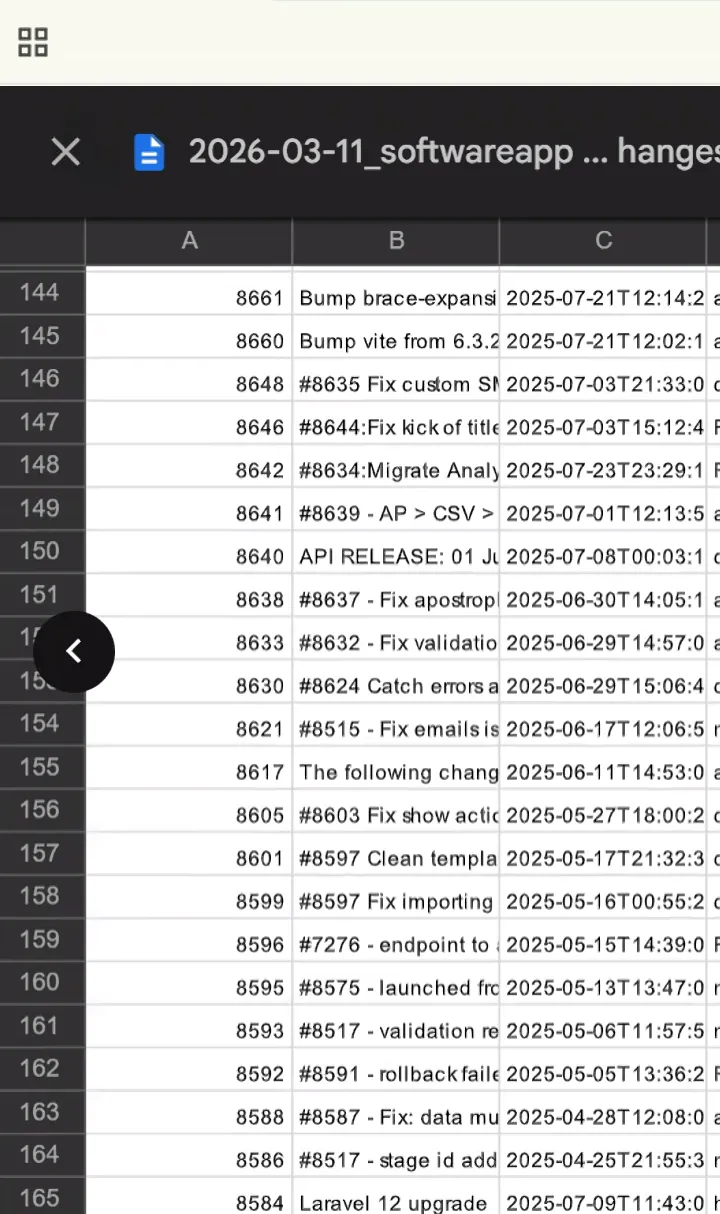 The mapping turns sample requests into lookup operations. Here is our auditor’s population list of merged pull requests. She sampled three from this list. Because we know which controls each PR maps to, the evidence lookup took minutes rather than hours. See the full workflow in the live recording.
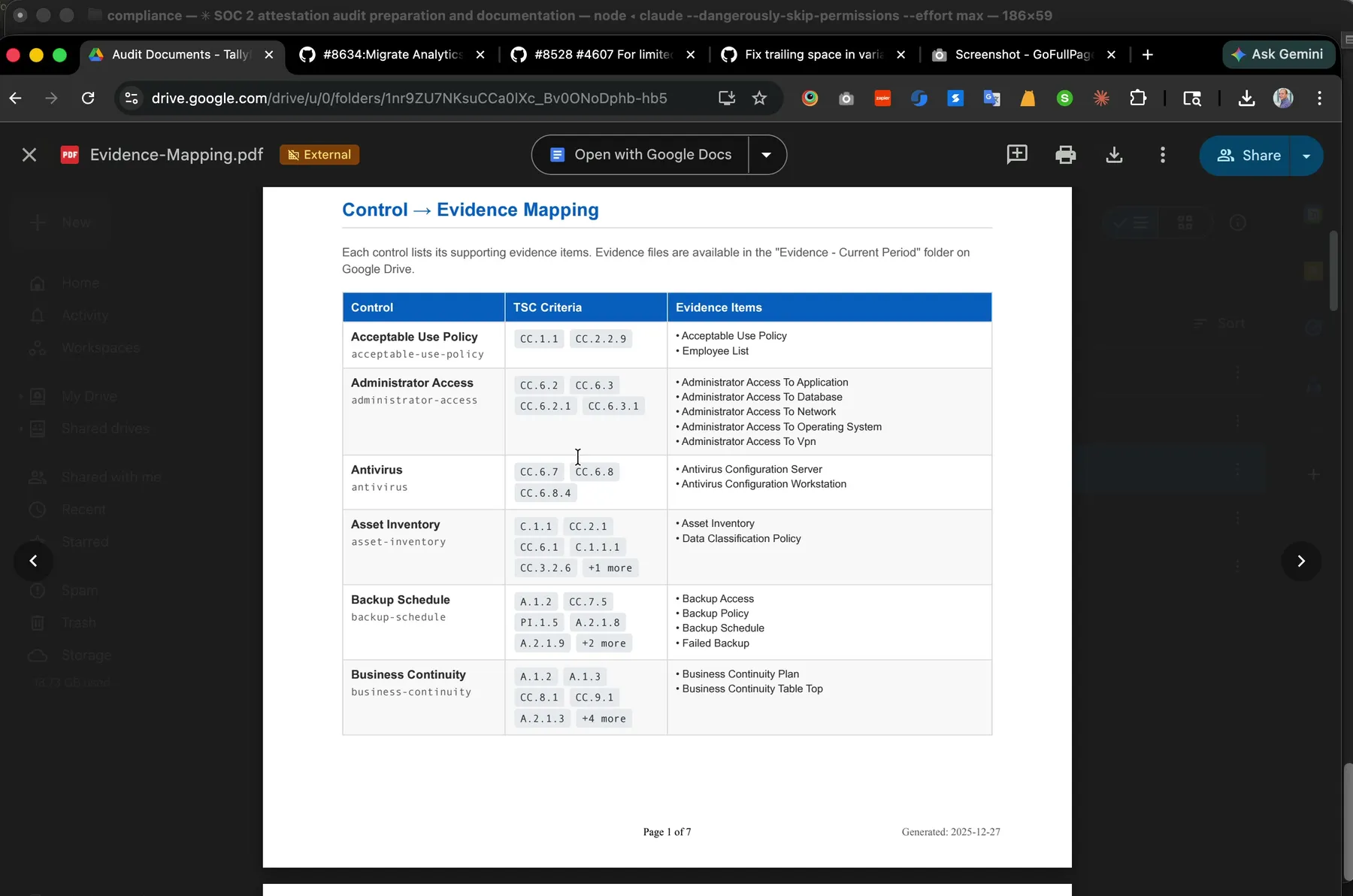 The Evidence Mapping PDF the auditor receives. Seven pages, 151 control-to-evidence relationships, generated from the same YAML that powers our Control Matrix. One file, one source of truth, two outputs.
The many-to-many problem
Think about a control like “security-training.” Simple enough. The company trains employees on security. But what does an auditor actually need to see?
Not one thing. Four things. Annual employee training completion records. The employee list showing who should have been trained. New hire training records for people who joined mid-cycle. The training materials themselves, proving the content meets the standard.
Now flip it around. That employee list you pulled for security training evidence? It also satisfies the acceptable use policy control, because you need to prove that every employee who signed the policy is still employed. The same list shows up as evidence for access reviews, background checks, and separation of duties.
This is the many-to-many relationship that makes SOC 2 evidence management a nightmare. One control needs multiple evidence items. One evidence item satisfies multiple controls. The relationships form a web, not a list.
Here is what it looks like in practice from our compliance repository:
control_to_evidence:
acceptable-use-policy:
  - acceptable-use-policy
  - employee-list
contracts:
  - contractual-terms
  - customer-contract
  - customer-list
  - vendor-contract
  - vendor-list
security-training:
  - annual-employee-training
  - employee-list
  - new-hire-training
  - training-materials
incident-response-process:
  - incident-response-plan
  - list-of-incidents
  - root-cause-analysis
  - security-incident-resolution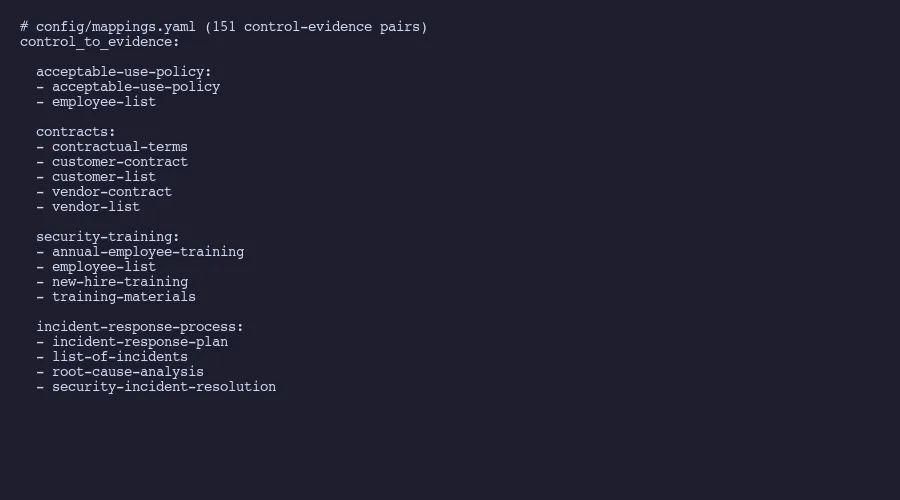
Notice the “employee-list” appearing under both acceptable-use-policy and security-training. In our full mapping file, that same evidence item appears under seven different controls. Seven. Collect it once, reference it seven times, but only if your system actually tracks those cross-references.
In a spreadsheet, that basically means either duplicating rows or building a lookup formula that nobody maintains after the person who wrote it leaves.
What the mapping actually looks like
The mapping file is deceptively simple. It is a YAML dictionary where each key is a control ID and each value is a list of evidence IDs. The whole thing fits in one file, reads cleanly in any text editor, and parses instantly with any programming language.
Our file has 67 top-level keys. Each key maps to between one and six evidence items. The average control needs 2.25 evidence items, which means most controls need more than one piece of proof. Some controls are straightforward. Password policy maps to a single screenshot of your authentication configuration. Done.
Others are dense. The “contracts” control maps to five separate evidence items: contractual terms documentation, a sample customer contract, the full customer list, a sample vendor contract, and the vendor list. Each of those items has its own collection cadence, its own source system, and its own staleness window.
The contracts mapping exists because the AICPA Trust Service Criteria require you to demonstrate that contractual obligations around security are defined, communicated, and maintained. One criterion, one control, five evidence items. And the auditor will ask for all five.
The real value shows up when you reverse the mapping. Instead of asking “what evidence does this control need?”, you ask “which controls does this evidence item satisfy?” A control matrix built this way tells you exactly how much coverage each evidence collection effort provides. If pulling your employee list satisfies seven controls, that single export is high-priority. If a particular vendor compliance report only satisfies one control, you know where to spend less time chasing.
If your control-to-evidence mappings live in a spreadsheet that nobody trusts, Amit can help you move to a structured, version-controlled system that actually scales with your compliance program.
Get in touchThe three-way chain from criteria to evidence
Here is the part that most SOC 2 guides skip. There are actually three layers, not two.
The AICPA publishes Trust Service Criteria, which are the formal requirements. These have identifiers like CC6.2, which states: “Prior to issuing system credentials and granting system access, the entity registers and authorizes new internal and external users whose access is administered by the entity.”
That’s the criterion. The abstract requirement. It says what needs to happen but not how.
Your controls are the how. For CC6.2, one of our controls is “administrator-access.” This control defines our actual process: who can grant admin access, what approval is required, how access is reviewed. The control is our answer to the criterion’s question.
The evidence proves the control works. For “administrator-access,” we maintain three evidence items:
- administrator-access-to-application: Screenshots showing who has admin access to our SaaS application and the access review confirming each person’s access is appropriate
- administrator-access-to-database: The same for direct database access, which is a smaller and more sensitive group
- administrator-access-to-network: Infrastructure-level admin access documentation, covering things like cloud provider console access and VPN administration
So the full chain for CC6.2 runs: Trust Service Criteria (what the standard requires) to control (how we meet it) to evidence (proof that we actually do it). Three proper layers. Each with its own identifiers, its own documentation, and its own update cadence.
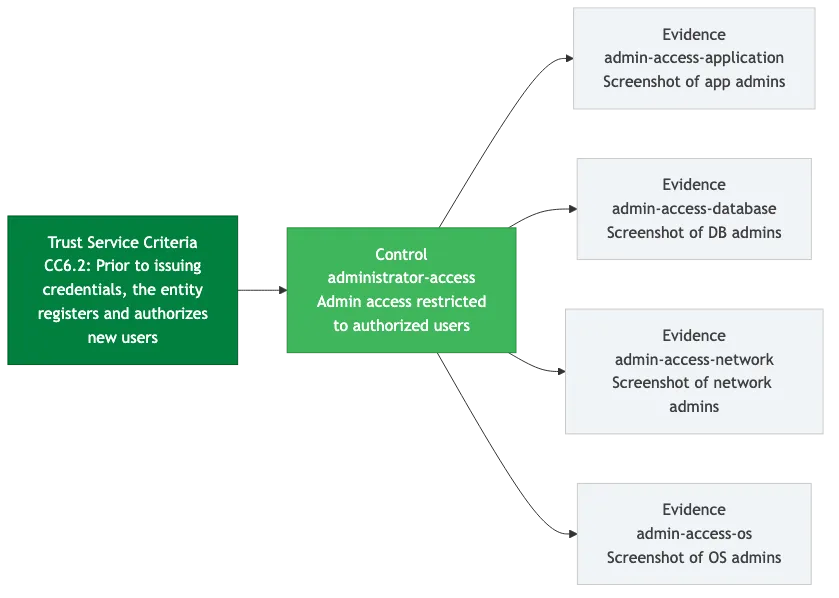

The criteria themselves don’t change often. The AICPA last revised the points of focus in 2022. But your controls change when your systems change. And your evidence changes every collection cycle. The mapping between them needs to stay current through all of it.
If you want to dig into how this connects to automating the tedious parts, my door is open.
Why spreadsheets break and structured data doesn’t
The spreadsheet approach sounds reasonable at first. Create a tab for controls. Create a tab for evidence. Add a column in the controls tab listing which evidence items apply. Put some conditional formatting on it. Ship it.
Here is what happens within six months, based on patterns documented by compliance practitioners. The conditional formatting breaks because someone sorts a column without selecting the whole sheet. An evidence item gets renamed in one tab but not the other. A new control gets added without updating the evidence mappings. Someone adds a note in a merged cell that hides data from filters. The person who built the formulas leaves. Now you have a spreadsheet that looks complete but contains invisible gaps.
This isn’t hypothetical. A Censinet analysis of SOC 2 compliance failures found that the most common audit gaps stem from weaknesses in access controls, asset inventory, and communication security. Those aren’t technical problems. Those are tracking problems. Which is almost worse, when you think about it. Companies knew what controls they needed. They just lost track of which evidence was current, which mappings were accurate, and who owned what.
Turns out, structured data doesn’t have these failure modes. A YAML file either parses or it doesn’t. You can’t accidentally hide data in a merged cell because YAML doesn’t have merged cells. A missing mapping shows up as a missing key. A renamed evidence item breaks the file in a way that’s immediately obvious, not silently wrong.
Version control adds another layer. When we described how we replaced our SOC 2 compliance platform, the mapping file was a big part of why. Every change to a mapping is a git commit. Who changed it, when, and why. The complete history of every relationship between every control and every evidence item, going back to the first commit. Try getting that from a spreadsheet’s “last modified by” field.
The machine-readability matters too. A script can parse the YAML mapping file and generate a reverse lookup in seconds. Which evidence items are most referenced? Which controls have the fewest evidence items and might be under-documented? Which evidence items are orphaned, collected but not mapped to any current control? These questions take minutes to answer with structured data. In a spreadsheet, they take hours and the answer might be wrong. That same structured approach makes risk assessment more tractable too.
Compliance practitioners are starting to call this approach compliance as code. We apply the same principle to policy management with markdown files, YAML frontmatter, and automated PDF generation. The idea is simple: treat your compliance artifacts the same way developers treat source code. Store them in version control. Make them machine-readable. Automate the tedious parts. Review changes through pull requests. Keep a complete audit trail for free.
Building your own mapping system
Is this hard to build from scratch? No. Start with what you have. If you’re running a SOC 2 program today, you already have a list of controls somewhere. You already know what evidence your auditor asked for last time. The mapping exists in someone’s head or scattered across email threads and shared folders. Your job is to make it explicit.
Step one: export your controls into a flat list. One control per line. Give each a short, hyphenated ID. “security-training” not “CT-SEC-004.” Human-readable IDs reduce errors because people can tell from the name whether they’re looking at the right thing.
Step two: do the same for evidence items. List every piece of evidence your auditor requested in your last examination. Give each an ID that describes what it is.
Step three: build the mapping. For each control, list which evidence items prove it works. This is the tedious part. It takes a full day for a typical SOC 2 program. Do it once. Then maintain it.
The resulting YAML file becomes the single source of truth for your compliance program’s structure. Scripts can generate status dashboards from it. AI can cross-reference it against AICPA criteria to identify gaps. New team members can read it and understand the program’s scope in an hour instead of a week.
For evidence collection schedules, use a separate YAML file that references the same evidence IDs. Each evidence item gets a collection frequency, a source system, a last-collected date, and a next-due date. The mapping file tells you what to collect. The schedule file tells you when. Our evidence collection automation workflow uses these same mappings to drive quarterly collection cycles.
The numbers from our system: 67 controls, 123 evidence items, 151 control-evidence pairs. That’s 151 relationships to maintain. In a spreadsheet, 151 relationships means 151 opportunities for silent failure. Not great odds. In YAML, 151 relationships means 151 lines in a file that can be validated, diffed, and version-controlled.
We spent years trying to manage these mappings in tools that weren’t built for many-to-many relationships. Spreadsheets assume grids. Compliance platforms assume their own data model. Neither assumes that the fundamental structure is a graph of typed relationships between three different entity types.
Once you see it that way, the solution is obvious. Store the relationships explicitly. Make them readable by both humans and machines. Track every change. Let the computer handle the cross-referencing that humans get wrong.
The mapping file is boring. It’s a dictionary. But it might be the single most important artifact in your compliance program, because everything else depends on getting these relationships right.
About the Author
Amit Kothari is an experienced consultant, advisor, coach, and educator specializing in AI and operations for executives and their companies. With 25+ years of experience and as the founder of Tallyfy (raised $3.6m), he helps mid-size companies identify, plan, and implement practical AI solutions that actually work. Originally British and now based in St. Louis, MO, Amit combines deep technical expertise with real-world business understanding. Read Amit's full bio →
Disclaimer: The content in this article represents personal opinions based on extensive research and practical experience. While every effort has been made to ensure accuracy through data analysis and source verification, this should not be considered professional advice. Always consult with qualified professionals for decisions specific to your situation.