Quick answers
Is there an export-Project button? No. The only first-party export is account-wide, JSON-only, and explicitly not designed for migration.
Does the API let me read Projects? No. As of May 2026, no Anthropic API endpoint lists or reads consumer Projects.
What actually works? Three workarounds: an end-of-Project consolidation prompt, the GDPR account export, third-party userscripts with caveats.
What about Claude Code? Different product, different storage. Local JSONL files in ~/.claude/projects/. Fully portable. The naming overlap is a coincidence.
People keep searching for the button. There isn’t one.
Anthropic shipped Claude Projects as a way to give Claude a persistent workspace - knowledge files, custom instructions, conversation history that builds up over months. What they did not ship is a way to take that workspace anywhere else. No “Export Project” button. No API endpoint. No documented file path. And, since February 2026, one specific GitHub feature request for read/write file capabilities closed as not planned with an “invalid” label and no response on file.
The gap is real and it bites mid-size companies hardest, because mid-size companies are the ones with months of accumulated business context inside a Project they originally built for one team and that has grown into the institutional memory for three.

The export button that does not exist
If you go searching for “export Claude project,” you end up on Reddit threads with no answer, on closed GitHub issues, and on community-built userscripts of dubious longevity. The structural reality is simple: claude.ai Projects live on Anthropic infrastructure and the only first-party data extraction Anthropic ships is account-level via Settings → Privacy → Export data.
Nick Sawinyh wrote a pointed post on March 31, 2026 describing exactly this asymmetry. He uses one phrase that captures the whole thing: “You can download your data, you just can’t bring it anywhere.” His read is that the export “exists because GDPR and CCPA require it” - not because Anthropic built it for migration. The download is a compliance artifact. It is not a portability feature.
Miguel Guhlin asked the question more directly in a March 15 post: “Why doesn’t Claude have an account migration tool? What’s the exit policy for clients? Claude and many others don’t have one.” The answer of course is that the absence of a tool is itself a policy. Anthropic has not built one because building one runs against the gravity of every workspace product ever shipped.
What is at stake for a 200-person services firm: every Project that holds standard operating procedures, deal-cycle context, client account notes, refined prompts for repeat work. None of it lives anywhere you can grep. If your Claude org disappears tomorrow, so does the institutional memory you spent eight months building inside it.
Workaround 1 - the end-of-Project consolidation prompt
The lowest-friction path is to ask Claude itself to compile everything before you leave. You stay inside the product, you do not need any third-party tool, and you walk away with a portable markdown artifact.
Here is the prompt to paste in a fresh chat inside the Project you want to extract:
Generate a single self-contained markdown document that captures
everything we have built in this Project. Include:

1. The custom instructions verbatim, under "## Project instructions"
2. A summary of every uploaded knowledge file - filename, purpose,
   and a 100-word digest of contents, under "## Knowledge files"
3. The complete log of decisions, preferred patterns, validated
   approaches from our conversation history, under
   "## Decisions and patterns"
4. Any reusable prompts I have refined inside this Project,
   under "## Reusable prompts"

Output one continuous markdown artifact. Do not condense for length.
I want enough fidelity that I could rebuild this Project from this
document alone.
What this captures: custom instructions in full, a structured digest of every knowledge file (filename, intent, contents), the decisions you have made conversationally inside the Project that never made it back into the knowledge files, and the prompt patterns you have refined. What it does not capture: original PDF or DOCX binaries (those have to be downloaded one at a time from the Project’s knowledge-file UI), conversation timestamps, the full text of conversations as they happened, branching history if you ran any.
The output is lossy. Claude is summarizing, not exporting. But a portable markdown spec is exactly what you would have wanted to write yourself if you had time, and 90% of what matters in a Project is the structural information about how the team uses it - which is what a good consolidation prompt extracts cleanly.
A useful habit: run this prompt every two or three months on every Project that holds business-critical context, and commit the output to a private git repository. It becomes a deterministic backup that survives any vendor change. The same markdown also works as the seed CLAUDE.md if you migrate to Claude Code or a different Project later.
What to inspect when you run it: scan the output for whether your custom instructions came through verbatim (they should), whether the knowledge-file digests accurately describe what’s in the files (they often miss nuance), and whether the conversational decisions surfaced as a coherent list (this is where the output is most useful and most variable). If anything important is missing, sharpen the wording in section 3 of the prompt and re-run. Typical output for an active Project sits somewhere between 2,000 and 6,000 words of markdown.
Workaround 2 - Settings, Privacy, Export data
The first-party path Anthropic offers, with sober expectations of what you actually get.
The flow is in the help article and it has four moving parts:
- Settings → Privacy → Export data → confirm
- An email arrives at the address on the account
- The email contains a download link valid for 24 hours from delivery
- The download is a ZIP containing your conversation history as JSON files
The same help article carries the line that tells you what the export is not for: “We do not support migrating data between separate accounts at this time.” Quoted verbatim. The export is a compliance artifact, not an import path.
A second sentence from Anthropic’s Privacy Center tells you what the export does not include: “Messages, files, and projects deleted from your account, either manually by individual users or via enterprise retention settings, will not be included in data exports initiated after the deletion.” If you delete a Project, even by accident, the next export is silent about it. There is no tombstone, no undo, no recovery.
For Team and Enterprise plans, org-level export is also available, but only to “Team and Enterprise plan Primary Owners” - same source. Same retention caveat. The Primary Owner can pull a ZIP for the whole organization, which is useful for legal evidence but not useful for migration because the file shape is still JSON conversation history, not Projects-as-packages.
What the export does well: it satisfies your GDPR Article 20 obligations on paper, it gives compliance teams something to point to in a vendor questionnaire, and it lets you demonstrate to auditors that you can produce your data on demand. What it does not do: let you ever re-import that data anywhere, including back into another Claude account.
What to expect from the ZIP itself: conversations as JSON files, with no Project boundary preserved in the directory structure as of this writing. Knowledge files you uploaded as PDFs or DOCXs typically appear as text extracts rather than the original binaries - if you need the originals, download them one at a time from the Project UI before you trigger the export. Email turnaround varies with account size; small accounts can see the email within minutes, while accounts with thousands of conversations can take a few hours. Open the ZIP immediately when it arrives - the link expires 24 hours later and re-triggering puts you back at the end of the queue.
Workaround 3 - third-party tools and the ToS gray zone
The community has built three tools because the gap is real. None of them are endorsed by Anthropic. All of them script the claude.ai web UI in some way. All of them sit in a ToS gray zone that you should think about before deploying inside a company.
Claude Project Files Extractor - a Tampermonkey userscript by sharmanhall on Greasyfork, version 4.0.0 as of January 2026, 300+ total installs. It opens a Project page in your browser, walks the knowledge-file list, and produces a ZIP of every file in one download. Including real PDFs (not just extracted text), CSV files, and a _export_metadata.json manifest. Runs locally in your browser, no external server.
Claude Project Conversations Exporter - a userscript by withLinda, hosted on GitHub Pages. Targets pages matching claude.ai/project/[uuid] and exports conversations from a single Project. Smaller scope, but useful if your knowledge files are already managed elsewhere and what you need out of Claude is the chat history.
claude-exporter - a Chrome extension by agoramachina, open source on GitHub, v1.10.x as of May 2026, 50+ stars. Exports conversations and artifacts in JSON, Markdown, or plain text. Worth knowing one documented limitation: “Plaintext and markdown formats only export the currently selected branch in conversations with multiple branches.” If your team forks conversations regularly, use the JSON output - the others silently drop the branches you are not looking at.
The ToS angle: Anthropic’s terms restrict automation and scraping. Whether a userscript that runs locally in your own browser, on your own session, against your own data, crosses that line is anyone’s guess. I would not run any of these inside a regulated industry without first asking the vendor and your legal team. The Greasyfork userscript has no corporate sponsor. The Chrome extension is open-source but uses the same DOM-extraction approach. None of them have a Letter of Authorization from Anthropic on file.
A note on the API as a non-option. The Anthropic API surface exposes Messages, Files, Skills, Agents, Sessions, Environments - and no Projects endpoint. The Sessions and Environments objects belong to Managed Agents, a separate product that is not a back-door into consumer Projects. There is no programmatic way to list, read, or export Projects via API as of May 2026. Scripted extraction does not exist because Anthropic has not built it.
Update (June 2026): one narrow exception, Enterprise only. Anthropic’s Compliance API does read project content - its content endpoints cover chats, files, and projects - but it’s admin-run for security and legal teams doing org-wide audit and retrieval, not a per-user “export my project” path. On Pro or Team, the workarounds below are still the answer.
Working through what to extract from Claude Projects before you commit to a Claude-only workflow? Blue Sheen helps mid-size teams map their AI data exits before the lock-in bites.
Why Claude Code is the only portable cousin
Two products from Anthropic share half a word and confuse half the developers who try to compare them. Claude.ai Projects is the workspace inside the chat product. Claude Code is the terminal CLI. They share no architecture, no storage layer, no UI, and no data path.
The relevant asymmetry: Claude Code sessions are stored locally. Anthropic documents this themselves: each session writes to ~/.claude/projects/<encoded-path>/<sessionId>.jsonl on your machine. The encoded path is the filesystem path of the directory you ran Claude Code in, with / and . replaced by -. Every session you have ever had is on your disk, append-only, in JSON Lines.
What that looks like for any directory you have actually used Claude Code in:
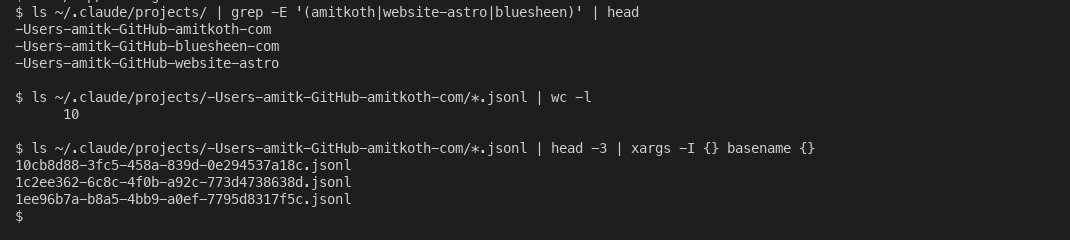
Local Claude Code session storage. Every working directory you have ever used with Claude Code is one folder of .jsonl files on your disk.
And the format inside each .jsonl is plain JSON Lines, append-only, parseable with anything that reads JSON:
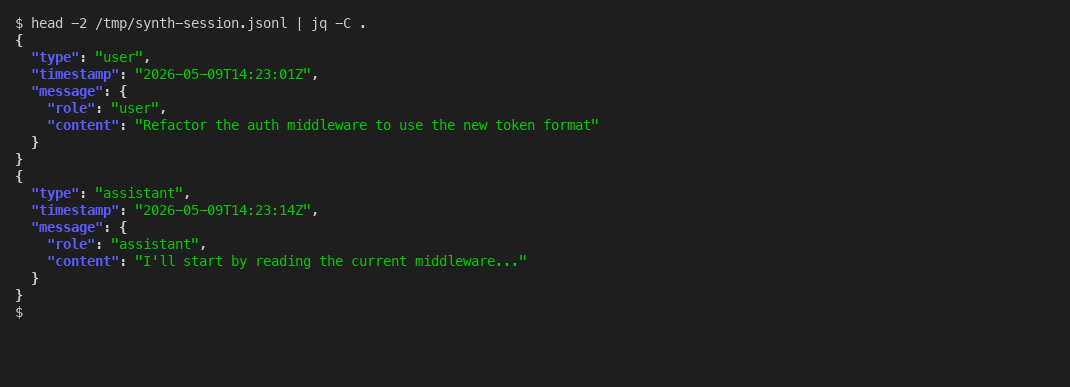
Each line is one complete JSON message. Append-only. Greppable. Backup-able. The opposite of what claude.ai Projects offers.
A community tool to know about: ZeroSumQuant’s claude-conversation-extractor, 550+ GitHub stars, opens with the line that tells you the gap exists: “Claude Code has no export button. Your conversations are trapped in ~/.claude/projects/ as undocumented JSONL files.” Trapped is a strong word for “stored in a plain text file on your hard drive,” but the point lands - the format is undocumented and there is no in-product export feature, even though every byte is locally owned.
Simon Willison wrote about this on December 25, 2025 with the engineer’s complaint: that Claude Code emits “default-invisible thinking traces” which any third-party transcript extractor will miss unless it parses every event type the .jsonl can contain. For Claude Code for web, his summary: “Getting transcripts out of that is even harder!”
The practical contrast: Claude Code data is yours physically. You can grep it, back it up to git, ingest it into your own pipeline, write your own ETL on top of it. Claude.ai Projects data is not. The naming overlap is unfortunate. The architecture gap is real. If you are picking which Claude product to commit institutional context to, the answer for portable use cases is Claude Code, every time. This is the same workaround-stack pattern I described in reading Outlook attachments in Claude - the wrapper missing from the product is what you have to build yourself.
What other vendors actually let you take with you
A quick comparison of where the four major workspace AI products sit on portability. None of them is perfect. One is actually exportable on day one.
| Workspace product | Configuration export | Knowledge files and history |
|---|---|---|
| Claude Projects (Anthropic) | No package export | Account-wide JSON ZIP only; not for re-import |
| ChatGPT custom GPTs (OpenAI) | No package export | Account-level ZIP via export tool |
| Gemini Gems (Google) | Yes - via Google Takeout | Gem JSON exportable; activity in My Activity |
| Copilot Studio agents (Microsoft) | Partial - via Solutions | Documented gaps in custom topics and knowledge sources |
Sources for the table: ChatGPT GPTs have no package export and a separate account-level data export. Gemini Gems data is included in Google Takeout when you check both the Gemini and My Activity boxes. Copilot Studio agents export through Microsoft Solutions, with documented gaps in what comes across.
Google made Gems portable from day one because Google Takeout is a 2011-vintage product they had to plug everything new into. Anthropic and OpenAI built workspace features in 2024 with no equivalent legacy export plumbing. The result is a real portability asymmetry that benefits whoever was already shipping a takeout-style export when the AI workspace wave arrived.
The portability gap probably has a clock on it. EU Data Act provisions are landing in phases - cloud interoperability requirements take effect September 12, 2026, and full data portability standards land September 12, 2027, with a maximum 30-day transitional period for any customer who wants to move providers. Meanwhile NIST launched an AI Agent Standards Initiative in February 2026 that explicitly names MCP as part of the lock-in counter-strategy. For consumer Claude.ai users in the EU, GDPR Article 20 already grants a structured-machine-readable-format right that the current ZIP export satisfies in letter and clearly does not in spirit. For multi-vendor strategy, see why a multi-model AI strategy beats single-vendor lock-in.
What to do this week
Five concrete steps you can act on without a procurement cycle:
- Run the consolidation prompt at the end of every Project chat, even the active ones. Save the markdown artifact to git or shared drive monthly. Treat it as your portable spec.
- Trigger a Settings → Privacy → Export data once now. Time the email turnaround. You want the muscle memory before you need it.
- Inventory which Projects hold business-critical context. Anything that survives a vendor switch needs to live in a portable format outside Claude.
- For your most context-heavy work, evaluate whether Claude Code with a CLAUDE.md in the repo is the better home. Your data lives on your filesystem, your team controls the backup, your migration story is
git clone. - If you are standardizing on Claude as a vendor (covered in how to standardize on one AI vendor), bake an export cadence into your governance. Quarterly at minimum. Treat it like a fire drill - the value is in having run it before you need it.
The wiki I told you was dead is dead because it sat on your disk and nobody read it. Claude Projects fixes the read problem. It does not fix the ownership problem. If anything it makes ownership less visible, because the data is on someone else’s server and you stopped thinking about where it lives. Most mid-size firms I work with do not realize the gap exists until they need to leave - which is precisely the worst time to learn that the only export path is a compliance ZIP that nobody can re-import. The work I do at Blue Sheen with mid-size firms increasingly starts with mapping which AI workspaces hold which institutional memory, because by the time you need to leave, it is too late to extract well.