Key takeaways
- A stop hook fires when Claude finishes a turn - and it can refuse to let the turn end
- Exit code 2 is the whole game - exit 2 blocks; exit 1 is treated as a non-blocking error and ignored
- The stop_hook_active flag stops infinite loops - check it, or your gate will jam shut forever
- Test-gating and lint-gating are the high-value patterns - block the turn until the suite is green
I had a hook problem before I had a hook. Claude Code would finish a long task, announce that it was done, and stop. Then I would check the files and find that three steps of a twelve-step plan were missing. No error. No warning. Just gone.
The fix was not a cleverer prompt. It was a short bash script that physically would not let Claude stop until it had verified its own work. I built Tallyfy because I kept seeing this exact pattern in human workflows long before AI sessions made it portable: soft instructions decay, hard gates do not. That script is a stop hook, and the stop hook is the single most useful hook event in Claude Code, because it is the only one that inverts control. Every other hook reacts to something Claude did. A stop hook decides whether Claude is allowed to be finished at all.
This post is the general guide to that mechanism: what a stop hook is, the exit code that makes it work, the trap that turns it into an infinite loop, and the handful of patterns worth wiring up. For the deep, specific story of using one to enforce plan completion, I wrote that up separately in how to ensure Claude follows a plan. This is the layer underneath it.
What is a Stop hook?
A hook is a script Claude Code runs automatically at a defined moment. If you are new to the idea, what a hook is covers the whole family. The Stop event is one specific moment in that family: the official hooks documentation lists it plainly as firing “when Claude finishes responding.” Your script runs in the gap between Claude believing it is done and the turn actually ending.
What makes the Stop hook different from every other hook is the direction of authority. Actually, let me back up, because “direction of authority” sounds more philosophical than it is. A PostToolUse hook runs after an edit and can comment on it, but the edit already happened. A PreToolUse hook can block a single tool call. The Stop hook blocks the act of finishing. When your script signals a block, Claude does not get to stop. It is told to keep working, with your reason as the instruction. You have inverted the normal arrangement, where Claude decides it is done and you find out afterward. Now Claude has to ask, every single turn, and your script answers. That is the entire value of a Stop hook, and it is why it is worth understanding properly rather than copying a snippet and hoping. A gate that you do not understand is a gate that will eventually lock you out instead of locking the problem in.
It helps to be precise about the failure this design fixes, because this gets to me about most “agentic” tooling discussion: people argue about model quality when the load-bearing problem is who checks the work. Without a Stop hook, “done” is whatever Claude says it is. Claude reaches the end of its reasoning, decides the task is finished, prints a summary, and the turn closes. Nothing checks that summary against reality. If the summary is wrong, you learn that later, by hand, when you open the files. The Stop hook moves the verification inside the loop. Instead of you being the check that runs after the turn, a script is the check that runs before the turn is allowed to close. The order matters. A check that runs after the fact is a report. A check that runs before the fact is a gate. Reports tell you what went wrong. Gates stop it from going wrong in the first place, and that difference is the whole reason this hook is worth the effort to set up.
The script itself is small. It receives a JSON payload on standard input describing the session, it does whatever check you care about, and it communicates its verdict back through an exit code and optionally some JSON. The check can be anything a shell can express: run the tests, run the linter, grep the transcript, call an API. The Stop hook does not care what you verify. It only cares whether you say yes or no.
Think about what this buys you over the alternatives. You could ask Claude, in a system prompt, to verify its work before finishing. You could ask it nicely every single message. Both of those depend on Claude remembering and choosing to comply, and in a long session both of those things weaken. The Stop hook depends on neither. It is a separate process. It runs on a turn whether or not Claude is paying attention, whether or not the instruction is still near the top of the context, whether or not Claude has decided the rule does not apply this time. That is the trade you are making when you reach for a hook. You give up the flexibility of a prompt and you get back something a prompt can never offer: a check that cannot be forgotten and cannot be argued with.
Exit code 2 is everything
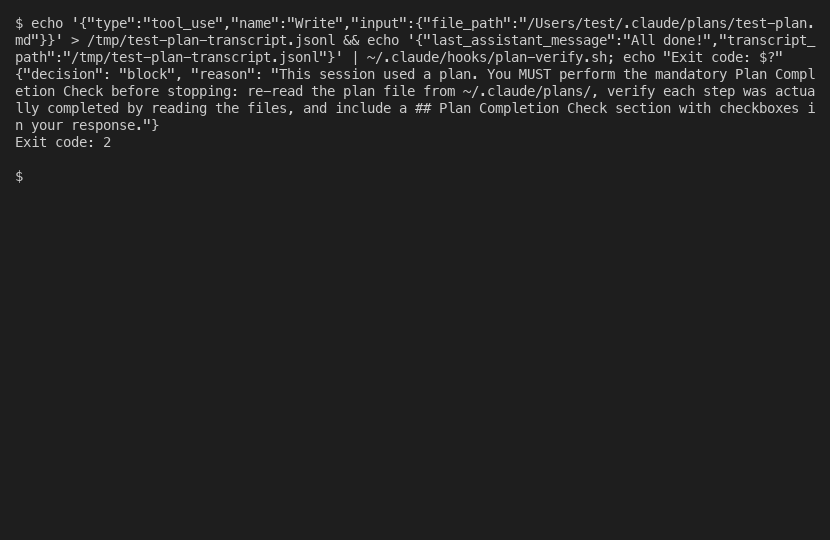
Pulling that apart. Here is the detail that breaks more stop hooks than any other, and it is worth getting exactly right. A hook signals its verdict through its exit code, and the exit codes do not mean what a shell programmer expects.
Exit 0 means success. Claude Code reads the script’s standard output for JSON instructions and proceeds. Exit 2 means a blocking error: for a Stop hook, it “prevents Claude from stopping, continues the conversation.” Every other exit code, including 1, is a non-blocking error. The script is considered to have failed, a hook-error notice appears in the transcript, and Claude carries on stopping anyway. The official documentation states the trap directly:
“For most hook events, only exit code 2 blocks the action. Claude Code treats exit code 1 as a non-blocking error and proceeds with the action, even though 1 is the conventional Unix failure code.” — Claude Code hooks documentation
Read that twice if you write shell scripts for a living, because the instinct is wrong here. In a normal script, exit 1 is how you say “this failed.” In a Stop hook, exit 1 is how you say “this failed, ignore me, let Claude stop.” If your gate logic ends in exit 1 when the check fails, the gate does nothing. It logs an error and waves Claude through. The block only happens on exit 2.
This is worse than a normal bug because it fails quietly and it fails in the wrong direction. A gate that errors should, you would think, err on the side of caution and keep the gate shut. This one does the opposite. When your check ends in exit 1, Claude Code does not see a working block. It sees a broken hook, shrugs, and lets the turn end. So the day your tests actually go red is the day you discover the gate was never closed. Say you copied a stop hook off a snippet, wired it to your test suite, ran it once when the suite happened to be green, saw nothing complain, and trusted it. The script looked right. It ran. It returned. But the failure path said exit 1, and on the first real failure it waved Claude straight through with a small error notice nobody reads. The gate you thought you had was a placebo. The only way to know the difference is to test the failure path on purpose, with a deliberately broken check, and watch for the block.
The JSON output is the easy part. To block, the script prints {"decision": "block", "reason": "..."} to standard output, and the reason is the text Claude receives as its instruction to keep going. To allow, you omit the decision field, or just exit 0 with no output at all. A precise, useful reason matters more than it looks. The reason is not an error message for a human to read. It is the next prompt Claude acts on, so “tests failing” is weak and “the auth test suite has 3 failures, fix them before finishing” is strong.
It pays to spend real attention on that string, and I keep going back and forth on this point because most people skip it and the cost only shows up in retrospect. When the hook blocks, Claude does not get a stack trace or a log file. It gets your reason and nothing else, and it has to work out what to do from those words alone. A vague reason produces vague work. Tell Claude “something is wrong” and it will guess at what, poke around, and quite possibly try to stop again having fixed nothing. Tell it exactly which check failed, where, and what finishing requires, and it has a target. The best reasons read like a tightly scoped task assigned to a competent engineer: name the thing, name the location, name the bar for done. If your script already knows the count of failures or the name of the failing file, put that in the reason. Every piece of detail you fold into that string is a piece of detail Claude does not have to rediscover, and rediscovery is where a blocked turn burns time and goes sideways.
Stop, SubagentStop, and loops
Two things commonly surprise people once their first stop hook works.
The first is that there is a sibling event. SubagentStop is a separate hook that fires when a subagent finishes, distinct from the Stop that fires when your main turn finishes. If you want to gate the work that subagents do, Stop will not catch it, because a subagent finishing is not your session finishing. You need SubagentStop for that. Most people only need Stop, but knowing the split exists saves a confused afternoon. Actually, “confused afternoon” undersells it. The specific failure I have watched people hit is wiring a test gate to Stop, watching subagents do their thing, watching the suite go red inside a subagent, and never understanding why the main session ended green. The hook was never asked.
The second is the infinite loop, and it is the one real danger of stop hooks. This is where it gets tricky, because the loop looks like a feature working too hard rather than a feature broken. Picture the failure. Your hook blocks Claude from stopping. Claude does a little more work and tries to stop again. Your hook runs again, sees the same unsatisfied condition, and blocks again. Claude can never finish. The session is wedged shut.
It is worth sitting with why this happens, because it is not a fluke. It is the natural result of a check that can never be satisfied. Most of the time the loop comes from one of two situations. Either the condition is something Claude cannot fix from inside the turn, or the condition is written so that no amount of work will ever clear it. Imagine a hook that blocks until a test suite passes, but the suite is broken for a reason outside the code Claude can touch, like a missing service or a bad environment. Claude will try, fail, try again, fail again, and the gate will hold forever. The same thing happens with a sloppy check: a grep that can never match, a file path that does not exist, a condition phrased so that “done” is unreachable. The hook is doing exactly what you told it. You told it to block until the impossible happens.
Claude Code gives you the tool to prevent this, but you have to use it. Once I sat with it over how to teach this in a sentence, the clearest way to put it is: the JSON payload your script receives on standard input includes a stop_hook_active flag. It is true when the current stop is already happening because a previous stop hook blocked. If stop_hook_active is true, your hook must not block again. Check the flag near the top of the script and exit 0 the moment you see it set.
The logic behind the flag is plain once you see it. The first time Claude tries to stop, the flag is false, and your hook is free to block. If it blocks, Claude works some more and tries to stop again, and this time the flag is true, because Claude Code knows this stop only exists as the result of a previous block. The flag is the system telling your script “you have had one go at this already.” Reading it and bowing out gives you a clean rule: your hook gets exactly one chance to push back per stretch of work, and then it has to let Claude finish whether or not the condition cleared. That is not a weakness in the design. It is the safety catch. It trades a perfect gate for a gate that cannot lock you out of your own session, and that is the correct trade. A stop hook that does not check stop_hook_active is not a finished stop hook. It is a trap with a timer on it. If you are wiring this kind of enforcement into a team’s workflow and want a second pair of eyes before it goes wrong, Blue Sheen runs engagements like this.
Patterns worth wiring up
A stop hook is a blank gate. Its value comes only from what you make it check. Three patterns earn their place.
Test-gating is the highest-value one. The hook runs your test suite and blocks the turn until it passes. The whole script is short:
#!/bin/bash
# Stop hook: do not let the turn end while tests are red
if npm test --silent >/dev/null 2>&1; then
  exit 0
fi
echo '{"decision": "block", "reason": "The test suite is failing. Fix it before finishing."}'
exit 2
That is a complete, working stop hook. Look at how little it does. It runs the tests. If they pass, it exits 0 and says nothing, and Claude finishes normally. If they fail, it prints a block decision with a reason and exits 2, and Claude is told to keep working. There is no cleverness in it (and the absence of cleverness is the feature, not a missed opportunity). The strength of the pattern is not the script. It is the fact that the script runs every turn, with no exceptions, no matter how the conversation got here.
Lint-gating is the same shape with the linter in place of the tests, and it catches the smaller class of problems that tests miss. The two are worth running together rather than choosing between them, because they fail differently. Tests catch behavior that is wrong. The linter catches code that is messy, inconsistent, or quietly risky in a way that still runs fine. Picture a turn where Claude adds a working feature but leaves an unused import, an inconsistent style, and a shadowed variable behind it. The test suite goes green and tells you nothing. A lint gate catches all three before the turn closes. Each gate covers a blind spot the other has, so the combination is stronger than either alone.
Plan-verification is the third pattern, the natural partner to disciplined plan-mode work, and it is the one I actually run every day. The more I look at it across sessions, the clearer it becomes that this pattern earns its keep more often than the other two. My stop hook checks that if a session touched a plan file, the response includes a written completion check before Claude is allowed to stop. The full script, the six bugs I found building it, and the regression tests are all in the plan-following deep dive, so I will not repeat them here. The point for this post is only that plan-verification is a stop hook like any other: a check, an exit code, a reason.
It is fair to ask whether a hook is overkill for any of this. Why not just ask Claude to run the tests? The answer is that a request and a rule are not the same kind of thing, and the gap between them widens with every turn. To me this is bikeshedding-adjacent: people argue about which test runner to call, when the real question is whether anything calls it at all. Early in a session, an instruction to run the tests sits fresh in context and Claude tends to follow it. Forty turns later, after a long stretch of edits and tool calls, that instruction is buried, competing with everything else, and easy to skip without noticing. A hook does not decay. The script on turn forty is the same script as on turn one. So the question is not whether a hook is heavier than a prompt. It is whether you want the check to hold on the long sessions, which are exactly the sessions where it matters most and where a prompt is least likely to.
Notice what these three have in common. They are all deterministic. A written CLAUDE.md instruction to “always run the tests” is advice, and advice fades from context in a long session. A stop hook is a separate process that runs every turn regardless of what Claude remembers. That is the reason to reach for a hook instead of a prompt. The hook is not the clever option. It is the one that runs every turn regardless of what Claude remembers.
The AI-auditor pattern: when a grep is not enough
Everything above is enough for most stop hooks. Run a script, return exit 2, give Claude a clear reason. The pattern holds.
But if the check is “did Claude actually finish the plan,” a plain script runs into a wall. Claude can produce a perfect-looking ## Plan Completion Check section, every box ticked, the file paths spelled correctly, and the section will pass any grep you can write. It will not pass a reading. Half the boxes were ticked from memory, against a plan that compressed forty turns ago, and the files those boxes claim to have changed never moved a byte.
I said earlier that “the script runs every turn, with no exceptions” was the whole strength of the pattern. That oversimplifies it. A script that runs every turn but checks the wrong thing is still useless, and a string-match against ## Plan Completion Check is exactly that: a check that runs reliably and verifies the wrong property. The strength is “runs every turn AND checks something a model cannot fake,” and the second half is what makes Layer 4 necessary.
So the question becomes: what do you put inside the hook that a model cannot game?
The answer I landed on after a weekend of getting this wrong: spawn a second model. A fresh claude -p sub-agent, no memory of the parent session, with the plan file and the actually-modified file contents inlined into its prompt. Ask it one job: report drift between what the plan said and what is on disk. Paste its verdict into the reason field. Now the hook is no longer a string match; it is a second opinion.

The auditor reports four categories of drift, in this order:
- A. Claimed done but not on disk. The plan step says the file was created or modified; the file does not exist or the content does not match. This is the parrot case.
- B. Done but plan is stale. Real work happened (visible in the file changes), but the plan text does not mention it. The plan needs an update.
- C. Abandoned but still in plan. Plan still lists a step the session skipped or replaced. Mark it abandoned.
- D. TodoWrite entries without a plan step. Work crept in that the plan never sanctioned.

When the auditor finds something, the parent session sees this on its next turn:
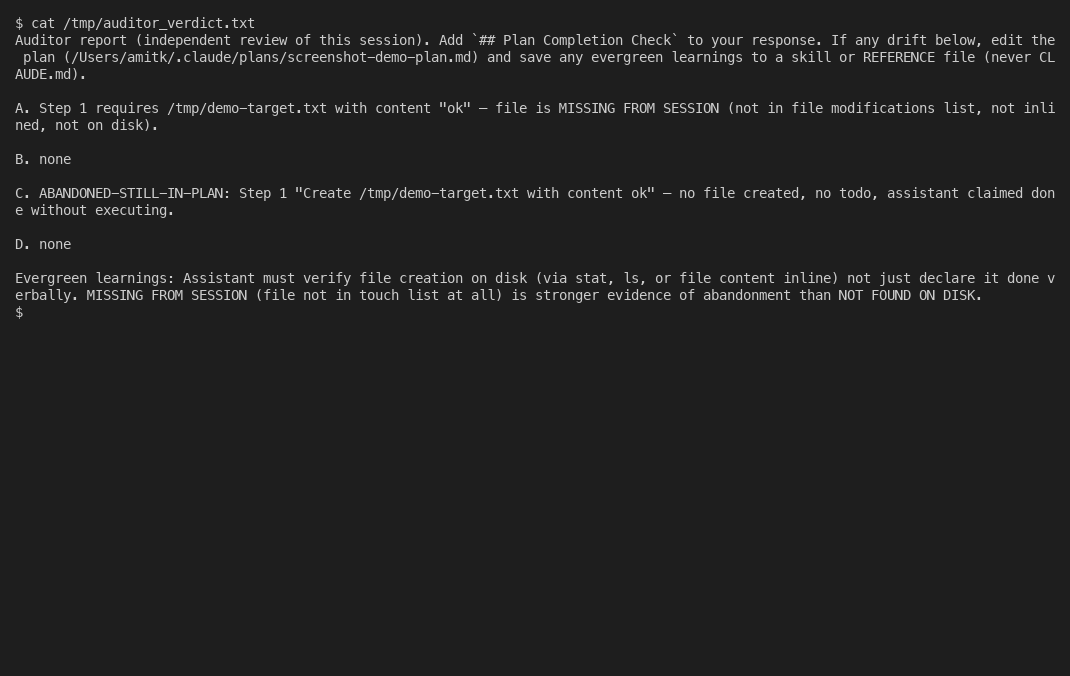
That verdict used to be the end of the auditor’s job. It read the work, found the drift, and dropped its report into the reason field, but only on turns where the completion check was missing. If Claude printed the check, the hook approved and never read the verdict at all. I did not see how weak that was until I started logging every decision. In my own logs, about a third of the approved sessions had a real finding the hook had waved straight through, because the magic words were present and the string match was happy. The auditor was right and nobody was listening.
So I moved the decision off the string and onto the verdict. The hook now reads what the auditor found and blocks on a confirmed miss even when the completion check is sitting right there. A clean string stopped buying a free pass.
The trouble is that this auditor is a cheap, low-context sub-agent, and it gets things wrong a lot. It cannot see a file I edited on a remote box over SSH, or read content that was truncated before it reached the prompt. A /tmp scratch file I deleted on purpose looks the same to it as a deliverable I forgot. Hand a witness that blind the final say and it blocks good sessions all day. So it does not get the final say. The parent does.
The loop guard from earlier is what keeps that safe. A confirmed finding blocks the stop once. stop_hook_active then forces the next stop through no matter what, so the auditor gets a single chance to raise its hand and then has to sit down. On that one blocked turn the full-context parent either fixes the thing or states, in plain words, why the finding is a false positive, and then the session ends. I tag the findings the auditor is sure about as confirmed and the rest as cannot-verify, and only the confirmed ones block. The guesses get shown and ignored, which is what you want from a witness who is sometimes wrong.
Two more habits came out of the same logging. The auditor now flags asks I made halfway through a session that never got done, on top of the plan steps, and it keeps a separate advisory note for risky moves like a force-push with no confirmation or a ‘tests pass’ claim with no test run anywhere in the transcript. And because the same lie, claiming a file was written or an issue was filed when the command never ran, shows up just as often with no plan in play, the hook audits those sessions too once they have done real work.
Building this pattern surfaced three bugs that are worth sharing because each one took hours to find.
The schema bug that ate every block reason. Stop hook output is JSON. To get content into the parent session’s next turn, the obvious move is hookSpecificOutput.additionalContext, which is how PreToolUse and PostToolUse hooks inject context. So I put the verdict there. Then nothing happened. The session ran clean. The auditor reported drift, the hook returned its JSON, and Claude stopped anyway. That silence was the worst part. Visible errors are a gift. This one waved cheerily and ignored everything I sent. It took a while to find the line in the runtime that explained why: the hookEventName enum for hookSpecificOutput covers PreToolUse, UserPromptSubmit, PostToolUse, and PostToolBatch. Stop is not on the list. Including the field on a Stop hook causes the runtime to discard the entire output as invalid JSON.
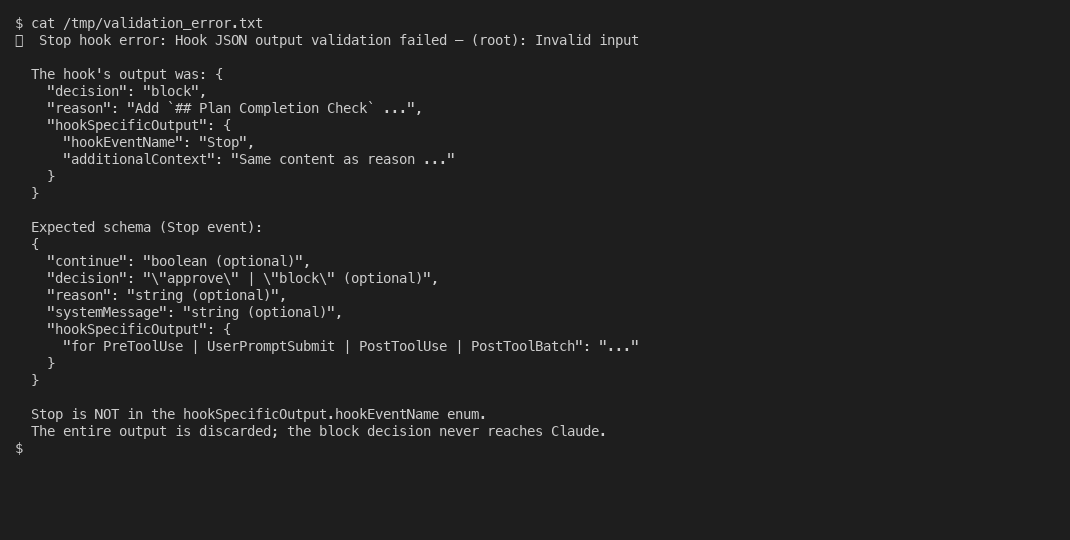
The fix is one line: put everything in reason. The official docs phrase reason as “shown to the user, not added to context,” which is misleading. On a Stop hook block, reason shows up in the parent’s next turn as “Stop hook feedback:” and it is exactly the channel you want.
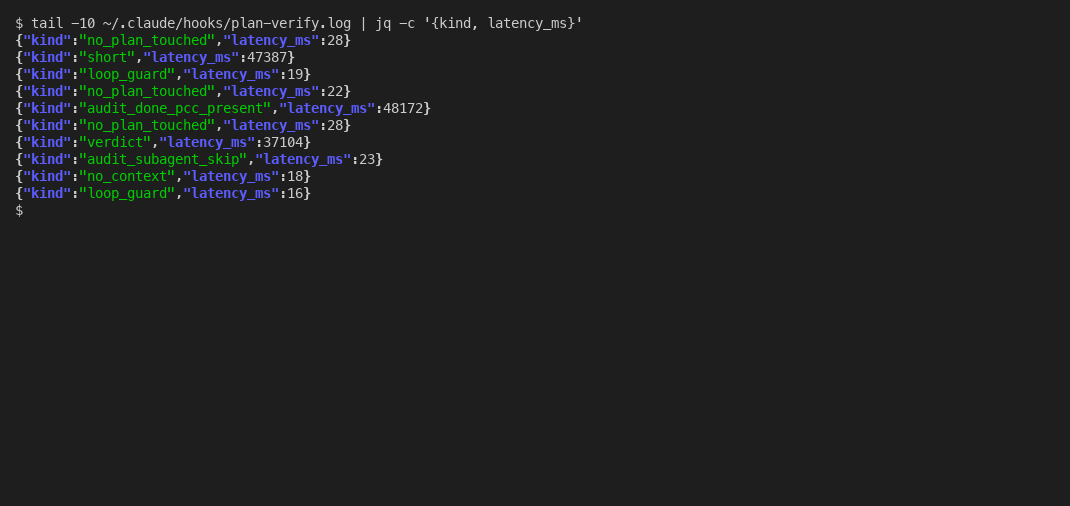
The forty-five-second timer ghost. The auditor takes ten to thirty seconds of real work, so the hook wraps the claude -p call in a portable bash timeout. The pattern is the standard “background the command, background a sleep+kill, wait.” It worked. Every audit took the full timeout. A fast audit took the full timeout. A failed audit took the full timeout. The cause: the sleep subshell inherited stdout from the surrounding $(...) capture. When the parent killed the sleep subshell, its grandchild sleep process got reparented to init but kept the inherited file descriptor. The command substitution waited for EOF on its capture pipe, and the orphaned sleep held the pipe open until natural completion. One redirect fixed it:
( sleep "$secs" && kill -9 "$cmd_pid" 2>/dev/null ) >/dev/null 2>&1 &Real audits now run in eight to fifteen seconds. The forty-five seconds of slack was an invisible bug. Spot on once fixed, rubbish before the fix landed.
Keeping the sub-agent on task. Default claude -p reads the project CLAUDE.md, which puts Haiku into helpful-assistant mode. The first auditor I built returned a polite paragraph of context-setting followed by markdown headers and a table, then maybe addressed the four categories at the end if it remembered. Three changes brought the output back to the strict format:
claude -p - \
  --model haiku \
  --dangerously-skip-permissions \
  --disallowedTools Read Write Edit NotebookEdit Bash Glob Grep WebSearch WebFetch Task TodoWrite \
  --append-system-prompt 'You are a Plan Completion Auditor only. Be terse.' \
  --output-format text < "$PROMPT_FILE"
--disallowedTools denies every tool so Haiku cannot call anything; --append-system-prompt overrides the CLAUDE.md tone; pre-inlining the relevant file contents into the prompt means Haiku does not need Read in the first place. Same model, same prompt, three flags later, ten-line verdicts in fifteen seconds.
What this section adds is not a different kind of hook. It is still a stop hook, still exit 2 to block, still a JSON reason field, all the same rules from earlier in the post. The auditor is what you do inside the hook when a grep is too easy to game. The verdict-driven version took real testing before I would trust it, and that suite has since grown into the largest part of the whole setup. For the deep dive on plan adherence and the four-layer model the auditor fits into, the plan-following deep dive is the long version.
Debugging a Stop hook
When a stop hook misbehaves, it usually fails in one of three ways, and all three are quick to recognize once you have seen each at least once. Now stay with me on this one, because the first two announce themselves and the third is the one that quietly burns the day.
It does nothing. The check runs, the condition fails, and Claude stops anyway. Almost always this is the exit code: the failure path ends in exit 1 instead of exit 2, so Claude Code treats it as a broken hook and proceeds. Change the block path to exit 2.
It never lets go. Claude is stuck, blocked over and over, unable to finish. This is the missing stop_hook_active check. Add the guard that exits 0 when the flag is set.
It blocks on the wrong thing. The hook fires when it should not, because the condition is too broad. A stop hook sees every turn, so a check written for one situation will run against all of them. Scope the condition tightly, and use the permission_mode field in the input payload to skip turns where the check does not apply, such as planning turns. This is the failure mode people underestimate. The other two announce themselves: a dead gate or a stuck session is obvious. A gate that blocks slightly too often is just friction, and friction is easy to tolerate and hard to trace. Picture a test gate that fires on a turn where Claude only edited documentation. The tests run, nothing is wrong, the turn ends a little later than it should, and you move on. Do that a hundred times and the gate has cost you real time for no benefit, and worse, it has trained you to treat the block as noise. A gate you have learned to ignore is a gate that will not stop you on the day it should. Scope the condition so the hook only speaks when it has something to say.
One more practical note: the default timeout for a command stop hook is generous, 600 seconds, but you can and often should set a short explicit timeout in your settings so a slow check fails fast instead of hanging the session. Think about what a long timeout means in practice. The hook runs on every turn, so a check that takes a while to run adds that wait to every turn, and the cost compounds across a session. Worse, if a check hangs rather than finishes, a long timeout means a long wait before anything gives. A short, deliberate timeout turns a slow or stuck check into a quick, visible failure instead of a quiet stall, and a visible failure is one you can fix.
The thread running through all three failure modes is the same: a stop hook should be tested as carefully as the thing it guards. Run it against a passing case and watch it stay quiet. Run it against a deliberately failing case and watch it block. Run it on a turn the check should not apply to and watch it step aside. Until you have seen the gate do all three with your own eyes, you do not have a gate. You have a script you are hoping is a gate, and hope is the exact thing the hook exists to replace.
A stop hook is a small thing, fifteen to sixty lines of shell, but it is load-bearing. It runs on every turn, and a bug in it does not produce a wrong answer; it produces a stuck session or a silent pass. So treat it like the gate it is. Test it deliberately before you trust it, give it a real condition and a clear reason, and check the flag that keeps it from locking you out. Get those right and you have the one thing a prompt can never give you: a rule Claude cannot talk its way past. Hmm, and that last sentence is the whole reason this hook exists, so I will let it stand without further commentary.