If you remember nothing else:
- Static site? Use Cloudflare Pages, free. A droplet is for an app that runs code and stores data, which Pages cannot do.
- A $4 droplet runs a real Node app plus a SQLite database with room to spare. The whole app used 15 MB of RAM on a 512 MB box.
- SQLite is the right database for a small app on one box. It is a file, no separate server, real SQL. Postgres is the upgrade, not the starting point.
- Caddy gives you a real HTTPS certificate and reverse-proxies to your app in three lines. You still own the patching, backups, and uptime.
Cloudflare Pages hosts a static website for free, and it will never run your app. That is not a knock on Pages. Serving files is what static hosting is for, and it does that better than a single server ever will. But the moment your thing runs code on every request and remembers something between visits, a saved row, a login, a counter that sticks, you have left the land of free file hosting. You need a computer that stays on. The cheapest good one costs four dollars a month.
This is the hands-on companion to my piece on where to host an app you built with AI. That post is the decision guide: what did you actually build, and what are you locked into. This one is the opposite of theory. I am going to put a real backend with a real database onto a $4 box, show you every command, and prove it works with output from a live server.
Why a droplet instead of Pages
Here is the dividing line, and it is the whole reason this post exists. A static site is files: HTML, CSS, a bit of JavaScript that runs in the visitor’s browser. Cloudflare Pages and Netlify hand those files to the world for free, fast, from everywhere. If that is all you have, build it and host it there and never think about servers again.
An app is different. It runs your code on the server when a request arrives. It writes to a database and reads it back on the next request. It holds state. None of that fits on static hosting, because there is no process running and nowhere to keep the data. This is the category my app-hosting guide calls a full-stack app, and it is where most things people vibe-code actually land. The tools that build it for you, Lovable and Bolt and Replit, quietly attach you to their cloud and their database, and the bill grows from there.
A droplet is the other path. You rent a small Linux machine, you run your app on it, you keep the database on its disk, and you own the whole thing for four dollars. The catch, and I will not pretend it away: you are now the operations team. Security updates are yours. Backups are yours. If it falls over at 2am, you find out when a user emails. For a side project or a small product that tradeoff is fine. For something that cannot be down, weigh it with open eyes.
What you are building
A Node app that stores notes in a SQLite database, running as a managed service, with Caddy in front handling HTTPS. That is the shape.

The box is the cheapest Basic droplet DigitalOcean sells. I pulled the live numbers rather than trust my memory.
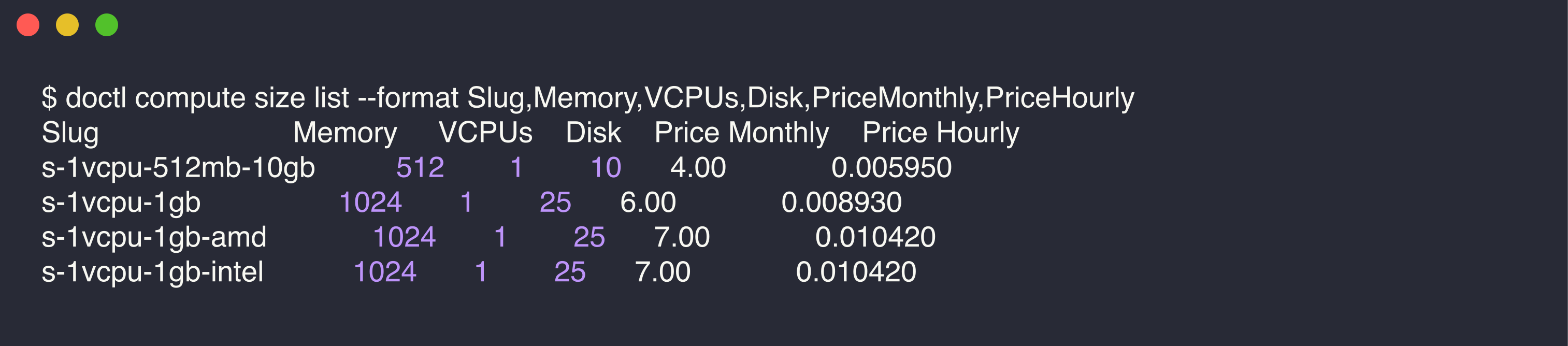
That s-1vcpu-512mb-10gb slug gets you 512 MB of RAM, one shared CPU, a 10 GB SSD, and 500 GB of transfer a month, for $4.00 at $0.00595 an hour. It sounds tiny. It is plenty for a small app, and I will show you the memory numbers later to prove it.
Three pieces run on that box. Node runs your app code. SQLite is the database, and this is the part people get wrong: they assume a database means a separate Postgres or MySQL server eating memory in the background. SQLite is not that. It is a single file your app reads and writes directly, with full SQL, no daemon, no port, no password. For one app on one box it is the correct choice, not a compromise. Caddy is the web server out front. It fetches and renews a real certificate from Let’s Encrypt on its own and passes requests to your app. Three lines of config, no certbot.
Setting up the droplet and the app
Create the droplet from the DigitalOcean console, or from your terminal with doctl:
doctl compute droplet create my-app \
  --size s-1vcpu-512mb-10gb \
  --image ubuntu-24-04-x64 \
  --region nyc1 \
  --ssh-keys YOUR_KEY_FINGERPRINT
SSH in and install the runtime. Node from NodeSource, plus Caddy and the SQLite CLI:
curl -fsSL https://deb.nodesource.com/setup_22.x | bash -
apt install -y nodejs sqlite3
# Caddy, one-time apt repo setup (see caddyserver.com/docs/install)
apt install -y debian-keyring debian-archive-keyring apt-transport-https curl
curl -1sLf 'https://dl.cloudsmith.io/public/caddy/stable/gpg.key' \
  | gpg --dearmor -o /usr/share/keyrings/caddy-stable-archive-keyring.gpg
curl -1sLf 'https://dl.cloudsmith.io/public/caddy/stable/debian.deb.txt' \
  > /etc/apt/sources.list.d/caddy-stable.list
apt update && apt install -y caddy
The app itself is small on purpose. This is the entire backend, an Express API that stores and returns notes:
const express = require('express');
const Database = require('better-sqlite3');

const db = new Database('app.db');
db.exec(`
  CREATE TABLE IF NOT EXISTS notes (
    id INTEGER PRIMARY KEY AUTOINCREMENT,
    message TEXT NOT NULL,
    created_at TEXT NOT NULL DEFAULT (datetime('now'))
  )
`);

const app = express();
app.use(express.json());

app.get('/api/notes', (req, res) => {
  res.json(db.prepare('SELECT id, message, created_at FROM notes ORDER BY id DESC').all());
});

app.post('/api/notes', (req, res) => {
  const message = ((req.body && req.body.message) || '').trim();
  if (!message) return res.status(400).json({ error: 'message is required' });
  const info = db.prepare('INSERT INTO notes (message) VALUES (?)').run(message);
  res.status(201).json({ id: info.lastInsertRowid, message });
});

app.listen(3000, '127.0.0.1', () => console.log('notes API on 127.0.0.1:3000'));
Copy it to the box, install two dependencies, and you have a working backend:
mkdir -p /opt/myapp && cd /opt/myapp
# rsync your server.js and package.json up here, then:
npm install express better-sqlite3
chown -R www-data:www-data /opt/myapp
better-sqlite3 ships prebuilt binaries, so that install takes seconds and needs no compiler on a normal Ubuntu box. Now make the app a real service so it starts on boot and restarts if it crashes. This is the thing static hosting can never give you: a process that stays alive. Write /etc/systemd/system/myapp.service:
[Unit]
Description=Tiny notes API
After=network.target

[Service]
WorkingDirectory=/opt/myapp
ExecStart=/usr/bin/node /opt/myapp/server.js
Restart=always
User=www-data

[Install]
WantedBy=multi-user.target
Then point Caddy at it. The entire /etc/caddy/Caddyfile is two lines:
yourapp.com {
    reverse_proxy localhost:3000
}
Start both and you are live:
systemctl enable --now myapp
systemctl reload caddy
Here is that service running on the real box, next to the memory it actually uses:
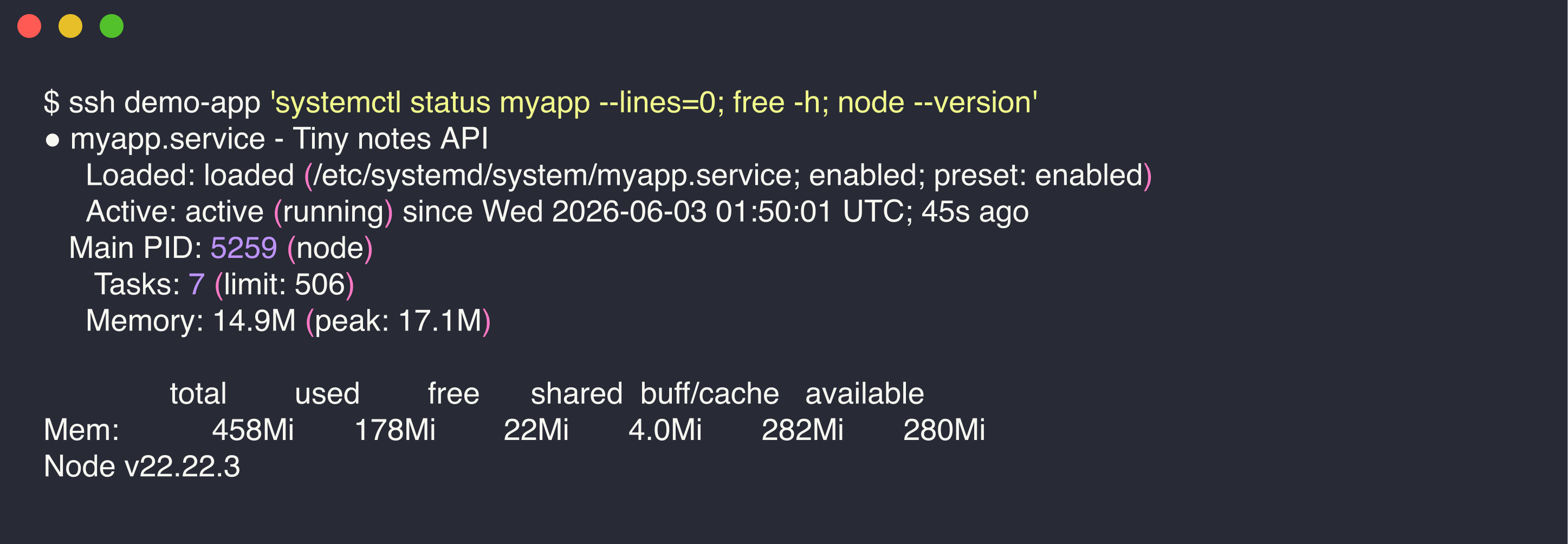
The app is active, managed by systemd, using 14.9 MB of memory. The box has 280 MB free. People underestimate how much headroom a $4 droplet has for a small app, because they are picturing a Postgres server they do not need.
The database, and proving it works
The point of a droplet over Pages is that data sticks. So let me prove it instead of asserting it. With the app live behind Caddy, I posted two notes over HTTPS and read them back. This is real traffic to the live box, the IP masked:
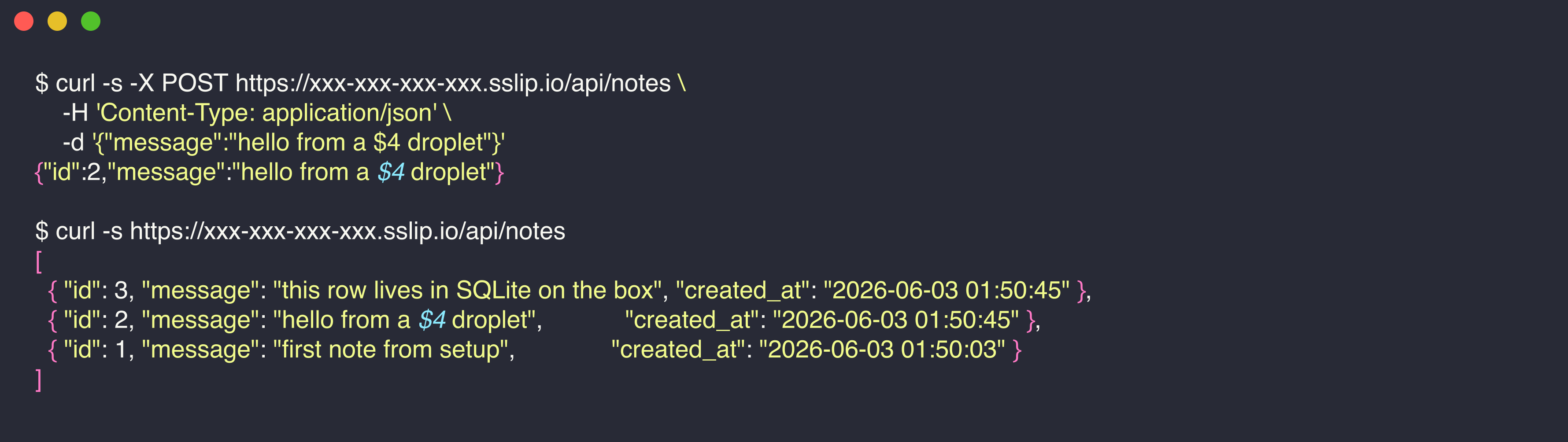
A POST writes a row and gets back its new id. A GET returns the list as JSON, served over a real Let’s Encrypt certificate that Caddy fetched on its own. The data is not in memory and it is not faked. It is in a SQLite file on the disk, which you can open and query directly:
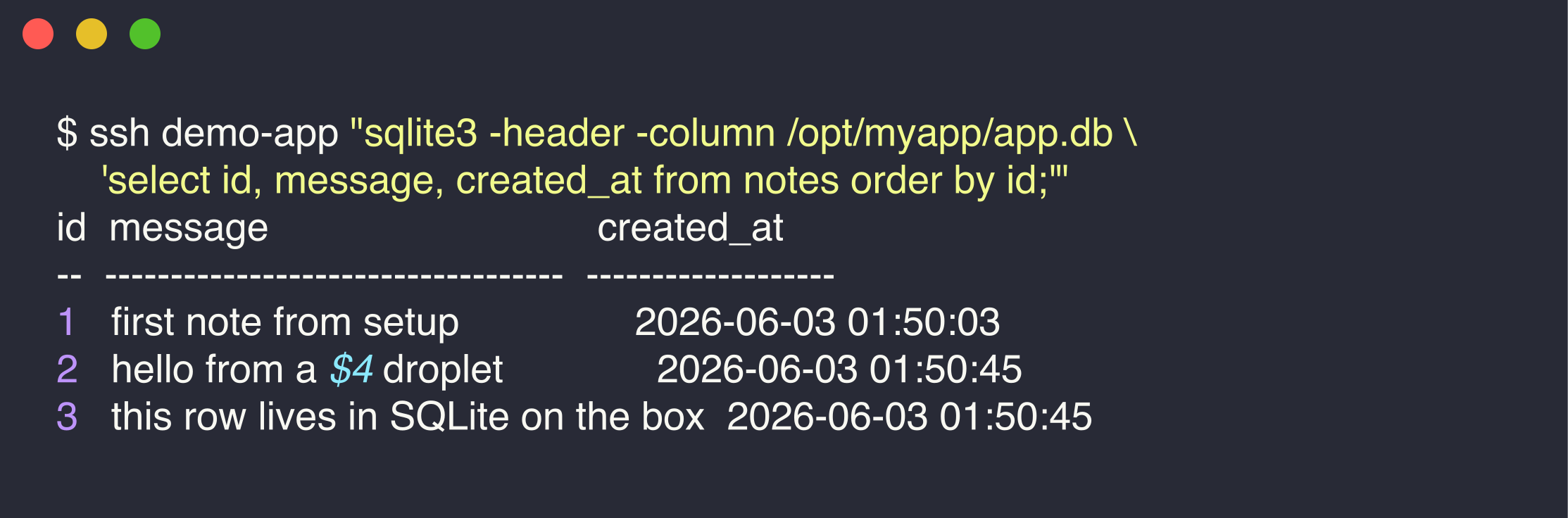
Three rows, on disk, with timestamps. Restart the app with systemctl restart myapp and they are still there, because SQLite wrote them to a file, not to a process that just died. That is a database doing its job, for zero dollars beyond the four you already paid.
Every screenshot here is from a real box. I created a $4 droplet, deployed this exact app to it, posted those notes over HTTPS, queried the database, then destroyed the droplet. The whole exercise cost about a cent.
So when do you actually need Postgres? When one box is not enough: several app servers hitting the same database, heavy concurrent writes, or features like full-text search and rich types that you want the database to handle. At that point move to managed Postgres, from DigitalOcean or Supabase, or run Postgres on a bigger droplet. Plenty of real products never reach that point. Reaching for Postgres on day one, for an app with a hundred users, is solving a problem you do not have yet.
When the droplet earns its keep
The straight version, the one I would tell a friend over coffee. If your thing is just files, use Cloudflare Pages and stop reading. If it is a frontend that only calls third-party APIs, Pages plus a serverless function still beats a server. The droplet earns its place the moment you have real server-side code and data that has to persist, and you would rather pay four dollars and own it than pay a platform twenty-five and rent it.
What that four dollars buys you, beyond the machine, is responsibility. You patch it. You back up the SQLite file, which is one line in a cron job since it is a single file. You harden it against the steady hum of bots knocking on every server’s door. None of that is hard. All of it is now yours.
So the three posts line up cleanly. Static site, Astro and Cloudflare Pages, free. Trying to decide where a vibe-coded app should live, the hosting decision guide. And when you have decided to own it on the cheap, this droplet, running a real app and a real database for the price of a coffee. The same review discipline from doing vibe coding well applies the whole way down: let the agent write the server, the systemd unit, the Caddyfile, then read every line before you trust it on a box that is now yours to defend.
If you are weighing this for an actual product and want a second opinion on owning versus renting, Blue Sheen does exactly this kind of call.