
Quick answers
How big is it? Twenty-five sections in four groups: eight org-level, three under People, nine under Products, five under Libraries and Access.
Where is the risk concentrated? In two of the four groups. Products and Libraries decide what the model can reach; the other two decide who can log in and what it costs.
What should you open first? Six settings, listed at the end. The rest can wait a week without anybody getting hurt.
Every enterprise admin console has the same problem. The navigation reflects how the vendor builds the product, and you need it to reflect how you govern it. Those are never the same shape, so you end up opening all of it once, in order, hoping the important things announce themselves.
They do not. Some of the highest-consequence settings in Claude Enterprise sit three clicks down a menu named after an internal product team, and some of the most prominent ones change almost nothing.
I hold Owner on a live Enterprise tenant at the moment, which is the only reason this is a description rather than a guess. Here is the whole tree.
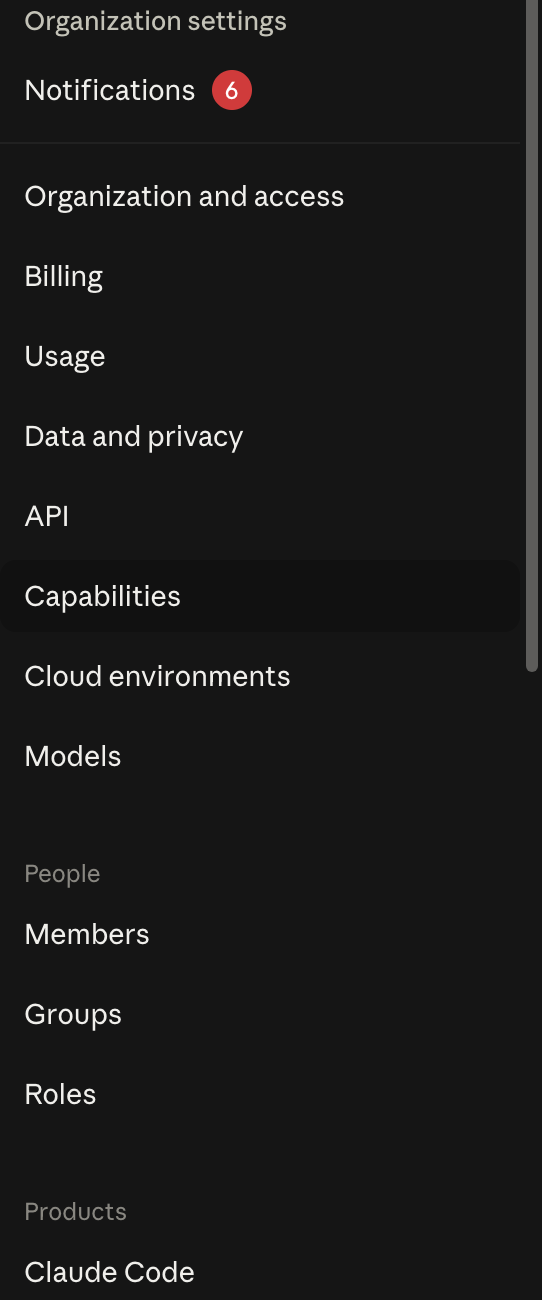
That capture shows the top of it. Below the fold the Products group continues, and a fourth group appears that the screenshot does not reach.
How the tree is actually organised
Four blocks, and the boundary between them is the product org chart rather than any governance model.
Org level, eight sections, no group heading
Organization and access. Billing. Usage. Data and privacy. API. Capabilities. Cloud environments. Models.
These are ungrouped, sitting straight under Notifications, which gives them a visual priority they only half deserve. Data and privacy and Capabilities are where the consequential switches live. Billing and Usage are reporting. Models decides which model versions your people can pick, which matters more than it sounds once a model generation gates a feature you depend on.
People, three sections
Members. Groups. Roles.
Identity and permissions, and the only block whose purpose is obvious from its name. Nothing surprising lives here, which is worth saying because it means you can skip it on a first pass.
Products, nine sections
Claude Code. Claude in Chrome. Claude Tag. Cowork. Artifacts. Claude Design. Office Agents. Claude Security. Claude Science.
Four of those carry a Beta badge. This block is the fastest-moving part of the console by a distance, and it is where a capability you have never heard of can arrive switched on. If you audit one block quarterly, audit this one.
Libraries and Access, five sections
Plugins. Connectors. Skills. GitHub. Directory.
The block that decides what Claude can reach outside itself, filed under a heading that sounds like a documentation site. I have written separately about how plugins, connectors and skills differ, because the three are routinely used as synonyms and are governed by three different pages with three different models.
Which settings change what the model can reach?
This is the question that matters, and the answer is scattered across three of the four blocks.
Under Capabilities you decide whether Claude can run code on a server at all, and separately whether that code may reach the network. The second one is the sharper edge, and its own help text says so.
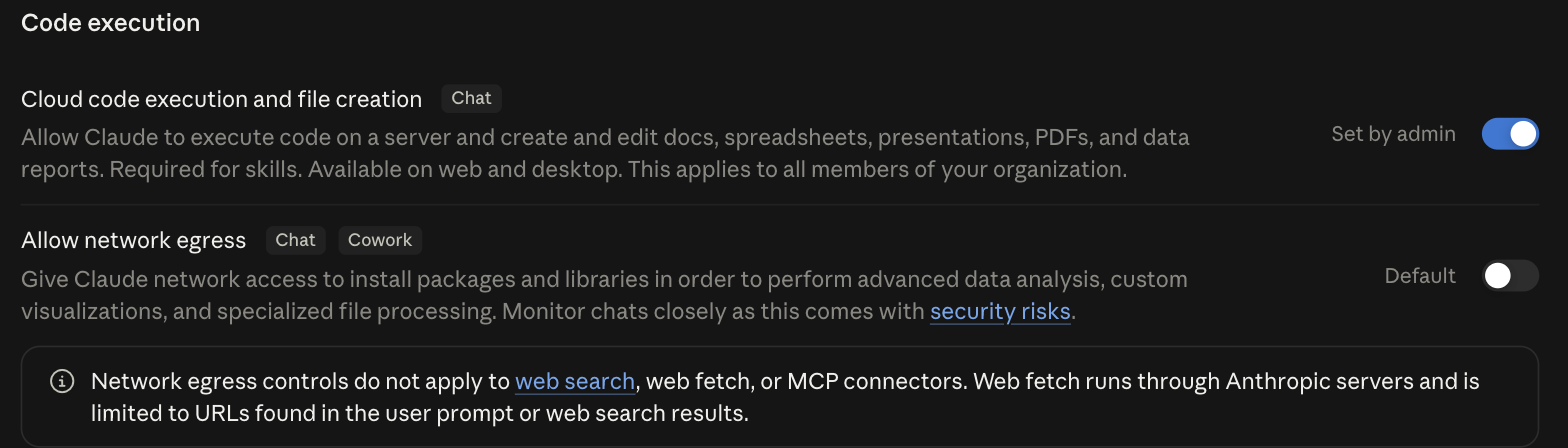
Read the small print under it rather than the toggle. Network egress controls do not apply to web search, web fetch, or MCP connectors. So the setting named after network access governs one of the four ways Claude reaches the internet, and the other three are administered elsewhere. That is not a criticism of the design, which is defensible once you know it. It is a warning about what the label promises.
Under Connectors you decide which external systems can be attached, and whether authorisation is per-person or organisation-wide, which is the difference between an integration somebody owns and one nobody does. Under Skills and Plugins you decide what packaged behaviour your people can install.
Under Claude Code sits a control that reads like a convenience feature and is really a reach question turned inside out. Remote control lets somebody carry on a local session from the web or the phone app.

Read what the help text says the session keeps rather than what the toggle is named. The session still runs on the user’s machine, with full access to their local filesystem, tools and project configuration. So what the switch hands out is not a hosted sandbox. It is a second device that can drive the first one. The laptop is still the thing holding your source code, and the phone becomes a way to steer it. That is a defensible thing to allow deliberately and an odd thing to allow by accident, which is presumably why it ships off and carries the words Set by admin.
And under Data and privacy sit the two controls I think are the most interesting things Anthropic has shipped for enterprises this year: inference hooks, which put your own server in front of every prompt, and US-only inference, which is one toggle covering what is really a two-part question.
Governing people is a separate tree from governing products
The split worth internalising is that this console has two independent governance surfaces and they do not reference each other.
The People block answers who is in the organisation and what they may do. The Products and Libraries blocks answer what the tool may do, for everybody, regardless of who they are.
Almost every setting in the second group is org-wide. There is no per-group override on most of them, so a capability you enable for the one team that needs it is a capability you have enabled for the finance department too. When consulting with companies on AI rollout, this is the single most common surprise: people arrive expecting the RBAC model they know from their identity provider, and find a set of global switches instead.
Plan for that rather than fighting it. If a capability is too dangerous for the whole company, the answer is usually a second workspace, not a cleverer permission.
Start with these six
Twenty-five sections is a week of clicking. Six of them will tell you almost everything about your exposure, and you can do these in an afternoon.
One. Data and privacy, retention and export. Establish what is kept and for how long before you establish anything else, because every other answer depends on it. Audit log export runs to a fixed window, and if your regulator expects a longer one, that gap is yours to fill.
Two. Capabilities, code execution and network egress. The two settings above. Know which is on, and know the four-way split in what egress actually covers.
Three. Claude Code. The most powerful thing in the console and the one most likely to be configured by whoever set it up first. I have written up what to check there in more detail than fits here.
Four. Connectors. Read the list, not the settings. The question is not how connectors are governed, it is which ones somebody has already attached and whether anyone still owns them.
Five. Managed settings. The mechanism that lets a policy file override what individual users and projects choose, and the reason a written baseline is worth having at all. A rule nobody can turn off is a different kind of rule.
Six. Models. Cheap to check, easy to forget, and it quietly gates feature availability. Several newer controls only work on recent model generations, so an org pinned to an older one has settings that cannot take effect.
What a console cannot tell you
Two things, and they are the reason none of the above is a governance programme.
It cannot tell you what your people are doing. Usage reporting shows volume, not judgement. A quiet month and a month where somebody pasted a customer list into a chat look identical from here.
And it cannot tell you what happens next. Every control on these 25 pages governs the model’s reach. None of them governs what your business does with the output, which is where the actual risk has always been. The console is a good perimeter and it stops precisely at the edge of your own processes.
The tier boundary is worth knowing too, because a fair amount of this does not exist at all below Enterprise. I have set out what the tier actually buys and, for anyone in regulated work, how the BAA fits and what Ask your organisation does to your internal search surface.
Open the six. Diary the Products block for a quarterly look, because it changes underneath you. Leave the rest until something makes you care about it.