If you remember nothing else:
- Connectors pull data from external services like Microsoft 365 and Google Drive using OAuth - Claude acts as the user, not as a separate system account
- Skills are plain instruction files that teach Claude how to behave for specific tasks - no API calls, no credentials, just text loaded into context
- Plugins bundle skills, connectors, and commands into installable packages for teams - but they don't work the same way across every Claude surface
Claude has three different ways to extend what it can do, and most people I talk to mix them up. Connectors bring in your data. Skills shape how Claude thinks. Plugins package everything together for distribution. Each one has different security implications, different admin controls, and different failure modes. Getting them confused isn’t just an academic problem - it determines who in your organization controls what data Claude can touch.
The thing is, they rolled out at different times, they work differently depending on whether you’re using Claude.ai, Cowork Desktop, or Claude Code, and nobody at Anthropic has published a single clear diagram showing how they relate. One practitioner called the whole rollout very janky, and I’m inclined to agree.
Let me break down what each one actually does.
Connectors bring in your data
Connectors are OAuth-based integrations that let Claude read from external services. Think Microsoft 365, Google Drive, Slack, Apollo, Linear. Your admin enables them at the organization level, then each person authenticates individually with their own credentials. No shared service accounts. No special API keys floating around.
This matters more than it sounds.
When Claude uses a connector, it acts as you. Delegated permissions. If you can’t see a document in SharePoint, Claude can’t either. If you have read access to a Slack channel, Claude gets read access to that same channel. The permissions boundary is your identity, not some admin-configured scope.
The Microsoft 365 connector specifically uses OAuth 2.0 On-Behalf-Of flow with PKCE. It creates two enterprise applications in Entra ID: “M365 MCP Client for Claude” and “M365 MCP Server for Claude.” Both are read-only. Refresh tokens expire after 90 days of inactivity, which means if someone leaves the company and you forget to revoke access, it eventually dies on its own. Eventually. That’s not a security strategy, mind you - it’s a safety net.
Correction, August 2026: that read-only line expired on July 7, 2026, when write tools shipped for the M365 connector. Write is not one switch, either. A Microsoft Entra Global Administrator or Application Administrator approves the wider permission set once per tenant under Enterprise applications in the Entra admin center, and then an organization Owner turns write actions on in Claude Organization settings under Connectors. Read and search tools work the same either way. The default is the part worth knowing. Anthropic’s setup guide for the connector states that “if your organization was using the connector before write tools launched, they will be blocked by default”, which is why a tenant that connected early is still read only months later, with nothing in the product saying so. An existing tenant does not quietly acquire the ability to send mail overnight.
A security team at Blue Cycle pointed out something that should make every CISO pause: this API-level data path bypasses every endpoint control in the stack. Your DLP agent watching the browser? Irrelevant. Your proxy filtering outbound traffic? Doesn’t see it. Consent governance becomes more important than blocking the browser, because the data flows through standard HTTPS directly between Claude and Microsoft’s APIs.
Syracuse University deployed the M365 connector across their IT department and described treating Claude as “a smart research assistant, not a search engine.” That take is spot on. Connectors don’t give Claude internet access or arbitrary search. They give it a window into specific, authenticated data sources that the user already has permission to see.
Apollo’s connector follows the same pattern - OAuth handshake, delegated permissions, read-focused access. So does Linear. So does Google Drive. The model is consistent even if the documentation is scattered. Anthropic also bundles connectors into a finished feature, Ask Your Org, a pre-configured project that searches across every connected source at once.
One limitation worth knowing: free users get one custom connector. Connectors only work in private projects. And if your files aren’t organized before connecting them, Claude will pull in the same mess you already have, just faster.
Skills teach Claude how to think
Skills are totally different from connectors. No API calls. No OAuth. No network connections at all.
A skill is a SKILL.md instruction file stored in a .claude/skills/ directory. That’s it. Plain text that tells Claude how to approach a specific type of work. Think of it as a reusable prompt that gets loaded into Claude’s context window when it’s relevant.
Update, June 2026: distribution grew up. Skills are no longer a per-user or per-repo affair. Team and Enterprise admins can now provision skills for the whole organization from the admin console: zip the skill folder, upload it under Organization settings, and it’s on by default for every user across web chat, the Desktop chat tab, and Cowork. Users can toggle an org skill off but can’t delete it, and provisioning events land in the audit log. The one surface this doesn’t reach is Claude Code, which still reads skills from the filesystem, so an org rollout pairs the console upload with a synced or managed copy for the builders. For a company that wants, say, one brand-voice skill or one document-handling skill applied everywhere, this closed the gap that used to require hosting skills somewhere fetchable. Nothing gets hosted. Nothing gets fetched.
I’ve built custom skills for brand voice enforcement, document review workflows, and code review checklists. The experience is sort of like writing a very detailed brief for a contractor - except the contractor has perfect recall and follows instructions literally. You write the skill once. It applies every time someone on the team works on that type of task.
The official skills guide shows how they work. You can bundle Python scripts, reference documents, and other assets alongside the SKILL.md file. A legal team might create an NDA review skill that includes their standard terms, red-flag clauses, and approval workflows. A marketing team might create a brand voice skill that captures tone, vocabulary, and formatting rules.
Aaron Ott described it well: MCP connectors are plumbing, skills are instructions, plugins are the finished product. Skills sit in the middle - they don’t fetch data, they shape behavior. Skills get interesting when paired with office agents that share context across Excel and PowerPoint.
Anthropic’s skills repository has crossed 146,000 stars on GitHub. The format is an open standard published at agentskills.io under Apache 2.0 licensing. Anyone can write them, share them, or build tools around them.
But here’s where it gets uncomfortable. Snyk’s ToxicSkills research from February 2026 found that 13.4% of publicly available skills had critical vulnerabilities. Not minor issues. Critical ones. Skills can include executable scripts, and a malicious skill could instruct Claude to run harmful commands or exfiltrate data from your project directory. The attack surface isn’t the skill file itself - it’s what the skill tells Claude to do with the tools it already has access to.
The security model here is basically trust. You trust the skill author the same way you’d trust a plugin developer or a npm package maintainer. Except there’s no equivalent of npm audit for skills yet. No dependency scanning. No automated vulnerability checks. You read the SKILL.md file, you read any bundled scripts, and you make a judgment call. The MCP servers a plugin bundles are the same problem one layer down, third-party code running with the agent’s access, which is why governing which MCP servers can run at all is a control worth enforcing, not just documenting.
That holds for the public catalogue and it still does. What has moved is the org boundary. Enterprise admin settings now carry a scanning gate, in beta, that runs when a skill or plugin is uploaded.
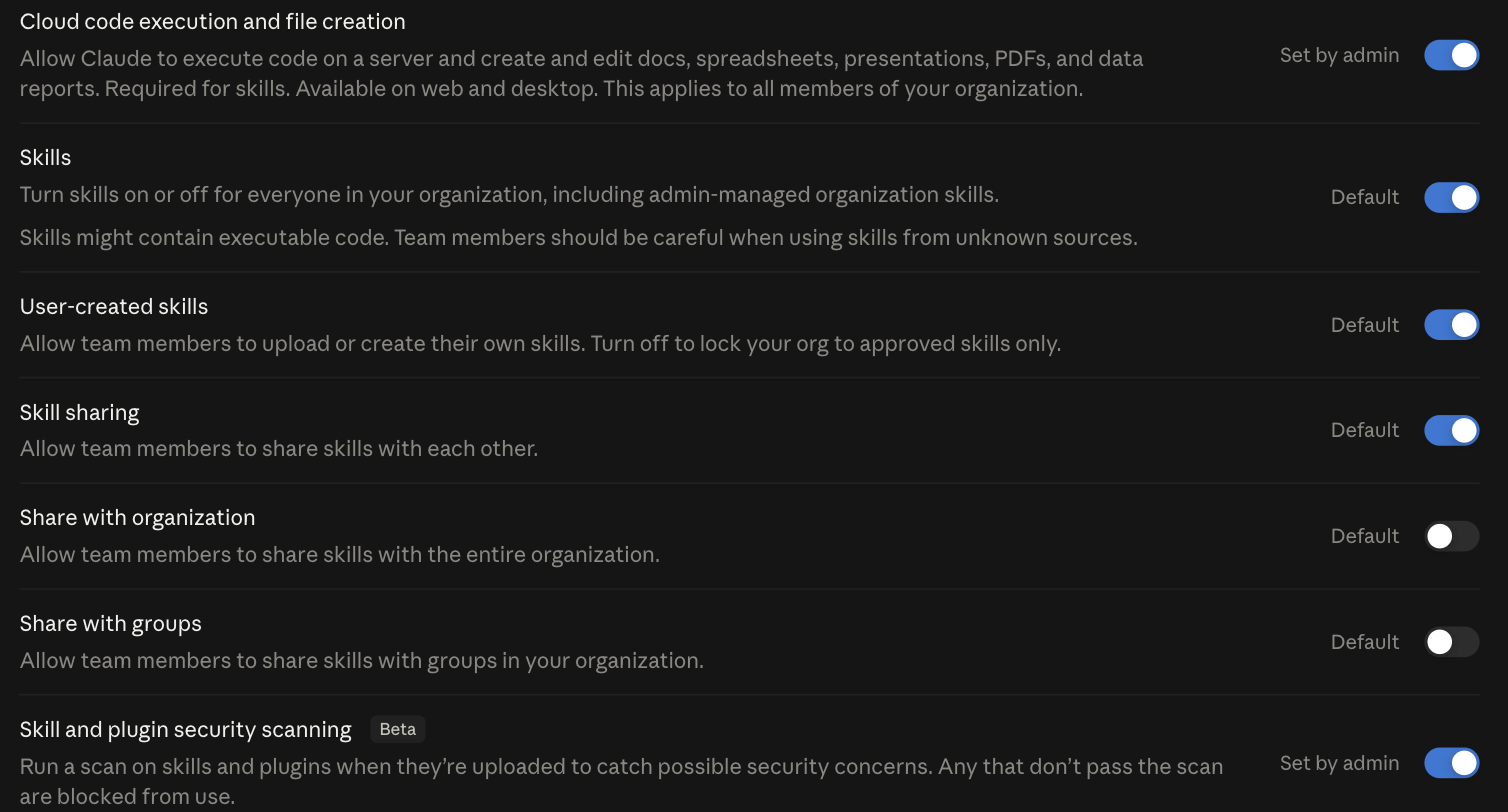
Three rows there do more work than the scan does. Turn User-created skills off and the org is locked to skills an admin approved, which is the difference between reviewing a catalogue and reviewing whatever anyone writes on a Friday. Share with organization and Share with groups both ship off, so a skill somebody builds stays with them until an admin opens the door. Treat the scan as a net underneath those three rather than a substitute for them. Read the right-hand column while you are there, because it tells you something the toggle position does not. Every row on that page is labelled either Default or Set by admin, and the scanning row reads Set by admin. Somebody turned it on. Do not assume you have it. Its own wording also sets the bar: it catches “possible security concerns” and blocks what fails. Nothing on that page reads a skill for what it instructs Claude to do with access it already has, which is the ToxicSkills finding, and that is still a judgment call somebody has to make.
One thing skills have going for them: they’re cheap on context. Progressive disclosure means Claude only loads the metadata at startup - the full skill content gets pulled in when it’s actually relevant. This matters a lot more than people realize, which brings me to a problem nobody talks about enough.
Plugins bundle everything for teams
Plugins are the packaging layer. A plugin bundles skills, MCP connectors, slash commands, sub-agents, and hooks into a single installable unit defined by a plugin.json manifest in a .claude-plugin/ directory.

Think of plugins the way you’d think about browser extensions. A skill is a script. A plugin is the extension that packages scripts, UI, permissions, and metadata into something you can install with one click.
The official plugin documentation describes three installation scopes: user (just you), project (everyone working on this codebase), and local (for development and testing). Plugin skills are namespaced - if a plugin called “acme” includes a skill called “hello,” it shows up as acme:hello. This prevents conflicts when multiple plugins define similar functionality.
Plugins are newer territory, and the directory is still growing. The official plugin directory on GitHub lists what’s available. Current offerings include code intelligence plugins covering 11 programming languages through LSP integration, plus external integrations for GitHub, Atlassian, Slack, Figma, and Vercel.
Anthropic runs a verification program where plugins can earn an “Anthropic Verified” badge after quality and safety review. Verified plugins auto-populate in the marketplace. If you’re building one, the submission process lives at clau.de/plugin-directory-submission.
Why would you bother with plugins instead of just distributing skills and connectors separately? Consistency. When your operations team needs Claude to follow specific workflows - checking Linear tickets, applying your brand voice, formatting outputs a certain way - a plugin ensures everyone gets the same setup. No forgotten skill files. No misconfigured connectors. One install, everything works.
Or at least, that’s the idea. The reality is messier, and I’ll get to that.
The context cost nobody warns you about
Here’s the elephant in the room. Every connector, every skill, every plugin tool eats context tokens before you type a single word.
JD Hodges measured the exact costs for common MCP servers: Playwright consumes roughly 3,442 tokens across 22 tools. Gmail takes about 2,640 tokens for 7 tools. Codex uses 610 tokens for 2 tools. SQLite needs 385 tokens for 6 tools. Just those four servers together burn approximately 7,077 tokens of your context window.
That sounds manageable. It isn’t.
A 5-server MCP setup can consume approximately 55,000 tokens before a single message is sent. One Reddit user reported that 4 MCP servers ate 67,000 tokens - gone, consumed by tool definitions alone, before they’d written a single prompt. When your context window is 200,000 tokens, losing a third of it to overhead is painful. When you’re on a plan with usage limits, it’s expensive.
The deeper problem is behavioral. When faced with too many similar tools, models confuse them. They pick the wrong tool for the task. Sometimes they hallucinate tool names that don’t exist at all. More tools doesn’t mean more capable. Past a threshold, it means more confused.
Scott Spence documented his optimization work on a server called mcp-omnisearch. He consolidated it from 20 tools consuming 14,214 tokens down to 8 tools at 5,663 tokens. A 60% reduction just by removing redundant tool definitions and consolidating similar operations. Brilliant work, and exactly the kind of thing most people skip because they don’t realize it’s a problem.
Anthropic has been working on this too. Their Tool Search feature reduced MCP context from 51,000 tokens to 8,500 - a 46.9% reduction - by loading tool descriptions on demand rather than stuffing everything into the initial context.
This is why skills are surprisingly cost-effective compared to connectors and MCP tools. Skills use progressive disclosure. At startup, Claude loads only the skill metadata - a few dozen tokens each. The full skill content gets loaded only when the task actually requires it. A library of 20 skills might cost you a few hundred tokens at startup, while 20 MCP tool servers would consume tens of thousands.
If you’re building out your Claude integration stack, context budgeting should be part of the architecture conversation from day one. Not an afterthought. I’ve watched teams load up every available connector and wonder why Claude’s responses got worse, not better. The irony is thick.
Start simple and add layers
The practical progression looks like this: start with connectors, add skills for repeatable workflows, and only reach for plugins when you need to package things for a team.
Connectors are basically zero-config for end users. Admin enables them, you click through an OAuth flow, done. There’s no code to write, no files to manage, no deployment pipeline. If your people need Claude to reference their email, calendar, or project management data, connectors are the obvious first step.
Skills come next, once you’ve identified patterns. If your team keeps giving Claude the same instructions - “use this tone,” “check for these risks,” “format output like this” - that’s a skill waiting to be extracted. Write it once, drop it in the .claude/skills/ directory, and everyone benefits.
Plugins make sense only when you’re distributing a standardized workflow across multiple teams or projects. If only three people need a capability, skills are fine. If thirty people need the same setup and you can’t trust them all to configure it correctly, that’s when plugins earn their complexity.
Admin control exists at three levels. Individual users can create local skills and install connectors they’re authorized to use. Team leads can standardize plugins and control which connectors their group accesses. Organization admins govern connector availability, approve plugins, and set security policies. This layering is reasonable on paper. In practice, the gaps are real.
Sean Lynch documented his experience and described it as, frankly, a nightmare. Cowork Desktop gets full organization support - plugins, connectors, team skills, the works. Claude.ai on web and mobile? No plugin support. Claude Code CLI can access connectors but not team-level skills or plugins. The same Anthropic subscription gives you different capabilities depending on which surface you’re using. That’s clunky, and there’s no indication of when it gets resolved.
Security-wise, the Harmonic Security guide flagged a CVE (CVE-2025-59536) showing that .claude/settings.json could be manipulated to execute arbitrary code. Their research also found that no Cowork activity appears in audit logs, the Compliance API, or data exports. If you’re in a regulated industry, that gap is a real problem.
My practical advice: disable all write-access connectors unless someone can articulate exactly why they need Claude to modify data rather than just read it. Start read-only. Expand permissions when there’s a demonstrated need and an audit trail to catch mistakes.
If you’re building knowledge management workflows with Claude Projects, skills are your best friend. They’re cheap, they’re transparent, and they’re version-controllable. Git track your .claude/skills/ directory and you have a full history of how your team’s AI workflows evolved.
For anything involving custom MCP development, understand that you’re adding permanent context overhead. Every tool definition lives in Claude’s working memory for the entire conversation. Budget tokens the way you’d budget memory in an embedded system - every byte counts.
The real assessment: Anthropic shipped three useful extension mechanisms, but the documentation is fragmented, the feature parity across surfaces is incomplete, and the security story has gaps that matter in enterprise environments. None of that means you shouldn’t use them. It means you should understand what you’re signing up for before you turn everything on.
Worth discussing for your situation? Reach out.