
The short version
A Claude share URL serves an empty page to anything that is not a signed-in browser, and it answers 200 either way, so a script cannot tell a link it may not read from one that never existed. If the sender is on Team or Enterprise, the link was never meant to leave their organization.
- The share page is 16,029 bytes of loader and one word of text
- Files you attached to the chat stay private and do not travel in the snapshot
- The Compliance API returns full chat content, but you cannot query it by share link
Someone sends you a link to a Claude conversation. You click it and get a login wall, or an error, or a page that sits there. You ask them to check the permissions and they tell you it opens fine on their machine, which it does.
Or you have the opposite problem. The link opens perfectly in your browser and you want the transcript in a file, so you point curl at it and get back a pile of markup with no conversation in it.
Both of those have the same root cause, and it isn’t a bug or a misconfigured permission. It’s three separate design decisions stacked on top of each other, and once you can name them the workaround is obvious.
What does a share page actually serve?
I ran the simplest possible test. Two share URLs with invented UUIDs, neither of which has ever existed, fetched with a normal browser user agent.
Both returned HTTP/2 200. Both returned exactly 16,029 bytes. Byte for byte identical.
Strip the markup out of those 16,029 bytes and you’re left with six characters of visible text: the word Claude. The rest is 36 module preload hints, 14 stylesheets, a manifest, three icons and two script tags. It’s a loader, not a document. The conversation arrives afterwards, over an authenticated request that your browser makes once the app boots.
Two things follow, and the second one is the trap.
The first is that no amount of HTML parsing helps you. There’s nothing to parse. Point requests and BeautifulSoup at a share URL and you’ll extract a husk. This isn’t Claude blocking you, it’s the normal shape of a client-rendered app, and it applies whether or not you have access.
The second is that the status code is worthless as a signal. A share you’re allowed to read, a share you’re forbidden to read, and a share UUID somebody invented all return the same 200 with the same body length. If you’ve built any check that treats 200 as “the link is live”, it has been reporting success this whole time and you have no idea whether any of those links resolve. That’s a quiet failure mode, because it looks exactly like the healthy one.
Team and Enterprise links never leave the organization
Anthropic’s documentation is direct about this: “Users on Team and Enterprise plans can only share chats with other members of the same organization, not publicly.”
So the colleague whose link won’t open for you probably did nothing wrong. They clicked Share, they got a link, the link works. It works for them and for the forty people who hold a seat in the same tenant. You aren’t one of them, and there’s no request-access flow that will make you one.
This catches people at exactly the wrong moment, because the reflex when a link fails is to assume it’s fixable. It’s usually a plan boundary rather than a permission you can be granted. The paths out are getting a seat in that organization, or asking the sender to paste the content somewhere you can both reach, or asking them to export it. Running Tallyfy, the question of what we can take with us comes up about every tool we depend on, and the answer is almost always better to establish before the day you need it rather than during.
There’s a case underneath the plan boundary that the documentation doesn’t mention, and you can only see it from the admin side.
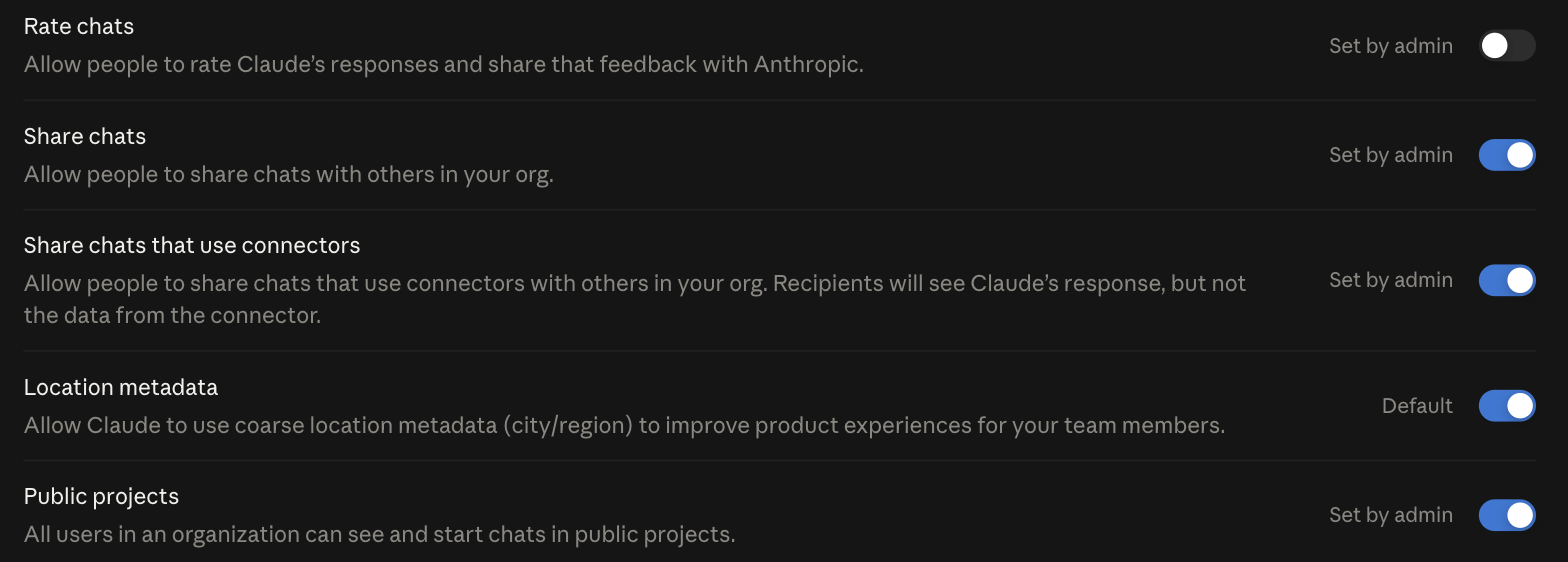
Chat sharing is an organization setting with its own switch. So a link can fail because the sender’s admin turned sharing off for everybody, which from the outside looks identical to the plan boundary, and where the fix is a conversation with an admin rather than a billing change. Note the separate line for chats that use connectors. An organization can allow ordinary sharing and still block sharing anything that touched a connected system, which is the right call when your connectors reach a CRM or a code host, and which means the same person can share one chat and not the next one with no visible reason why.
There’s a related detail worth knowing even when the link does open for you. The snapshot is frozen at the moment of sharing. Anthropic again: “All messages sent after sharing a chat will remain private by default. However, if you unshare the chat and share it again, the snapshot will be updated to include any new messages.” A link you bookmarked three weeks ago is stale by design, and nothing in the page tells you that. If the conversation carried on, you’re reading a truncated version of it and it looks complete.
The file you attached does not travel with it
This is the one that quietly ruins handovers, and it’s stated plainly in the docs: “If you share a chat that contains an attached file, the file itself is not included in the shared snapshot and remains private.”
Picture the common case. You upload a spreadsheet, you work through it with Claude across forty turns, you arrive at something useful, and you share the conversation with a colleague so they can pick it up. They get every message. They get the reasoning. They do not get the spreadsheet. The thing the entire conversation is about is the one thing that stayed behind.
Artifacts are the exception. The docs confirm that “the chat snapshot includes all messages that were sent prior to sharing the chat, including any artifacts”, so a document or a script Claude produced inside the chat does come across. Uploads out, generated artifacts in.
The working rule is to treat a share link as prose plus artifacts, and to send source files by whatever channel you’d normally use. If a file matters to the handover, attach it to the email.
The Compliance API is the only programmatic route
There is a supported way to pull full conversation content out of Claude, and it’s worth being precise about what it is, because the shape of it explains why it doesn’t solve the problem you probably have.
The Compliance API is available to Claude Enterprise organizations. Every endpoint sits under /v1/compliance/* on api.anthropic.com. Content access needs a Compliance Access Key created in claude.ai carrying the read:compliance_user_data scope. An Admin API key won’t do, and gets a 403 on the content endpoints. You list chats with GET /v1/compliance/apps/chats, then pull one chat’s full text with GET /v1/compliance/apps/chats/{chat_id}/messages.
What comes back is richer than a share link. Each message carries its text, plus arrays of files, generated_files and artifacts, and each of those has a download endpoint keyed by ID. The uploaded spreadsheet that stayed private when you shared the chat is retrievable here, byte for byte, with its original filename in the Content-Disposition header. The whole set is rate limited to 600 requests a minute per parent organization.
Now the catch. There is no share-link parameter anywhere in that API. You filter chats by time range, by user_ids[] in batches of one to ten, and by project_ids[] in the user-filtered form. Chats come back carrying an href that looks like https://claude.ai/chat/<uuid>, which is the chat’s own identifier and not the share identifier sitting in your clipboard. Those are different UUIDs for different objects, and nothing exposes the mapping between them.
So if what you have is a share URL, the API cannot look it up. You’d page the organization ordered by updated_at, filter to the person you think wrote it, and match on the chat name and timestamp. That works, and it’s clearly a search rather than a lookup.
The deeper point is about ownership. This is an eDiscovery and legal-hold instrument, sitting alongside Claude logs into your SIEM as part of the same governance surface. It reads and permanently deletes any user’s content across the tenant. It belongs to a security or legal custodian, and asking them to run it so you can read one colleague’s chat is a real request with a real approval path attached. That friction is doing its job. It should not be easy for one employee to read another employee’s conversations, and the awkwardness you feel making that request is the control working.
The Messages API is no help here either, for a different reason. It’s stateless. It has no view of claude.ai history at all, and there’s no endpoint that takes a conversation UUID. The two products share a company and not a data model. The same gap shows up when people go looking for export of Claude Projects data and find that no supported path exists.
Capture it from the network tab, not the print dialog
When the link does open for you and you need the content in a file, the reflex is Cmd-P and Save as PDF. Don’t. You get a picture of prose. Code fences lose their fencing, long tool output truncates at the page break, tables reflow into nonsense, and the result can’t be grepped or diffed or fed to anything. You’ve converted structured data into a screenshot.
The better capture takes about twenty seconds. Open the link in the browser where you’re signed in. Open DevTools, go to Network, filter to XHR, then hard reload the page. Watch for the request that returns the message array, right-click it and copy the response, and save that as JSON. You now have roles, timestamps, message boundaries and the structure intact, in a form you can process. If you’d rather script it, any browser automation that can read network requests does the same thing without the clicking.
Two boundaries on that. It only works where you already have access, and the empty shell being publicly reachable does not make the content behind it public. Building a scraper against an organization you don’t belong to isn’t a technical problem you’ve solved, it’s a terms-of-service problem you’ve created. If you want to dig into where these lines sit for your own rollout, my door is open.
None of this is exotic. A share link is a read-only, point-in-time, plan-scoped snapshot of text and artifacts, rendered client-side, with the uploads stripped out. It was built to let someone read a conversation, and it does that well. It was never built to be an export format, an archive, or an integration point, and most of the frustration comes from asking it to be one of those.
The provenance question is the one worth carrying away. If a conversation matters enough that you’ll want it in six months, decide now where the durable copy lives, because a link in a chat thread is not it.