Quick answers
Can you run your own pen tests for SOC 2? Yes. SOC 2 does not mandate external pen testing. Auditors want evidence of regular security testing with documented findings and remediation.
What tools do you actually need? Nuclei for vulnerability scanning, testssl.sh for TLS analysis, nmap for port reconnaissance, and security header checkers. All free and open source.
How often should you test? Monthly automated scans with AI-generated reports give you continuous evidence rather than a single annual snapshot.
Most companies pay a painful five figures annually for penetration testing. We run ours monthly for essentially nothing.
That’s not bravado. At Tallyfy, we replaced an expensive annual engagement with a suite of open-source security scanners that run on the 15th of every month via cron. The output feeds into AI that generates a structured PDF report with executive summary, OWASP Top 10 mapping, CWE classifications, and SOC 2 Trust Service Criteria references. Total cost: the compute time on a server we already had.
The real question isn’t whether this is possible. It’s why more companies don’t do it. Turns out, the answer is simple: the compliance industry profits from the assumption that security testing requires expensive specialists for every engagement. A founder on r/startups captured the typical panic: a client demands a pen test report and you have no idea where to start.
What SOC 2 actually requires for security testing
Here’s something that surprises most founders going through their first SOC 2 audit. The AICPA Trust Services Criteria don’t explicitly mandate penetration testing at all.
What the criteria do require is evidence that you’re testing your controls. If you need a grounding in what SOC 2 actually involves, start there. CC4.1 states that organizations must “select, develop, and perform ongoing and/or separate evaluations to ascertain whether the components of internal control are present and functioning.” Penetration testing is mentioned as one method to satisfy this. Not the only method.
Then there’s CC7.1, which requires ongoing monitoring for vulnerabilities. And CC7.2, which demands monitoring for irregular activity. Neither says “hire an external firm.” Both say “prove you’re looking.” Can you skip it? No.
The reality on the ground is more complicated. Most auditors expect to see pen test evidence. CPA practitioner analysis put it well: a vulnerability scan or penetration test is not required to meet the Trust Services Criteria, even though it is still a prudent practice. But 90% of auditors won’t accept a SOC 2 engagement without some form of pen test documentation. So you need it. The question is how you produce it.
For a Type 2 audit, which examines controls over a period of months, a single annual snapshot actually looks weak. Monthly automated testing with documented findings creates a much stronger evidence trail than one expensive engagement per year.
Pen-test evidence lives alongside every other control in our numbered evidence folder structure:
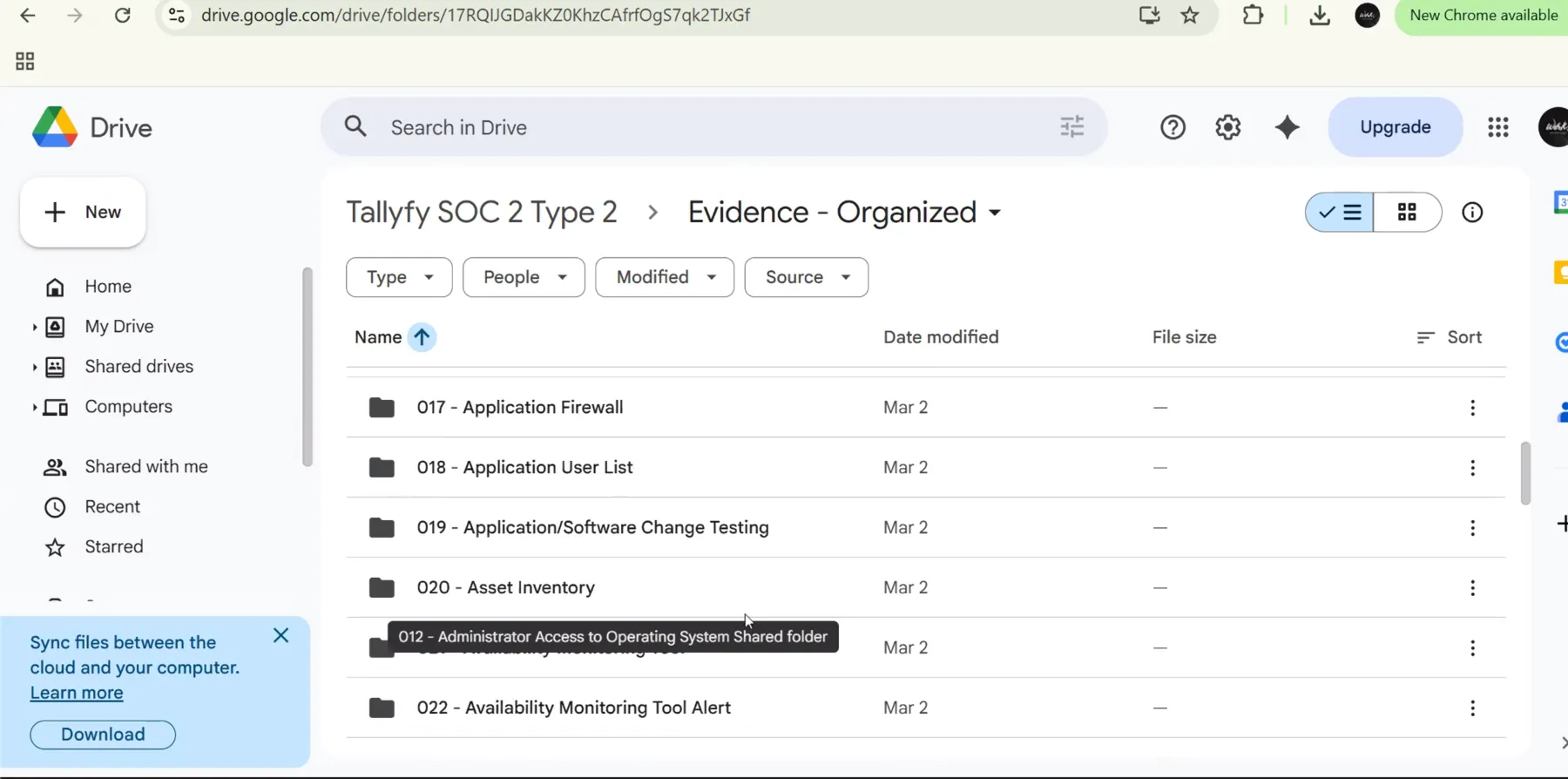 Pen-test reports land in the same numbered-folder structure as every other SOC 2 evidence item. Auditors find them without asking. The structure is visible in a sixteen-minute live audit walkthrough.
The open-source tool suite
We test two external-facing targets: our account portal and our API. Everything runs read-only against production endpoints. No authentication bypass attempts, no destructive payloads, no fuzzing that could affect availability. Rate-limited to 5-10 requests per second.
Here’s the actual stack.
Nuclei handles the heavy lifting. Built by ProjectDiscovery, it’s a template-based vulnerability scanner with over 9,000 community-maintained templates covering everything from known CVEs to misconfigurations to exposed admin panels. You point it at a target, it runs thousands of checks, and outputs structured JSON. The template system is what makes it brilliant. Each check is a YAML file describing exactly what to look for and how to classify the severity. Want to check for Log4j? There’s a template. Want to check for exposed.env files? Template. CORS misconfigurations? Template.
testssl.sh covers TLS and SSL configuration. It’s Dirk Wetter’s bash script that tests your server’s TLS implementation against every known weakness. Weak ciphers, protocol support, certificate chain issues, known vulnerabilities like BEAST, POODLE, Heartbleed. It outputs machine-readable JSON alongside human-readable results. No installation, no dependencies beyond bash and openssl.
nmap is the classic. Gordon Lyon’s Network Mapper has been the standard for port reconnaissance since 1997. We use it to verify that only expected ports are open on our external infrastructure. If something shows up that shouldn’t be there, we know about it before anyone else does. Its scripting engine extends basic port scanning into version detection, service fingerprinting, and lightweight vulnerability checks.
Humble checks HTTP security headers. Missing Content-Security-Policy? Missing X-Frame-Options? Misconfigured CORS? This catches the configuration-level issues that Nuclei might not prioritize but auditors definitely notice.
Chris Sullo’s Nikto provides web server scanning. It checks for dangerous files, outdated server software, and server configuration problems. It’s noisy and slow compared to Nuclei, but it catches a different class of issues and gives your evidence another independent data source.
Five tools. All free. All well-documented. All producing structured output that feeds into a single report.
If you want help shaping the actual implementation, Blue Sheen runs engagements like this.
How automated pen test reports work

Raw scanner output is basically useless to an auditor. They don’t want to read 400 lines of JSON from Nuclei. They want a professional document that maps findings to risk categories, references industry standards, and shows you’re taking the results seriously.
This is where AI earns its keep. After each monthly scan, the raw results from all five tools land in a structured directory:
pen-tests/2025-december/
raw_results/
nuclei_results.json
nmap_results.json
ssl_results.json
headers_results.json
cors_results.json
scan_metadata.yaml
Tallyfy_PenTest_2025-12-17.pdf
Tallyfy_PenTest_2025-12-17.md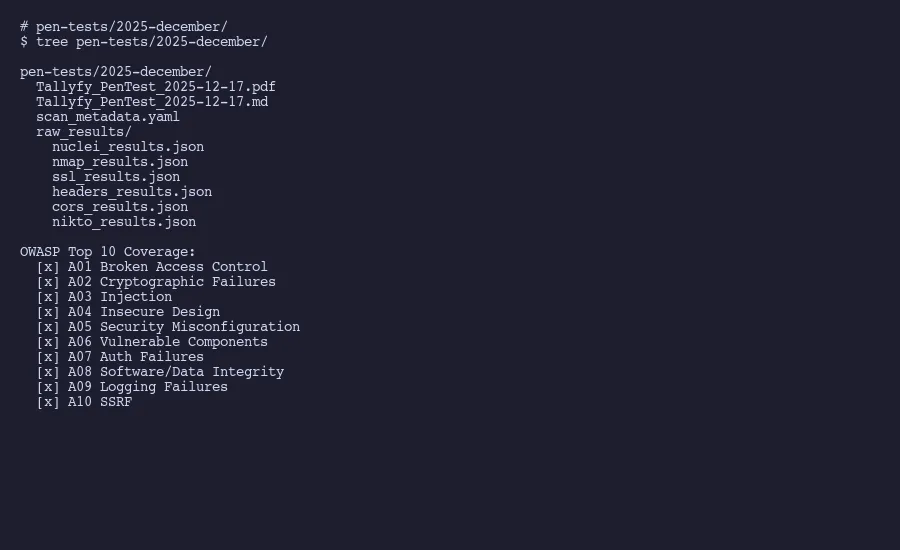
The scan metadata captures when the test ran, which tools and versions were used, what targets were scanned, and the rate limiting parameters. This matters for reproducibility. An auditor should be able to look at any report and understand exactly what was tested, when, and how.
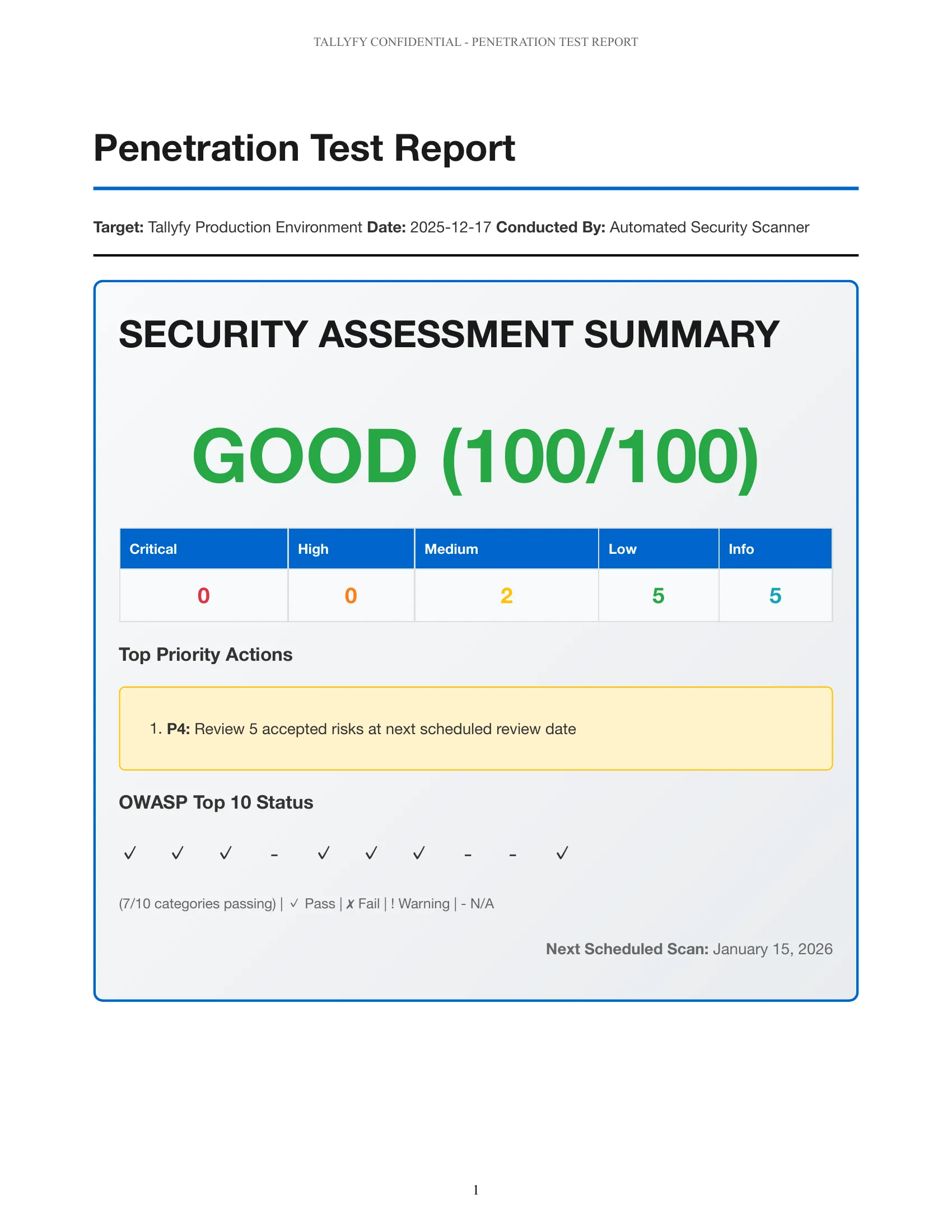
AI processes the raw results and produces a report with a consistent structure. Executive summary with an overall security posture score. Severity breakdown across critical, high, medium, and low findings. Individual findings with CWE classifications so every issue maps to a standard weakness enumeration. OWASP Top 10 coverage mapping showing which categories were tested and what was found. And SOC 2 Trust Service Criteria references tying each section back to the specific CC criteria it satisfies.
The markdown version goes into version control. The PDF gets shared with auditors. Both are generated from the same data, so they’re always consistent.
One thing worth explaining: the CWE mapping is not decorative. When a finding says “CWE-79: Improper Neutralization of Input During Web Page Generation” instead of just “possible XSS,” it tells the auditor you understand the vulnerability taxonomy. It also makes remediation tracking cleaner because every issue has a standardized identifier that doesn’t depend on which tool found it.
The severity scoring follows a simple logic. Anything that could lead to data exposure or unauthorized access is critical or high. Configuration weaknesses that increase attack surface without direct exploitation paths are medium. Informational findings that represent best practice gaps are low. This classification drives prioritization. Basically, fix the scary stuff first. Critical and high findings get remediated before the next monthly scan. Medium findings have a 90-day window. Low findings get batched into quarterly cleanup.
The whole pipeline takes about 20 minutes of compute time and produces a report that would cost you thousands from a consulting firm. Actually, that comparison is not quite fair. Not identical to what a manual pen tester produces, obviously. But for ongoing monthly evidence, it’s more than sufficient.
As we covered in our experience replacing a SOC 2 compliance platform with AI and Google Drive, the compliance industry has conditioned companies to believe this kind of automation isn’t possible. It very much is.
OWASP Top 10 coverage mapping
Auditors care about systematic coverage. They want to see that you’re testing against a recognized framework, beyond running random tools. OWASP’s Top 10 is the standard reference for web application security risks, and mapping your scan results to it demonstrates exactly the kind of structured approach that satisfies CC4.1. The categories below follow the OWASP Top 10:2025 release, which reordered the list, renamed a few entries, and folded server-side request forgery into broken access control.
Here’s how the tool suite maps to each category.
A01: Broken access control. Nuclei templates test for exposed admin panels, directory traversal, IDOR patterns, and misconfigured access controls. Because the 2025 list rolled server-side request forgery into this category, Nuclei’s SSRF templates (which check whether the server can be coaxed into reaching internal resources) land here too. This is the number one web application risk according to OWASP, and it gets the most template coverage.
A02: Security misconfiguration. Between Humble’s header analysis, Nikto’s server checks, and Nuclei’s misconfiguration templates, this category gets thorough coverage. Default credentials, unnecessary services, missing security headers, verbose error messages. It moved up to the number two spot in 2025.
A03: Software supply chain failures. New as its own category in 2025, expanded from the old vulnerable-components and software-integrity entries. Nuclei’s CVE templates check for known vulnerabilities in specific software versions, and nmap’s version detection identifies what’s running, so anything on a version with known issues gets flagged. The broader supply chain concerns (dependencies, build pipelines, signed artifacts) sit mostly with dedicated controls, and the report says as much.
A04: Cryptographic failures. testssl.sh covers this almost fully on its own. Weak ciphers, deprecated protocols, certificate issues, missing HSTS headers. Every TLS misconfiguration that could expose data in transit.
A05: Injection. Nuclei includes templates for SQL injection, XSS, command injection, and LDAP injection patterns. Our read-only constraint means we’re detecting possible injection points rather than exploiting them, which is appropriate for automated external scanning.
A06: Insecure design. This is harder to test with automated tools since it’s about architectural decisions. We document this category as partially covered and note that architecture reviews happen separately from automated scanning. Mind you, being upfront about coverage gaps actually builds credibility with auditors.
A07: Authentication failures. Nuclei tests for weak authentication patterns, default credentials, and session management issues on external endpoints.
A08: Software or data integrity failures. Insecure deserialization, unsigned updates, and untrusted data that drives code execution. Automated external scanning provides limited coverage here, and the report notes it as backed by separate controls.
A09: Security logging and alerting failures. Not directly testable through external scanning. The report references this as covered by separate monitoring controls rather than pretending the scanners address it.
A10: Mishandling of exceptional conditions. New in 2025. Poor error handling and insecure failure states, where a crash or an unhandled exception leaks data or drops the system into a less safe mode. The scans pick up stack traces and overly detailed error pages; the failure-state logic itself gets reviewed separately.
The report shows a checkmark for each category with a note on coverage depth. Full coverage, partial coverage, or covered by separate controls. This transparency is what separates a credible internal pen test from a box-checking exercise.
What auditors want to see in your pen test evidence
I’ve been through enough SOC 2 audits now to know what the auditor is actually looking at when they review pen test evidence. It’s not the scan results. It’s the process around the scan results.
Consistency matters more than depth. A monthly scan with documented findings beats an annual deep dive. Auditors reviewing a Type 2 report are looking for evidence that controls operated effectively over the entire examination period. Twelve monthly reports covering that period tell a stronger story than one report from month three.
Remediation tracking is mandatory. Finding vulnerabilities isn’t enough. You need to show what you did about them. Every finding in the report should have a status: remediated, accepted risk with justification, or in progress with a timeline. We track this in the same Git repository where the reports live, so there’s a full audit trail of when issues were identified and when they were resolved.
Methodology documentation gets read. Auditors are keen to understand your testing approach. Which tools, which targets, what constraints, what’s in scope and what isn’t. Our scan_metadata.yaml captures all of this. The fact that we rate-limit to 5-10 requests per second and only test external endpoints shows we’re being responsible about testing against production systems.
Framework mapping shows maturity. When findings reference CWE numbers and map to OWASP categories, it signals that you understand security testing at a structural level. Which is kind of the whole point. When the report ties back to specific SOC 2 CC criteria, it shows you understand what the audit is actually evaluating.
Scope honesty builds trust. Don’t claim your automated scan covers everything. Our reports explicitly note what isn’t covered: internal network testing, social engineering, physical security, business logic testing that requires authenticated access. Auditors respect a clear statement of limitations far more than inflated claims of completeness. If you need authenticated or internal testing, that might justify a periodic external engagement for those specific areas.
Version control is your friend. Some companies store pen test reports in shared drives or compliance platforms. We store ours in Git. Every report is a commit with a timestamp, and the full history of findings, remediations, and accepted risks is traceable through commit logs. When an auditor asks “show me the pen test from August,” you can pull the exact state of the repository at that point. Git gives you an immutable audit trail for free, which is better than anything a compliance platform provides. This is part of the same evidence collection automation approach we use across the entire compliance program.
There’s also a practical benefit to storing reports alongside the remediation work. When a developer fixes a finding, the code change and the updated pen test status can reference each other. That traceability supports what CC7.4 asks for: responding to identified security incidents through a defined response program, with documented remediation.
The pattern we’ve landed on works. Monthly automated scans for continuous coverage. All evidence in version control. AI-generated reports that map to recognized frameworks. And plain documentation of what the automated approach covers and what it doesn’t.
For a SaaS company running external-facing services, this covers the vast majority of what auditors need to see. You’re monitoring for vulnerabilities continuously (CC7.1), testing your controls regularly (CC4.1), and documenting findings with remediation (CC7.4). That’s the substance of what SOC 2 asks for.
The five-figure annual pen test engagement isn’t buying you better security. It’s buying you a PDF with someone else’s logo on it. If your auditor accepts well-documented internal testing with clear methodology and framework mapping, that money is better spent on actually fixing things.
“We release new features every week, and the product one year from now and today are two different products.” — Igor Andriushchenko, Director of Quality and Security at Snow Software, pentesting and DevOps engineer perspective
- Need help setting this up? Let’s talk.