
The busywork of SOC 2 evidence collection and how to eliminate it
SOC 2 evidence collection is not intellectually hard. It is tedious, repetitive, and shockingly error-prone when done by hand. The real cost is not the collection itself but the organizational overhead of naming, tracking, and chasing people for sign-offs across dozens of systems.

The short version
SOC 2 evidence collection is not intellectually difficult. It is tedious, repetitive, and error-prone when done manually. The busywork includes navigating to dozens of different systems, taking correctly-dated screenshots, naming files consistently, and tracking what has been collected versus what is still outstanding.
- 123 evidence items across four different collection frequencies
- Evidence comes from screenshots, system exports, attestation letters, and policy documents
- The naming and organizational overhead is often worse than the actual collection
123 evidence items. Four different collection frequencies. Dozens of source systems. That is the recurring busywork behind every SOC 2 Type 2 program.
Nobody warns you about this part. The compliance conversation always centers on policies, controls, auditor selection. Important stuff. But once you have all of that sorted, you still face the actual grind: collecting proof that your controls work, over and over, on a schedule that never lets up.
A Coalfire compliance report found that 60% of GRC users still manage compliance manually with spreadsheets. That number should shock you, but it won’t surprise anyone who has actually done it. The spreadsheet is the evidence tracker. The Google Drive folder is the evidence locker. The calendar reminder is the collection trigger. And the person responsible is usually someone who has about fifteen other things to do.
The evidence collection grind nobody talks about
Here is what a typical SOC 2 Type 2 evidence set actually looks like in practice. Not the sanitized version from your compliance platform’s marketing page. The real one.
PNG screenshots from AWS IAM showing who has what access. More screenshots from firewall rules, password policy settings, monitoring dashboards. XLSX exports of your employee list, customer list, vendor inventory. PDF documents covering policies, attestation letters, penetration test reports. CSV exports of access logs and training completion records.
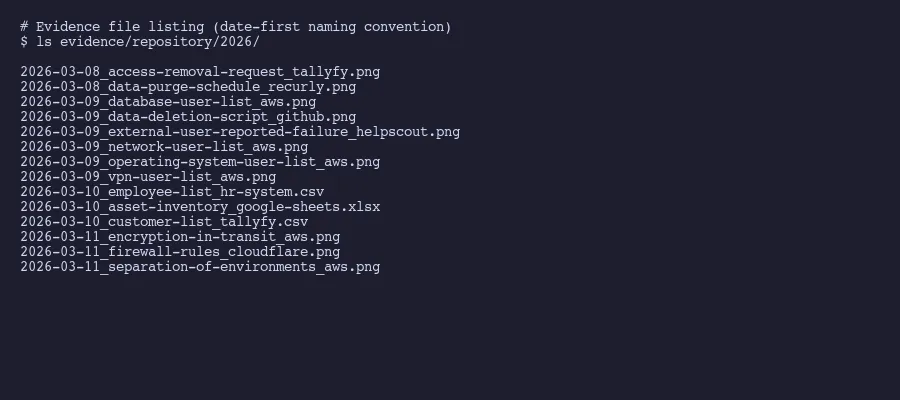
Each of these has a specific collection frequency. Three items need refreshing every 90 days. Another three every 180 days. Five items, mostly user access lists, need updating every 300 days. And the bulk of it, 112 items, gets collected annually.
That is not a typo. 112 annual evidence items.
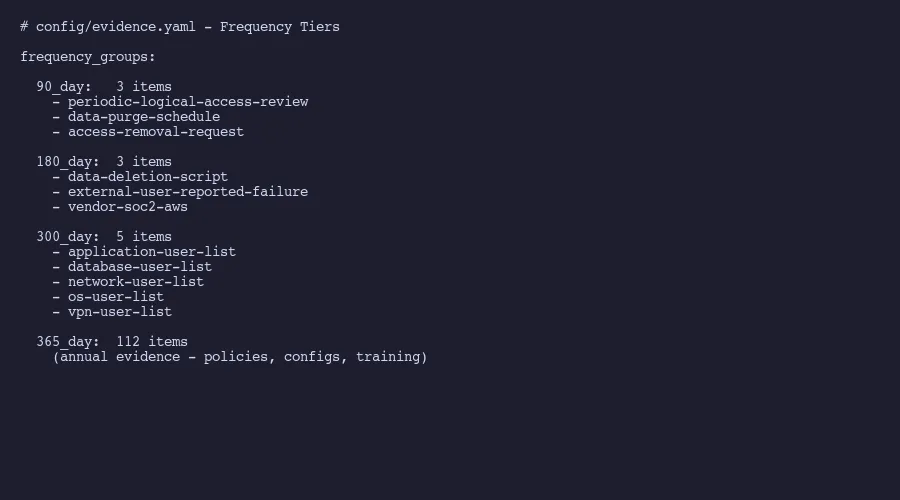
The frequency breakdown matters because it means evidence collection is never actually “done.” You finish the annual batch and three months later, the quarterly items come due again. It is a rolling obligation that most people underestimate until they are living inside it.
A Thomson Reuters survey found that almost two-thirds of compliance officers spend between one and seven hours per week just tracking regulatory developments. That does not even include the time spent actually collecting and organizing evidence. The tracking alone eats hours.
Where the time actually goes
People assume the hard part is knowing what to collect. It isn’t. Your auditor gives you a request list. Your compliance framework maps controls to evidence. The intellectual challenge is minimal.
The time goes to execution. Logging into AWS and navigating to the exact IAM settings page. Taking a screenshot that shows the date clearly. Saving it with the correct filename convention. Repeating that for the next system. And the next. And the next.
Practitioner accounts of compliance work reports that 65% of risk and compliance professionals say automating manual processes would reduce their complexity and cost. That number tells you something important: the majority of people doing this work already know the problem is mechanical, not strategic.
A single evidence collection sprint, when you sit down and power through it, might look like this: four sessions across four days, covering 99 items. That sounds manageable on paper. In reality, each session involves switching between a dozen browser tabs, waiting for slow admin consoles to load, double-checking that your screenshot captures the right date range, and fighting with file naming conventions. The cognitive load is low. The tedium is extreme.
The frustration compounds because most of this work feels like it should take minutes but takes hours. Opening your cloud provider’s billing dashboard to screenshot your current plan? Two minutes. Finding the right page in your HR system to export training records as a CSV? Maybe five minutes. But multiply those small tasks by 123 items, add in the navigation overhead, the file renaming, and the inevitable “wait, did I already collect that one?” moments, and you have lost a week.
Collecting evidence from people, not just systems
Here is the part that truly tests your patience. Some evidence items are not sitting in a system waiting to be screenshot. They depend on other people.
Employee acknowledgements of security policies. Manager attestations confirming their teams completed required training. Approval sign-offs for access changes. Written confirmations that someone reviewed and accepted the acceptable use policy. These are all legitimate evidence items that require a human being to do something, and then you need proof they did it.
This is where most compliance programs quietly fall apart. You can set a calendar reminder to collect your AWS screenshots. You cannot force your VP of Engineering to sign an attestation letter on your timeline. People are busy. They forget. They think compliance is someone else’s problem.
At Tallyfy, we deal with this exact challenge by using workflow automation for human-dependent evidence. When someone needs to acknowledge a policy, it goes through a tracked approval workflow. The system records who completed it, when they completed it, and stores the confirmation as evidence. When training is due, the workflow assigns it, sends reminders, and captures completion status automatically.
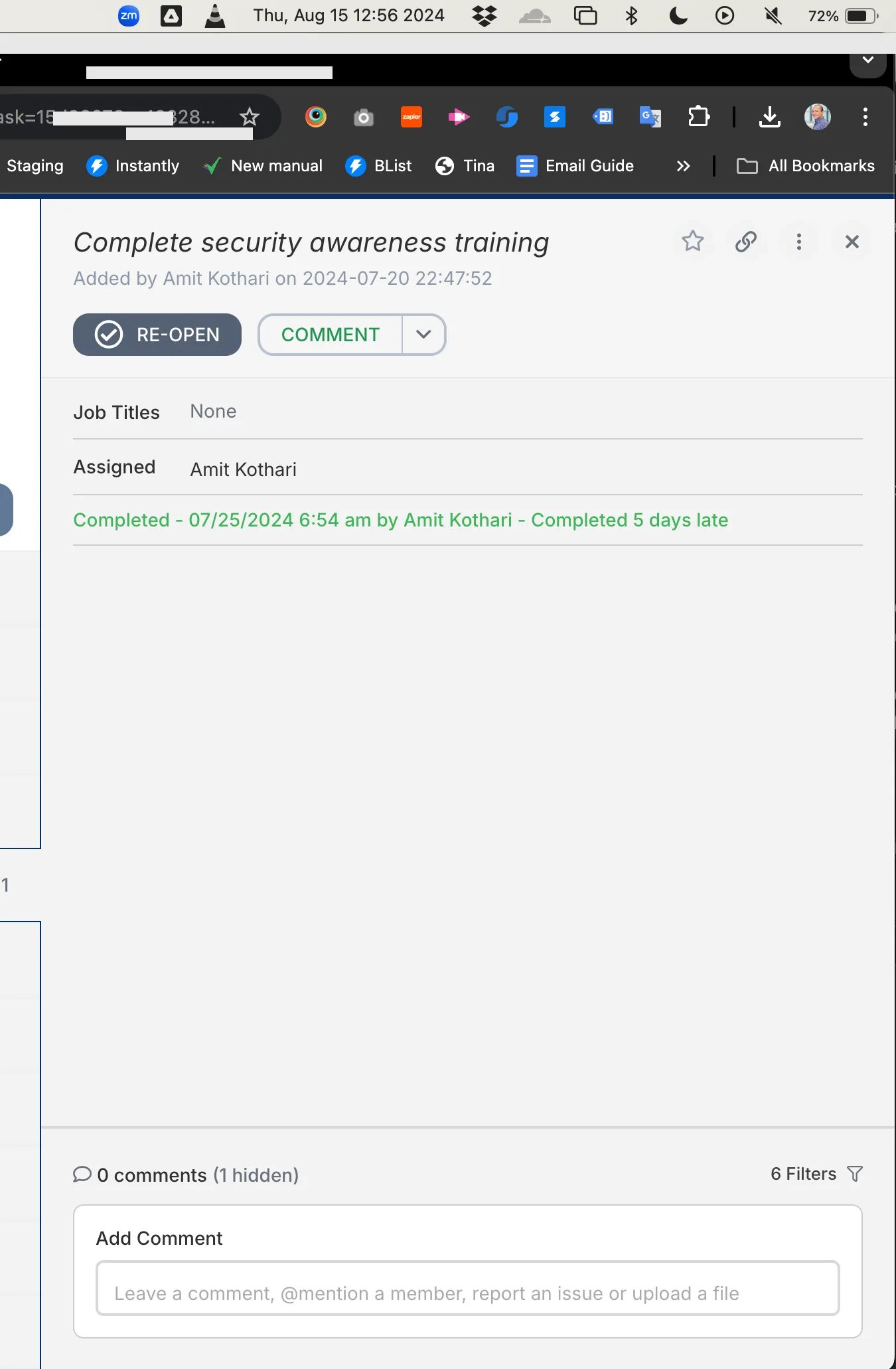
The difference is night and day. Instead of sending Slack messages that get buried, writing follow-up emails that get ignored, and maintaining a side spreadsheet to track who has responded, you have a single workflow that handles the nagging and the recordkeeping simultaneously. The screenshot of a completed approval workflow in Tallyfy becomes the evidence itself.
People-dependent evidence is consistently the hardest to collect on schedule. Compliance practitioners report that compliance teams spend disproportionate time chasing responses and coordinating with other departments. Systems don’t forget. Systems don’t need lunch breaks. People do.
Why the organizational overhead is worse than collection
Collecting the evidence is one thing. Organizing it is another problem entirely.
Think about naming conventions alone. You need a system that tells your auditor exactly what they are looking at without them having to open every file. Something like CC6.1-AWS-IAM-PasswordPolicy-2026-03.png versus screenshot-3.png. Multiply that naming decision by 123 items and you start to understand why people spend more time organizing evidence than collecting it.
Then there is the tracking problem. Which items have been collected this cycle? Which are overdue? Which ones need to be refreshed because the previous collection is about to expire? Without a system, you are maintaining a spreadsheet that is itself a form of busywork. The meta-work of tracking the work.
Version control adds another layer. Your auditor asks for the current employee list. You collected one in January. It is now March. Is January’s list still valid? Did anyone join or leave since then? If you replaced it, did you archive the old version? These are not hard questions. They are tedious questions that need answering 123 times.
I wrote about replacing compliance platforms with simpler tools because the organizational overhead is where those platforms actually earn their money. Not in the collection itself, which they often can’t fully automate anyway, but in the naming, versioning, and tracking layer on top.
The audit itself requires specific mapping between controls and evidence, and maintaining that mapping is its own task. When you update an evidence item, you need to confirm it still satisfies the same control. When a control changes, you need to identify every evidence item affected. The web of dependencies is what makes this feel like a full-time job rather than a periodic task.
What actually eliminates the busywork
Be honest about what can and cannot be automated. Some evidence will always require human judgment. Your risk assessment, your incident response decisions, your policy review conclusions. These need a person. Accept that.
But the collection mechanics? Those are entirely automatable. AI-assisted approaches to evidence collection can handle the repetitive screenshot capture, the file naming, the organizational structure, and the tracking of what is current versus what needs refreshing.
The pattern that works looks like this. First, separate your evidence into two categories: system-generated and people-generated. For system-generated evidence (screenshots, exports, logs), set up automated collection that runs on the right frequency. For people-generated evidence (attestations, sign-offs, training confirmations), build workflow automations that handle the assignment, reminders, and proof capture.
Second, stop treating evidence collection as a periodic sprint. Neumetric’s breakdown of evidence collection processes emphasizes embedding collection into daily operations rather than cramming it before an audit. The sprint model is why people burn out. The continuous model spreads the load.
Third, accept that the naming and organizational overhead requires a system, not discipline. Humans are bad at maintaining naming conventions across 123 items over twelve months. It is not a character flaw. It is just how brains work. Any solution that depends on someone consistently naming files correctly for a year is a solution waiting to fail.
The endgame is not zero effort. Compliance takes work and it should. What you can eliminate is the mechanical repetition, the organizational busywork, and the exhausting chase for human responses. That is where the real hours disappear. And that is what makes people dread audit season instead of treating it as routine.
The companies that handle SOC 2 most efficiently are not the ones with the biggest compliance teams. They are the ones that identified which of their 123 evidence items are mechanical, which depend on people, and built different systems for each. Everything else is just clicking through admin consoles and renaming files.
About the Author
Amit Kothari is an experienced consultant, advisor, coach, and educator specializing in AI and operations for executives and their companies. With 25+ years of experience and as the founder of Tallyfy (raised $3.6m), he helps mid-size companies identify, plan, and implement practical AI solutions that actually work. Originally British and now based in St. Louis, MO, Amit combines deep technical expertise with real-world business understanding.
Disclaimer: The content in this article represents personal opinions based on extensive research and practical experience. While every effort has been made to ensure accuracy through data analysis and source verification, this should not be considered professional advice. Always consult with qualified professionals for decisions specific to your situation.